Building a smart home around Apple means navigating HomeKit, Matter, Thread, and a maze of accessories that promise everything but rarely deliver the same level of polish. The ten picks below span plugs, thermostats, locks, doorbells, and the quiet infrastructure that holds it all together. Each one was chosen because it slots cleanly into Apple-centric routines or pairs with HomeKit without forcing you to live inside yet another app.
Your Options, Compared

Shelly Plus Uni Smart Wi-Fi & Bluetooth Module (Dry Contact)

Aqara Smart Thermostat W200 with Apple Adaptive Temperature

Aqara Wireless Mini Switch and Smart Plug with Energy Monitoring

Shelly 1 Mini Gen4 Smart Relay Switch (Matter & Zigbee)

meross Outdoor Smart Plug for HomeKit, Alexa, Google
meross Outdoor Dimmer Plug for HomeKit, Alexa, Google
NETGEAR Nighthawk X4S AC2600 Smart WiFi Router (R7800)

Aqara Smart Doorbell Camera G410 with HomeKit Secure Video

Aqara UWB Smart Lock U400 with Apple Home Key
meross Outdoor Smart Plug with 3 Independent Sockets
The Picks, Examined More Closely
The Shelly Plus Uni is a small, board-level relay that hides behind switches, sensors, or low-voltage gadgets and pulls them onto your network without rewiring the wall. It accepts 8 to 24 VAC, 9 to 28 VDC, and 5 VDC, which makes it useful for things a typical smart plug can’t touch, like garden irrigation valves, garage door triggers, or vintage lamps with dry-contact controllers.
Where it differs from the Shelly 1 Mini Gen4 covered later is flexibility over raw switching power. The Uni also doubles as a Wi-Fi range extender and Bluetooth gateway, so it can bridge BLE sensors into your broader setup. For most Apple-centric homes, that means the Home app sees the underlying device through your hub rather than directly, but the automation possibilities grow accordingly.
The Upside
- Accepts a wide 8–24 VAC, 9–28 VDC, and 5 VDC input range, so it adapts to low-voltage projects where ordinary plugs won’t fit
- Acts as both a Wi-Fi extender and a Bluetooth gateway, letting nearby sensors reach your router without extra hardware
- Pairs with Alexa, Google Home, Home Assistant, and SmartThings, so your automation engine of choice is rarely blocked
- Sits behind existing switches and gear, so you keep your wall aesthetic and avoid clunky plug-in modules
- Fits inside standard back boxes and tight enclosures, making it a friend to renters and retrofit projects
Things To Consider
- You’ll need to wire it yourself, and dry-contact setups require basic electrical comfort or a sparky on call
- Direct HomeKit control isn’t native here, so Apple users typically route commands through a compatible hub
- The bare-board form factor means you’ll want a small enclosure if it’s living somewhere visible or dusty
Who It Suits Best
Tinkerers who want to make an existing low-voltage circuit smart, from gate motors to old lamp relays, without pulling in a full electrician.
Where Another Pick Suits Better
Homeowners who just want a simple wall switch should skip this for the Shelly 1 Mini Gen4, which fits behind a standard switch box with less wiring fuss.
The Aqara W200 is built for people who want their thermostat to think, not just follow a clock. Adaptive Temperature, an Apple feature that uses your iPhone’s location and HomeKit activity states, lets the W200 ease the temperature when you head out and start recovering comfort before you arrive home.
For Apple users, the appeal is straightforward: you don’t build schedules manually, you just rely on Home, Sleep, Away, and Extended Away states. The catch is that Adaptive Temperature needs a home hub, such as an Apple TV or HomePod, to coordinate. Owners of large homes may also notice that the thermostat benefits most when paired with Aqara temperature sensors in key rooms, otherwise it relies on a single point of measurement.
Everyday Advantages
- Adaptive Temperature handles schedule logic through your iPhone, which removes most manual programming
- Speaks HomeKit natively, so Siri voice control works without extra bridges or apps
- Saves energy automatically by responding to activity states like Sleep and Extended Away
Points To Keep In Mind
- Adaptive Temperature requires a hub like Apple TV or HomePod, which adds to the upfront cost
- You may want extra room sensors to avoid hot or cold spots in larger layouts
Right Fit For
iPhone-led households that want climate automation to follow their daily routine rather than a fixed clock schedule.
Consider Something Else When
Renters without a C-wire or compatible HVAC system should look at the meross outdoor plugs, which deliver HomeKit value without touching the furnace.
This bundle pairs a single Aqara Wireless Mini Switch with a smart plug that tracks real-time energy draw. Zigbee, the low-power mesh protocol Aqara uses, links both to an Aqara Hub, which then exposes them to HomeKit. For an Apple user, that hub hop is the price of admission, but the upside is reliable local response and battery-friendly remotes.
The mini switch supports single, double, and long-press gestures, so one button can trigger a scene, toggle a lamp, or shut down a group of devices. The plug, rated to handle 15A appliances like window air conditioners and space heaters, also feeds energy data into the Aqara app, which is handy for spotting power-hungry devices without a separate monitor.
Noteworthy Benefits
- Three-button gestures on the mini switch cover most routine needs without needing a phone in hand
- The plug handles up to 15A loads, so window units and space heaters fit within its rating
- Energy monitoring surfaces real-time draw, helping you catch wasteful devices
- Scenes and timers run through the Aqara Home app, which keeps automations organized
A Few Limitations
- An Aqara Hub is required and not included, and the hub must sit within roughly 400 inches of the switch and your router
- Only Aqara-branded hubs are supported, so existing third-party Zigbee bridges won’t pair with this
- For Apple users, latency depends on hub routing, which feels slightly slower than native HomeKit devices
Made For
Households already running an Aqara Hub who want a tactile button plus an energy-aware plug without juggling two ecosystems.
Skip It When
Shoppers without an Aqara Hub should jump to the Shelly 1 Mini Gen4, which works as a Matter relay straight out of the box.
The Shelly 1 Mini Gen4 is a dry-contact relay designed to fit behind a standard wall switch, with Wi-Fi, Matter, and Zigbee all baked in. Matter, the cross-ecosystem standard Apple now supports in Home, means you can add it to your home without an extra hub. That alone removes the most common friction point for people dipping a toe into smart lighting.
The 8A load ceiling is modest, which rules out kitchen counter appliances and space heaters but covers nearly every residential light circuit. Compared with the Plus Uni earlier in this list, the 1 Mini Gen4 trades wide voltage input for a smaller footprint and Matter compatibility, so it’s the better pick when you just want a dumb switch to become smart.
A Few Strong Suits
- Matter support means it pairs directly with Apple Home without needing a third-party hub
- Wi-Fi plus Zigbee radios give you flexibility on which mesh to ride
- Compact size fits inside standard switch boxes, so retrofits stay clean
- Dry contacts make it safe for various low-voltage switching tasks
Honest Caveats
- The 8A limit means high-draw appliances like heaters need a beefier relay
- Wiring work is required, which isn’t for everyone and may need a pro
Who Will Love This
Apple users who want to convert a few existing wall switches into HomeKit-controllable lights without buying a hub.
Look Elsewhere When
If you’d rather not open the wall, the meross Outdoor Smart Plug delivers HomeKit control with zero installation beyond an outlet.
The meross Outdoor Smart Plug is a two-outlet, IP44-rated enclosure that handles rain and dust for patio lights, fountains, and string lighting. IP44 means it’s splash-proof rather than fully sealed, so covered locations are still the safer choice, but most porches and pergolas fall well inside its comfort zone.
Where it stands out for Apple users is native HomeKit support without a hub, plus compatibility with Alexa, Google, and SmartThings. The dual outlets are independently controlled, which lets you run patio string lights and a fountain on separate timers from one wall brick.
Real Benefits
- IP44 weatherproof housing with socket covers protects against rain and dust
- Two independently controlled outlets let one plug handle multiple devices
- Native HomeKit support means Siri control works out of the box
- Wide use-case range from garden lights to holiday displays
Where It Is Less Suited
- IP44 is splash-resistant, not fully waterproof, so exposed open-deck installs may need extra shelter
- Range depends on your Wi-Fi reaching the outdoor location, so far corners may need a mesh node
Best Suited To
Homeowners wanting to schedule patio and landscape lights through HomeKit without running new wiring outside.
Reach For A Different Pick When
You need three separately controlled outlets, in which case the meross Outdoor Smart Plug with 3 Independent Sockets later in this list is the right fit.
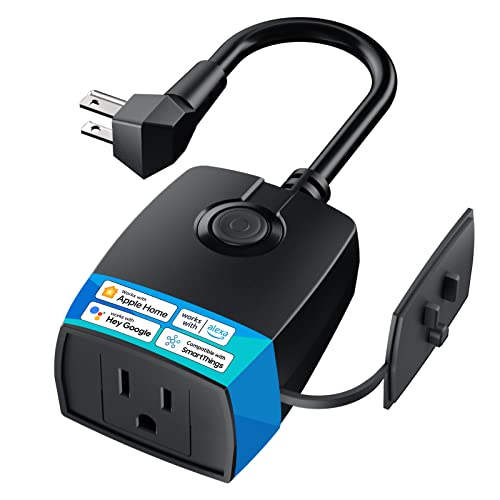
The meross Outdoor Dimmer Plug layers 1% to 100% dimming onto a weatherproof outdoor enclosure, addressing a real gap: most outdoor smart plugs are on/off only. For landscape lighting, that means you can drop string lights to a warm 30% for dinner or ramp them up for a party without swapping bulbs.
Voice control with Siri lets you say “set yard lights to 50%” and the Home app or Meross app both support fine dimming steps. The hardware button also includes preset steps at 10%, 20%, 30%, 50%, and 100%, so you can override automation without your phone.
What Helps Most
- 1% to 100% dimming unlocks scene-based outdoor lighting rather than simple on/off
- Hardware presets let you adjust brightness without the app
- Works with HomeKit, Alexa, and Google for cross-ecosystem households
Potential Compromises
- Only dimmable loads should be attached, since non-dimmable bulbs may flicker or buzz
- Wi-Fi signal strength at the install location affects responsiveness
Perfect Match For
Households with dimmable landscape lighting who want Siri-driven scenes instead of basic schedules.
Swap It Out When
If your outdoor gear is on/off only, like a fountain or shop vac, the standard meross Outdoor Smart Plug is a simpler and cheaper choice.
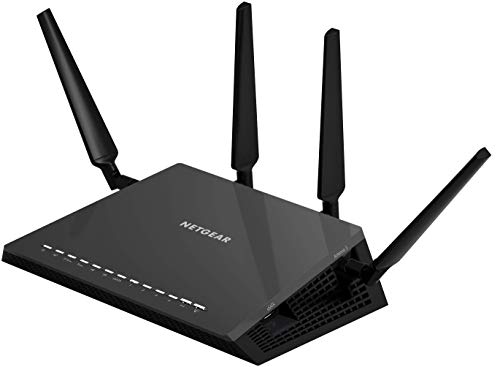
The Nighthawk X4S isn’t a HomeKit device, but it sits behind every HomeKit device you own. Routers tend to be the silent bottleneck when smart home gear turns sluggish, and this one targets that head-on with a 1.7GHz dual-core processor and a simultaneous dual-band design that streams up to 800 Mbps on 2.4GHz plus 1733 Mbps on 5GHz.
Coverage is rated up to 2500 square feet, which suits most suburban homes, and the 4×4 antenna array helps maintain signal at the edges where outdoor plugs and garage cameras usually live. MU-MIMO and Beamforming, two features that shape the signal toward active devices, also help when you’re running 40 or so connected things at once.
Points In Its Favor
- Dual-band AC2600 with 160MHz support keeps lag low when many devices stream at once
- Four gigabit Ethernet ports let you wire in stationary hubs, Apple TVs, and consoles
- USB 3.0 and eSATA ports support shared storage or printers across the network
- Up to 2500 square feet of wireless coverage handles most mid-size homes
- Alexa voice controls let you manage basic router functions without an app
Trade Offs To Consider
- This is a Wi-Fi 5 router, so homes with Wi-Fi 6E or 7 gear won’t tap into the newest bands
- Large homes with thick walls may still need a mesh add-on to reach outdoor outlets reliably
Built With In Mind
Smart households that want a stronger, faster backhaul to support dozens of HomeKit, Matter, and Thread devices without dropouts.
A Better Fit Elsewhere
Apartment dwellers with modest bandwidth needs should skip this and instead put money toward a few meross outdoor plugs for actual smart control.
The Aqara G410 is one of the rare doorbells that supports HomeKit Secure Video, Apple’s encrypted pipeline that stores footage in iCloud rather than a third-party cloud. For privacy-minded households, that changes the calculus around doorbell cameras, since footage stays within the Apple ecosystem you already trust.
Beyond HomeKit, the G410 also plays nicely with Matter, Alexa, Google Assistant, SmartThings, and Home Assistant. A built-in Aqara Zigbee and Matter hub also means this doorbell can act as a bridge for nearby sensors, so you can pair it with the Smart Lock U400 down the line for a unified entry system.
Useful Highlights
- HomeKit Secure Video support keeps recordings encrypted within iCloud
- Built-in Zigbee and Matter hub reduce the need for separate bridges
- Cross-ecosystem compatibility covers Alexa, Google, SmartThings, and Home Assistant
- Included chime offers an in-home alert without buying extra hardware
Things To Weigh
- HomeKit Secure Video requires an iCloud storage plan and a home hub, adding to monthly costs
- Wired doorbell installation may need basic electrical work if you lack existing low-voltage wiring
The Right Fit
Apple-centric households that want front-door video stored privately in iCloud without a third-party subscription.
Another Choice May Suit
If you don’t already use an Apple hub or iCloud storage, the Aqara UWB Smart Lock U400 offers tangible everyday value without monthly fees.
The Aqara U400 is built around Ultra-Wideband, a radio technology that detects your approach and unlocks the door before you touch anything. Add Apple Home Key support, and your iPhone or Apple Watch becomes the credential: tap to unlock or just walk up with the device in your pocket. Fingerprint reading covers the people in your household who don’t carry an Apple device.
Where it earns its premium status is the combination of three unlock methods (UWB, Home Key, and fingerprint) in a single deadbolt. Hands-free entry helps when you’re carrying groceries or wrangling kids, and the lock still falls back to a physical key if electronics fail.
What Pays Off
- UWB detects your approach and unlocks automatically, ideal when your hands are full
- Apple Home Key support means your iPhone or Apple Watch acts as a secure credential
- Fingerprint reader covers non-Apple household members without giving out a phone
- Deadbolt form factor keeps the familiar keyway as a backup
Practical Considerations
- Battery-powered locks need periodic battery swaps, commonly every few months depending on traffic
- Door alignment matters more than with a basic deadbolt, so older doors may need adjustment first
Whose Shelf It Belongs On
Apple users who want keyless entry with multiple fallback methods and a polished everyday experience.
Not Your Match When
Renters who can’t swap the deadbolt should consider the Aqara Smart Doorbell Camera G410, which adds value without altering the door hardware.
The meross 3-Outlet Outdoor Smart Plug addresses the common frustration of wanting to control three things in the same spot. Patio lights, a fountain, and holiday inflatables can each run on their own schedules, because each socket is independently controlled rather than synchronized.
A Mediatek IoT chipset powers the Wi-Fi radio, which generally means a longer connection range and fewer offline moments than older outdoor plugs. For Apple users, HomeKit support is the headline feature, although remote HomeKit access requires a home hub like an Apple TV or HomePod, which is standard for the platform.
Where It Helps
- Three independent outlets replace a small power strip with smarter scheduling
- HomeKit compatibility brings Siri control to outdoor setups
- Mediatek IoT chipset extends Wi-Fi range and reduces dropouts
- Solid choice for seasonal decor, parties, and permanent landscape lighting
What To Weigh
- HomeKit remote access requires an Apple TV or HomePod as a hub, which adds to the system
- Outdoor enclosures still need a sheltered outlet for long-term reliability
Who Should Grab It
Hosts and homeowners managing holiday lights, party setups, or multi-zone landscape lighting who want one plug to do the job of three.
Where A Sibling Pick Shines
If you only need two outlets or want dimming for landscape lights, the meross Outdoor Dimmer Plug covered earlier is a tighter fit.
Picking Smart Home Gear That Actually Plays Nice With Apple
Matter has quietly become the most important spec in this category. It’s a cross-ecosystem standard that lets HomeKit, Google Home, Alexa, and SmartThings share devices without the usual compatibility headaches. For an Apple-centric home, that means you can buy with more confidence, knowing the device will still work if you swap ecosystems later.
Thread, a low-power mesh network, is the second spec worth knowing. Thread creates a self-healing mesh, so devices act as repeaters and your system stays responsive even when one node drops. Apple TV and HomePod double as Thread border routers, which is why homes with those hubs tend to feel snappier.
HomeKit Secure Video is the third pillar. It encrypts camera footage in iCloud rather than sending it to a vendor cloud, which is a meaningful privacy upgrade. The trade-off is that you need an iCloud storage plan and a home hub, which adds to the monthly cost but keeps recordings inside the Apple ecosystem.
Finally, think about your Wi-Fi backbone. The Nighthawk X4S in this list is a strong example: more devices mean more pressure on the router, and a solid backhaul keeps everything responsive.
Key Considerations Across These Picks
Pitfalls Shoppers Hit
A common mistake is mixing protocols without checking the hub situation. Zigbee devices like the Aqara Mini Switch need an Aqara Hub, while Matter devices like the Shelly 1 Mini Gen4 don’t, and HomeKit-only devices sit somewhere in between. Buying first and clarifying hubs later leads to orphaned gear.
Another trap is underestimating Wi-Fi range. Outdoor plugs and garage sensors often live at the edge of coverage, where routers struggle. A mesh node or a stronger router, like the Nighthawk X4S, prevents the “device shows offline” headaches that sour smart home setups quickly.
When Paying More Pays Off
Higher-tier picks earn their money through better radios, longer support, and broader compatibility. The Aqara U400 Smart Lock is a good example: UWB unlock, Apple Home Key, and fingerprint in one device is meaningfully more capable than a basic HomeKit keypad.
The Aqara Doorbell G410 also justifies its price through HomeKit Secure Video and a built-in Matter hub. When you find yourself wanting to expand later, that built-in hub saves you from buying yet another box, which is where premium pricing quietly pays for itself.
Frequently Asked Questions
Do I need a home hub to use these devices?
Most HomeKit and Adaptive Temperature features require a home hub like an Apple TV or HomePod. Matter devices can pair directly to your iPhone, but remote access and automations still benefit from a hub. If you live entirely in Apple’s ecosystem, a hub is the single best investment for reliability.
Are these devices compatible with non-Apple ecosystems?
Many of the picks here support Matter, Alexa, Google, and SmartThings alongside HomeKit. The Aqara G410 doorbell and Shelly 1 Mini Gen4 relay are good cross-platform examples. Pure HomeKit-only devices are rarer in this list because Matter has become the more flexible standard.
Can I mix indoor and outdoor devices on the same network?
Yes, but outdoor gear often sits at the edge of Wi-Fi coverage. A strong router like the Nighthawk X4S or a mesh node helps outdoor plugs and doorbells stay online. You may also want to confirm weatherproof ratings, like the IP44 housing on the meross outdoor plugs, before installing outside.
How secure is HomeKit Secure Video really?
Footage is encrypted end-to-end and stored in iCloud, with Apple holding the keys rather than the camera vendor. That model avoids the breach patterns seen with third-party clouds, though it does require an iCloud storage plan and a home hub to function.
What happens if my internet goes down?
Locally scheduled automations keep running on HomeKit and Matter devices when the internet drops, but remote Siri commands and cloud features will pause until the connection returns. Devices that depend on vendor clouds will lose most functionality offline.
Wrap Up
Apple’s smart home story keeps getting better, and the gear on this list sits at the sweet spot where HomeKit, Matter, and good old-fashioned utility overlap. Start with the room that bugs you most, whether that’s the front door, the thermostat, or the patio lights, and build outward from there.