Upgrading your home’s climate control means sorting through a wall of options, and Honeywell has been quietly building some of the most dependable smart thermostats on the market for decades. If you’re renovating a single zone or wiring comfort into a multi-room layout, the right pick balances HVAC compatibility, app quality, and a screen you actually want to look at. This list cuts through the model numbers to match real households with the right Honeywell smart thermostat for how you live.
The Essentials At A Glance

Honeywell Home RTH9585WF Wi-Fi Smart Color Thermostat + Wall Plate
Honeywell Home RTH7600D 7-Day Programmable Touchscreen Thermostat

Honeywell Home RTH9600WF Smart Color Thermostat + Coverplate Bundle

Honeywell Home RTH9600WF Smart Color Thermostat (ENERGY STAR)

Honeywell 115369 24V Wireless FocusPRO Thermostat Kit

Honeywell Home T10 Pro Smart Thermostat with RedLINK

Honeywell Home S200 FocusPRO Smart Thermostat (3H/2C)
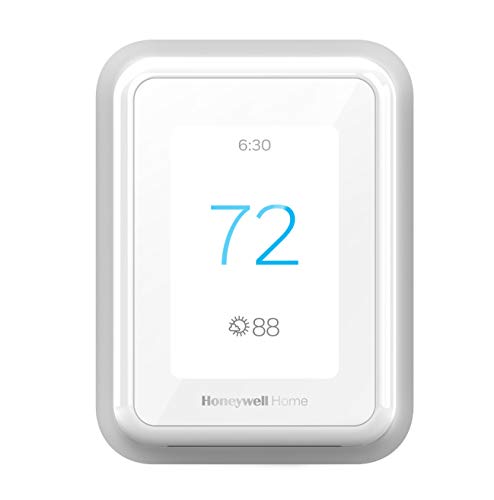
Honeywell Home T9 WiFi Smart Thermostat with Room Sensors
Honeywell Home RTH9585WF Wi-Fi Smart Color Thermostat (Gray)

Honeywell T10+ Pro Smart Thermostat with Indoor Air Sensor
A Breakdown Of The Leading Choices
The RTH9585WF sits in that comfortable middle ground where most households land. It carries a full-color touchscreen you can match to your wall color, which sounds like a small thing until you mount it in a hallway where every visitor sees it. The compatibility list is unusually broad for the category: forced air (gas, oil, electric), hot water, steam, and heat pumps with electric backup all work, so most standard central systems are covered.
If you’re upgrading from a builder-grade thermostat and want Wi-Fi scheduling without the price tag of a flagship, this is the sweet spot. Flexible programming handles both a personal schedule and utility peak-rate periods, which matters in regions with time-of-use billing.
The Helpful Details
- Full-color touchscreen that you can personalize to blend with your wall or stand out as a feature.
- Works with a wide HVAC mix, including forced air, hot water, steam, and heat pumps with electric backup, covering most central systems.
- Flexible programming supports both personal routines and utility peak-rate pricing windows.
- Bright, readable display that stays legible from across a room, helpful in open-plan homes.
- Wi-Fi control through the Honeywell Home app means the thermostat keeps working from the couch, the office, or the airport.
Things To Consider
- Does not support electric baseboard heat at 120 to 240 volts, so verify your system type before ordering.
- A common-wire (C-wire) is generally expected for steady Wi-Fi power, which may add an installation step in older homes.
Quick Facts
Who It Suits Best
Households with standard central HVAC who want a colorful, app-connected thermostat without stepping into pro-grade pricing.
Where Another Pick Suits Better
If your home runs on multi-stage heat pump equipment, the Honeywell Home T10 Pro Smart Thermostat with RedLINK handles those stages more reliably.
The RTH7600D is the kind of thermostat a landlord appreciates and a renter can install without drama. There’s no Wi-Fi, no app, no voice assistant. Just a backlit touchscreen, a clear weekly schedule, and the ability to set different temperatures for four periods per day. For people who’d rather not fiddle with another login, that’s the whole appeal.
Temporary and permanent hold settings handle everything from a weekend away to a long vacation, so you can leave the heat low for a month without losing your carefully tuned weekday routine. Compared with the RTH9585WF earlier on this list, you give up the color screen and remote access in exchange for a simpler, more predictable device.
Notable Upsides
- Straightforward 7-day programming with four periods per day covers the standard wake, leave, return, sleep rhythm.
- Backlit touchscreen stays readable at night without needing a phone flashlight.
- Temporary and permanent hold modes handle short trips and extended absences without rewriting your schedule.
- No Wi-Fi means no account, no firmware anxiety, and no privacy concerns about cloud connectivity.
Worth Noting
- No remote access, so adjustments happen only at the wall or after you walk back into the house.
- Programmable-only setup feels dated if you’ve already lived with a Wi-Fi model elsewhere.
Made For
Renters, guest suites, and anyone who wants dependable scheduling without the complexity of an app or voice assistant.
Skip It When
You want remote control from your phone, in which case the Honeywell Home RTH9585WF Wi-Fi Smart Color Thermostat is the more natural fit.
This bundle pairs the RTH9600WF color thermostat with the THP2400A white coverplate, which solves one of the most common install headaches: the old thermostat left a paint scar on the wall that no smart screen wants to sit on top of. The coverplate also mounts to a standard 2×4 electrical box, so retrofits into older construction look cleaner from day one.
The thermostat itself is ENERGY STAR certified and tracks heating and cooling use while pushing personalized efficiency tips. Flexible programming means you can hand it a schedule or let it run on autopilot, depending on how hands-on you want to be.
Everyday Wins
- Coverplate hides old paint marks and adapts to a 2×4 electrical box for cleaner retrofits.
- ENERGY STAR certification supports energy-tracking features and may qualify for utility rebates depending on your provider.
- Color touchscreen that you can recolor to match décor changes over the years.
- Personalized energy tips help you spot patterns in your heating and cooling habits.
Trade Offs
- Like most Honeywell Wi-Fi thermostats, it generally requires a common wire, which older homes may not have.
- Rebate availability depends on your utility provider, so the savings aren’t universal.
Spec Overview
Best Suited To
Homeowners replacing an older thermostat and wanting a clean install without painting or patching the wall first.
Look Elsewhere When
You already have a clean wall and don’t need the coverplate, in which case the standard Honeywell Home RTH9600WF Smart Color Thermostat (ENERGY STAR) saves you the bundle piece.
The standalone RTH9600WF shares the same color-screen DNA as the bundle above but skips the coverplate and the wall-mount extras. If your wall is already clean and you just want the thermostat itself, this is the cleaner order. You still get the customizable color display, which is one of the more fun features in the lineup, since it lets you change the background whenever the mood strikes.
Connectivity is the headline: the Honeywell Home app handles remote monitoring, and the thermostat works with common voice assistants for hands-free adjustments. Flexible programming supports both a personal schedule and utility peak-rate windows. ENERGY STAR certification keeps efficiency in the foreground.
Advantages To Know
- Customizable color touchscreen that lets you refresh the look without buying new hardware.
- Works with widely used smart home platforms through the Honeywell Home app.
- ENERGY STAR certification helps track and reduce heating and cooling use.
- Flexible scheduling supports both personal routines and time-of-use utility plans.
A Few Limitations
- Requires a common wire (C-wire) for reliable power, which older homes may need to retrofit.
- Smart home integration depends on third-party platform compatibility that can shift over time.
Right Fit For
Voice-first households who already have a clean wall and want app and voice control without paying for install accessories.
Consider Something Else When
Your wall has paint scars or an oversized old footprint, in which case the RTH9600WF + Coverplate Bundle handles the install cleanly.
The 115369 kit is the one installers reach for when running new wire isn’t practical. It uses Honeywell’s RedLINK wireless technology, which means the wall thermostat talks to an Equipment Interface Module (EIM) mounted near your HVAC gear. For finished walls, brick, or retrofit situations where opening up drywall isn’t an option, that wireless link can save a full day of work.
The kit also includes a return air sensor that maintains safe indoor temperatures if the wireless thermostat loses power, holding 62°F for heating and 82°F for cooling as a protective baseline. It’s an older, professional-leaning design, and you may find the install more involved than a standard swap.
What Stands Out
- RedLINK wireless connection eliminates the need to run new thermostat wire through finished walls.
- Equipment Interface Module centralizes HVAC wiring for a cleaner equipment-side install.
- Return air sensor keeps heating and cooling within safe limits if the wireless thermostat loses power.
- Well-suited to retrofits and additions where running new cable would be invasive.
Points To Keep In Mind
- Designed for professional installation, so less experienced DIYers may want to budget for an electrician or HVAC tech.
- Wireless components add a small maintenance point compared with a hardwired thermostat.
Who Will Love This
Homeowners and pros tackling retrofits, additions, or finished-wall situations where new wire runs are impractical.
Another Choice May Suit
For a simpler swap in a standard home with accessible wiring, the Honeywell Home RTH9600WF Smart Color Thermostat is far easier to install.
The T10 Pro steps into pro-grade territory. It supports up to 3 heat pump stages or 2 conventional heat stages plus 2 cool stages, which covers the multi-stage systems that simpler thermostats can’t handle. The LCD is on the smaller side at about 7.27 inches diagonally, but the unit is built for homes with more complex HVAC rather than for visual flair.
Fan switching includes Auto, On, and Circulate modes, and system switching covers Heat, Off, Cool, Auto, and Emergency heat for heat pump households. If your equipment is anything beyond single-stage, this is where Honeywell’s thermostat lineup starts to feel properly serious.
Practical Pluses
- Supports up to 3 heat pump stages or 2 conventional heat stages, fitting complex multi-stage systems.
- Circulate fan mode keeps air moving gently through the home without running full heating or cooling cycles.
- Emergency heat mode gives heat pump owners a manual fallback during extreme cold snaps.
- Wi-Fi capability connects to the Honeywell Home app for remote monitoring and scheduling.
Honest Caveats
- Designed for pro installation, and the configuration menu is denser than consumer-grade models.
- Terminal count is high, so a quick DIY swap on unfamiliar equipment can lead to miswiring without guidance.
Perfect Match For
Heat pump households with multi-stage equipment who need finer switching than a single-stage thermostat can offer.
Reach For A Different Pick When
Your system is a straightforward single-stage setup, in which case the Honeywell Home RTH9585WF Wi-Fi Smart Color Thermostat covers you without the install complexity.
The S200 FocusPRO is Honeywell’s sleeker take on the pro installer favorite. It supports up to 3 heat stages and 2 cool stages on conventional systems, plus up to 3 heat and 2 cool on heat pump equipment, making it a true fit for homes with zoned, multi-stage hardware. The UWP wall plate is included, and Honeywell designed it specifically for fast installation and easy upgrades.
The snap-on accent piece lets installers swap the look without replacing the whole unit, which is a small but welcome touch for professional jobs. Compared with the T10 Pro earlier on the list, the S200 leans harder into a streamlined residential-install profile while keeping pro-grade stage support.
The Case For It
- Handles up to 3 heat and 2 cool stages, fitting demanding multi-stage conventional and heat pump systems.
- UWP wall plate speeds up installation and simplifies future upgrades.
- Snap-on accent piece lets installers customize the look without swapping the thermostat body.
- Wi-Fi connectivity bridges the install-grade hardware with consumer-friendly app control.
Potential Drawbacks
- Stage-rich feature set is overkill if your system is plain single-stage equipment.
- Installer-focused hardware may sit at a price point that casual DIYers won’t see the value in.
Built With In Mind
Multi-stage conventional system owners who want pro-grade switching with a more residential install profile.
A Better Fit Elsewhere
Single-stage homeowners are better served by the Honeywell Home RTH9585WF Wi-Fi Smart Color Thermostat, which trades stage depth for color-screen personality.
The T9 takes a different angle from the rest of the lineup. Instead of leaning on a bigger screen or a flashier design, it focuses on room-by-room comfort through Smart Room Sensors. In a two-story home where the upstairs bedroom runs hot and the downstairs office runs cold, that room-priority approach can matter more than a color display.
A Monthly Energy Report helps you see what the system is actually doing, and an adaptive schedule adjusts to your routine without forcing you to reprogram every time life shifts. Auto change from heat to cool handles shoulder-season swings without manual nudging.
Bright Spots
- Smart Room Sensor support prioritizes comfort in the rooms you actually use, not just where the thermostat is mounted.
- Monthly Energy Report gives you a clear picture of how much heating and cooling you’re using.
- Adaptive schedule learns your routine, reducing the need to reprogram around lifestyle changes.
- Auto heat-to-cool switching handles spring and fall transitions without manual mode changes.
Smaller Caveats
- Real room-priority benefits depend on adding room sensors, which are sold separately and add to the total cost.
- Wi-Fi connectivity expects a C-wire for stable power in most homes.
Feature Snapshot
Whose Shelf It Belongs On
Multi-room households with uneven temperatures who want room-priority comfort over a flashy single-room display.
Not Your Match When
You live in a small open-plan space where a single thermostat reading is plenty, in which case the Honeywell Home RTH9585WF Wi-Fi Smart Color Thermostat is a simpler answer.
The second-generation RTH9585WF in gray is the earlier sibling of the unit covered at the top of this list. Same family, same customizable color touchscreen, same 7-day programming flexibility, and the same ENERGY STAR mindset. The gray finish suits modern interiors, and the DIY-friendly setup is part of the appeal.
You can change the background color to match your paint, use it through the app, or simply run the on-screen schedule. For a first-time smart thermostat shopper, the honest read is that this model covers most households comfortably without crossing into pro installer territory. Compared with the T10 Pro covered above, you trade multi-stage depth for a friendlier price and a more design-led unit.
Everyday Perks
- Customizable color touchscreen lets the thermostat blend into or stand out from your wall as you prefer.
- ENERGY STAR efficiency supports ongoing energy use tracking.
- DIY-friendly setup with app-based configuration that doesn’t require a professional installer.
- Voice assistant compatibility adds hands-free adjustments for a fully connected home.
Room For Improvement
- Requires a C-wire, so older homes without one may need a quick wiring upgrade first.
- Not compatible with line-voltage heating systems, which matters in some older properties.
Who Should Grab It
First-time smart thermostat shoppers who want a friendly color touchscreen and reliable scheduling without pro-tier complexity.
Where A Sibling Pick Shines
Multi-stage heat pump owners should look at the Honeywell Home T10 Pro Smart Thermostat with RedLINK instead, which handles those systems properly.
The T10+ Pro is where Honeywell’s residential line ends and its pro-grade climate management begins. It builds on the T10 Pro with RedLINK 3.0 wireless accessories and an included indoor air sensor, so you’re not just managing temperature anymore, you’re managing the full indoor environment. Humidification, dehumidification, and ventilation can integrate without running new wires.
The pitch is room-by-room comfort: prioritize the rooms that matter most and customize the rest. Compared with the color-screen RTH9600WF, this is a different kind of investment, aimed at homeowners thinking about long-term whole-home air quality rather than a single-room upgrade.
Why It Works Well
- Indoor air sensor bundled in, giving you humidity and air quality data beyond temperature alone.
- RedLINK 3.0 accessories add humidification, dehumidification, and ventilation without new wire runs.
- Room-priority control targets comfort where your household spends its time.
- Whole-home system support makes it a long-term play for households planning air quality upgrades.
Points To Weigh
- Whole-home scope means the feature set can be more than a single-zone homeowner needs.
- Accessories install quickly once paired, but the initial setup takes longer than a basic swap.
The Right Fit
Whole-home households planning humidity and ventilation upgrades who want their thermostat to anchor a broader indoor air strategy.
Swap It Out When
You’re only managing a single zone with no plans for humidity or ventilation gear, in which case the Honeywell Home RTH9585WF Wi-Fi Smart Color Thermostat is a friendlier starting line.
What To Weigh Before Choosing A Honeywell Smart Thermostat
Match Your HVAC First, Features Second
The single biggest mistake you can make is falling for a feature set your equipment can’t use. A 3-stage heat pump thermostat like the T10 Pro is wasted on a single-stage gas furnace, and a color touchscreen won’t help if your system runs on 120 to 240 volt electric baseboard heat (which most Honeywell models explicitly exclude). Pull the cover off your current thermostat or check your system’s documentation, and confirm what you actually have before browsing screens.
C-Wire Reality In Older Homes
A common wire, often shortened to C-wire, is the low-voltage return path that keeps Wi-Fi thermostats powered continuously without draining battery backups. Many Honeywell smart thermostats expect one. If your current thermostat only has R, W, and Y wires, plan on a C-wire adapter or a quick rewiring step before installing.
Decide What “Smart” Means To You
Smart means different things to different homes. A Wi-Fi-only thermostat gives you app and voice control without room sensors. A room-sensor-ready unit like the T9 adds multi-room priority comfort. RedLINK wireless models like the 115369 kit open retrofit-friendly installs. Knowing whether you want remote control, room balancing, or wireless flexibility keeps the choice honest.
Plan For Voice And Utility Integration
If you already use voice platforms or your utility offers peak-rate rebates, check compatibility before locking in. ENERGY STAR models like the RTH9600WF may qualify for utility incentives depending on your provider, which can change the real-world value meaningfully.
Key Considerations Across These Picks
Pitfalls Shoppers Hit
The classic mistake is buying a thermostat with the prettiest screen, then discovering it doesn’t talk to your HVAC. Line-voltage baseboard owners in particular run into this, since most Honeywell smart thermostats exclude that wiring. Another trap is assuming every Honeywell supports the same smart home platforms. Older models may have leaner app ecosystems than the newer T-series, and skipping a C-wire check is the most common reason a swap goes sideways mid-install.
What The Higher Tier Buys
Paying more in this category usually buys multi-stage HVAC support, room-sensor ecosystems, and whole-home air quality integration. The T10+ Pro, for example, leans into humidification, dehumidification, and ventilation accessories. The RTH7600D, by contrast, is a programmable workhorse with no Wi-Fi. The upgrade only makes sense if your home’s equipment actually benefits from the extra stages or if you’re building a longer-term air-quality plan.
Frequently Asked Questions
Do Honeywell smart thermostats need a C-wire?
Most Honeywell Wi-Fi models expect a common wire for steady power. Homes without one can usually add a C-wire adapter at the furnace or use a power extender kit, depending on the system.
Will a Honeywell thermostat work with my voice assistant?
Recent Honeywell Home models support widely used voice platforms through the Honeywell Home app, though specific compatibility can vary by model, so it’s worth confirming before installing.
Can I install a Honeywell smart thermostat myself?
Many homeowners handle a like-for-like swap in under an hour with basic tools. Multi-stage systems, wireless RedLINK kits, or unfamiliar wiring benefit from a professional installer.
Are Honeywell thermostats compatible with heat pumps?
Several models support heat pumps, including the T10 Pro and T10+ Pro, which handle multi-stage heat pump systems. Simpler models cover single-stage heat pumps but may not manage auxiliary or emergency heat cleanly.
Do these thermostats track energy use?
ENERGY STAR models like the RTH9600WF and RTH9585WF provide energy tracking and personalized efficiency tips, depending on your utility and app settings.
The Takeaway
A Honeywell smart thermostat fits naturally into most central HVAC setups, but the right pick depends on your system’s stages, your wiring, and how much remote control you actually want. Match the model to the equipment first, then layer in features like color screens, room sensors, or RedLINK wireless once the basics are covered. Comfort gets a lot easier once the thermostat finally matches the home it’s running.