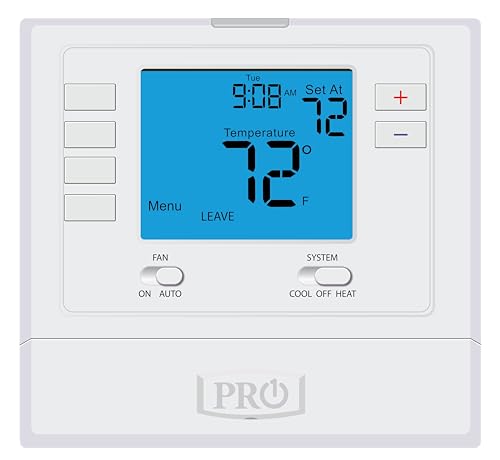
Swapping a wall thermostat sounds small, but the right one quietly runs your home every day. If you’re replacing a dead unit, upgrading from a manual dial, or finally cutting the cord with a basic programmable model, this shortlist covers the real options: simple wall units, multi-stage programmable thermostats, and a couple of Wi-Fi touchscreens that pull double duty as home control panels. Each pick below was chosen for a specific kind of home, system, and homeowner, so matching it to your setup matters more than chasing features.
How The Shortlist Stacks Up
PickWhy We Picked ItBest ForAction

Editor’s ChoicePRO1 T725 Heat Pump/Conventional Programmable Digital Wall Thermostat (2H/1C, 1H/1C)
Heat-pump ready with 7-day schedules
Mixed-system homes with heat pumps

Budget FriendlyHeagstat NonProgrammable Thermostat 1 Heat/1 Cool (White Backlight)
Plain single-stage wall control
First-time thermostat swaps
Simple StandoutEconoHome Non-Programmable Thermostat for Home (Heat & Cooling Control)
No-frills heat-and-cool dial
Rentals and weekend cabins

Low-Fuss PickPRO1 T701 Single Stage Non-Programmable Wall Thermostat (1H/1C)
Big screen, no schedule to manage
Owners who never use schedules
Heavy Duty PickPRO1 T715 Multi-Stage Programmable Gas Thermostat (2H/2C)
Multi-stage scheduling for gas rigs
Two-stage gas furnace homes
Smart UpgradeHoneywell Home RTH9600WF Smart Color Thermostat (Wi-Fi, Touchscreen)
Color touchscreen with app control
Connected households and remodels
Flexible FavoritePRO1 T721 Non-Programmable Wall Thermostat (2H/1C Heat Pump or 1H/1C)
Heat pump and conventional in one
Households planning future HVAC changes
![]()
Feature RichHoneywell Home RTH9585WF Wi-Fi Smart Color Thermostat (7-Day Programmable)
Customizable color screen + Wi-Fi
Smart-home tinkerers and families

Refined PickHoneywell Home 7-Day Programmable Touchscreen Thermostat
Classic Honeywell touch interface
Set-and-forget weekly schedules
![]()
Well Rounded PickPRO1 T805 Single Stage Programmable Wall Thermostat (1H/1C)
Oversized display with optional scheduling
Living rooms with far-away walls
Taking A Closer Look At The Options
The PRO1 T725 is the kind of wall thermostat you buy when your system isn’t quite ordinary. It handles a 2 heat/1 cool heat pump as easily as it handles a basic 1 heat/1 cool conventional setup, so homes that straddle both categories don’t need a second unit later. For most owners, the appeal is the 4 sq. in. blue backlit screen paired with full 7-day or 5/1/1 programming, which lets you shape a weekday-to-weekend schedule without living at the wall.
Compared with the Heagstat and EconoHome picks later in this list, the T725 adds genuine scheduling depth. Where those basic units just hold a single setpoint, this one lets the system back off overnight and ramp up before the alarm goes off.
A Few Highlights
- ✓Compatible with 2H/1C heat pump and 1H/1C conventional systems in one body, useful during HVAC swaps.
- ✓7-day and 5/1/1 programming modes translate into real overnight savings for working households.
- ✓The 4 sq. in. backlit display stays readable from across a living room at a glance.
- ✓Battery or hardwire power gives flexibility in older homes without a common wire.
Things To Consider
- •Programming takes longer to learn than a non-programmable dial, so first-timers may need an afternoon with the manual.
- •Heat-pump compatibility is a non-issue for many households, meaning you pay for capability you won’t use.
Key Specs
| | Feature | Specification | Why It Matters |
|---|
| System Support | 2 heat/1 cool heat pump or 1 heat/1 cool conventional | Covers mixed-vintage homes with one thermostat |
| Schedule Modes | 7-day and 5/1/1 programmable | Matches weekday/weekend routines without manual tweaks |
| Display | 4 sq. in. blue backlit screen | Stays readable in low light and from across the room |
Who It Suits Best
Homeowners running a heat pump with auxiliary backup who want scheduling flexibility without jumping to a smart thermostat.
Where Another Pick Suits Better
Skip the PRO1 T725 and grab the Honeywell Home RTH9600WF if you want app-based remote control and don’t mind needing a C-wire.
The Heagstat sits in the simplest category on this list: a single-stage, non-programmable 1 heat/1 cool thermostat for conventional forced-air systems. You press up or down to change temperature and the white backlight helps at night. There are no schedules to manage, no app, no learning curve. For an older home with a gas or electric furnace paired with a separate AC condenser, it covers the basics cleanly.
Wiring is the catch worth flagging early. The base accepts 2 to 5 wires only, so any installation with 6 to 8 wires won’t fit. Compared with the PRO1 T701 covered later, this one trades a slightly larger display for a lower entry price and the same no-frills experience.
Standout Benefits
- ✓Plain up/down temperature control is approachable for anyone, regardless of tech comfort.
- ✓The white backlight keeps the setpoint visible during a nighttime check without harsh glare.
- ✓Single-stage design suits the most common residential furnace-plus-AC pairings.
Honest Caveats
- •Limited to 2-5 wire installations, ruling out some homes with multi-stage or heat-pump wiring.
- •No scheduling means manual adjustments every time your routine shifts.
- •24VAC conventional systems only, so heat-pump households should look at the PRO1 T725 instead.
Made For
First-time thermostat owners with a simple forced-air system who want a wall unit that just works without menus or apps.
Skip It When
Reach for the EconoHome Non-Programmable Thermostat instead when you want similar simplicity with a slightly different button layout.
The EconoHome leans hard into the “swap it and forget it” attitude. It’s a non-programmable digital thermostat aimed at homes with central gas, oil, or electric furnaces, plus cool-only AC systems that need a basic wall control. The fan switch toggles between on and auto, the temperature is a single setpoint, and that’s the entire experience. For a rental unit or weekend cabin, that simplicity is the point.
Installation reads as approachable enough that a handy homeowner can usually handle it on a slow Saturday. Compared with the Heagstat, the EconoHome positions itself as a heat-and-cool single-stage alternative in a similar no-schedule footprint, with fan-mode control added into the mix.
The Helpful Details
- ✓Single-stage heat and cool compatibility covers the most common residential HVAC pairings.
- ✓Manual fan switch (on/auto) gives basic air circulation control without a smart system.
- ✓Single-stage design keeps the wall unit uncluttered for guests, tenants, or older family members.
Worth Noting
- •No programmable schedules, so energy savings depend entirely on you bumping the setpoint manually.
- •Compatibility is limited to single-stage systems, leaving multi-stage homes under-served.
Quick Facts
| | Feature | Specification | Why It Matters |
|---|
| Compatibility | Central gas, oil, electric furnace + cool-only AC | Covers most older homes with separate heat and cool equipment |
| Fan Control | On/auto switch | Handy for circulating air without running heat or cool |
| Programming | Non-programmable | Zero learning curve for first-time users |
Best Suited To
Landlords and weekend-property owners who want a setpoint thermostat that tenants can’t accidentally reprogram.
Not Your Match When
The PRO1 T805 is a smarter swap when you want a bigger display and optional scheduling on a single-stage system.
The PRO1 T701 is what happens when PRO1 takes its T700 platform and strips out the schedule entirely. You get a 4 sq. in. blue backlit screen, a glow-in-the-dark light button for finding the wall control in the dark, and a clean 1 heat/1 cool conventional interface. For households that never touch schedules, that’s actually the point. No buried menus, no setup wizard.
It runs on either batteries or a hardwired common source, which makes it friendly to older homes. Compared with the EconoHome pick above, the T701 leans on a bigger display and PRO1’s reputation for clean button feel.
Noteworthy Benefits
- ✓The 4 sq. in. blue backlit screen is large for a non-programmable unit, easing aging-eye readability.
- ✓Glow-in-the-dark light button makes nighttime adjustments easier without flipping a hall switch.
- ✓Battery or hardwire power supports older homes without an obvious C-wire.
Trade Offs
- •Conventional systems only, so heat-pump households should pivot to the PRO1 T725 or T721.
- •Single-stage support means two-stage furnace homes lose efficiency features their equipment supports.
Who Will Love This
Owners who set a temperature once a season and want a clean, oversized wall readout to glance at from the couch.
Look Elsewhere When
The Honeywell Home 7-Day Programmable Touchscreen Thermostat is a smarter fit for households that want weekly schedules on a familiar Honeywell home.
The PRO1 T715 is the largest stage-count thermostat on this list. It speaks fluent 2 heat/2 cool, which means a two-stage gas furnace plus a two-stage AC compressor can both run at low fire for longer, gentler cycles. Schedules can run as 7-day, 5/1/1, or non-programmable, which gives owners a real choice instead of forcing them into menus they don’t want.
The T700 platform shows up again here, with the same 4 sq. in. backlit display and glow-in-the-dark light button as the T701. For most two-stage homes, the upgrade over a single-stage wall unit is comfort and quieter equipment run-time, depending on your furnace’s actual staging behavior.
What Works In Its Favor
- ✓Multi-stage 2H/2C support unlocks quieter, longer furnace and AC cycles for steadier room temperature.
- ✓Three schedule modes (7-day, 5/1/1, non-programmable) let owners opt out of programming entirely.
- ✓Battery or hardwire power eases retrofits where a common wire isn’t already in the wall.
Points To Note
- •Multi-stage equipment is required to feel the benefit. Single-stage homes won’t hear a difference.
- •The non-smart design means no app control, which rules it out for households that want remote access.
At A Glance
| | Feature | Specification | Why It Matters |
|---|
| System Support | 2 heat/2 cool gas furnace systems | Matches two-stage equipment without staging limits |
| Schedule Modes | 7-day, 5/1/1, or non-programmable | Use it as a smart scheduler or as a plain thermostat |
| Display | 4 sq. in. blue backlit screen with glow button | Read across the room and find it at night |
Perfect Match For
Owners of multi-stage furnaces who want scheduling control without crossing into Wi-Fi territory.
A Better Fit Elsewhere
Pick the Honeywell Home RTH9600WF instead when multi-stage equipment pairs with a desire for app-based control.
The Honeywell Home RTH9600WF is the first Wi-Fi entry on this list, and it shows. The color touchscreen changes palette to match a wall or a mood, programming adapts to either your weekly schedule or your utility’s peak rate windows, and the companion app lets you nudge the temperature from the office. A C-wire is required at install, so older homes without one need a simple adapter or a wire pulled first.
Compared with the PRO1 T725 earlier, the RTH9600WF trades the T700 platform’s dedicated buttons for a full touchscreen experience and adds remote access. For most connected households, that jump is the real reason to spend more.
Bright Spots
- ✓Customizable color touchscreen lets the wall control blend with paint, wallpaper, or season.
- ✓Wi-Fi remote access through the app means adjustments from a car, office, or airport.
- ✓Flexible programming supports both personal schedules and time-of-use rate plans.
Honest Caveats
- •A C-wire is required, so older homes may need an adapter or new wire run before install.
- •Wi-Fi setup can frustrate homeowners who haven’t paired a smart-home device before.
Right Fit For
Connected households and recent remodels where a C-wire is already in the wall and app control is the point.
Skip It When
The Honeywell Home RTH9585WF is a strong sibling if you want a similar Wi-Fi experience with a slightly different feature mix.
The PRO1 T721 is a useful hybrid. It handles a 2 heat/1 cool heat pump as easily as it handles a 1 heat/1 cool conventional system, all without forcing you to set up a weekly schedule. The T700 platform brings the 4 sq. in. blue backlit display and a glow-in-the-dark light button for nighttime checks, and power options include AA batteries or a hardwired common source.
For homeowners planning a future HVAC swap, the dual compatibility is genuinely reassuring. Compared with the PRO1 T725 above, the T721 trades schedules for a simpler wall experience while keeping heat-pump reach intact.
Real-World Strengths
- ✓Heat-pump and conventional compatibility in one body protects the thermostat through future equipment changes.
- ✓Non-programmable design means a guest or tenant can’t accidentally wipe a schedule.
- ✓Battery or hardwire power eases install in older homes without a C-wire.
Small Caveats
- •Heat-pump systems are typically multi-stage, so the T721 only supports 2H/1C configurations.
- •No scheduling means setpoint adjustments are manual across weekday and weekend routines.
Who Should Grab It
Households with a 2H/1C heat pump who want setpoint simplicity and the option to switch to a conventional system later.
Swap It Out When
Pick the PRO1 T725 instead when weekly scheduling is worth the extra setup time for the same system.
The Honeywell Home RTH9585WF is the second-generation Wi-Fi smart color thermostat from Honeywell, and it leans into the customization side of the category. The background color is changeable to match a wall or a personal preference, the 7-day programming handles shifting schedules, and the touchscreen walks through setup in plain language. A C-wire is required, so plan for that on older homes.
It is not compatible with line volt heating, which rules out some electric baseboard installations. Compared with the RTH9600WF earlier, this unit shares the Wi-Fi core but tends to ship at a friendlier entry point.
What Pays Off
- ✓Customizable color screen makes the wall control feel like part of the room rather than an appliance bolted on.
- ✓7-day programming adapts to rotating work weeks and school calendars.
- ✓Wi-Fi app control supports remote tweaks from the road or the office.
Practical Considerations
- •Line volt heating systems are not supported, ruling out some electric baseboard homes.
- •C-wire required, so older homes without one may need an electrician’s visit.
Feature Snapshot
| | Feature | Specification | Why It Matters |
|---|
| Connectivity | Wi-Fi with companion app | Adjust temperature from anywhere on your phone |
| Programming | 7-day programmable | Matches shifting weekly routines |
| Compatibility Note | C-wire required, not for line volt | Plan wiring before purchase on older homes |
Built With In Mind
Smart-home households that want a customizable color touchscreen and weekly scheduling in a single wall unit.
Consider Something Else When
Pick the Honeywell Home RTH9600WF if you want a similar Wi-Fi experience with a slightly different feature mix.
The Honeywell Home 7-Day Programmable Touchscreen Thermostat is a classic wall unit with a crisp touchscreen and a familiar Honeywell setup flow. Schedules can run the same every day, just on weekends, or vary day to day. The package ships with a quick installation guide, screws, anchors, and a UWP mounting system, which keeps a Saturday install contained.
Compared with the PRO1 T725 covered earlier, this Honeywell swaps out the T700 platform buttons for a touchscreen interface and a broader 7-day scheduling focus. There is no Wi-Fi here, which keeps the install simple for households that don’t want an app.
The Practical Payoff
- ✓Touchscreen interface keeps navigation shallow, easing first-time setup.
- ✓Flexible scheduling modes cover weekday-only, weekend-only, or fully rotating routines.
- ✓Included mounting hardware and quick guide shorten the install window.
Less Ideal Details
- •No Wi-Fi means no remote app access for travelers or office-bound households.
- •Touchscreen responsiveness can vary, depending on the home’s wiring and the install quality.
Whose Shelf It Belongs On
Set-and-forget households that want a polished Honeywell touchscreen and weekly schedules without any smart-home integration.
Reach For A Different Pick When
The Honeywell Home RTH9585WF is a stronger fit when Wi-Fi control and color customization matter as much as scheduling.
The PRO1 T805 sits on the T800 platform, which means a noticeably bigger 7 sq. in. blue backlit display compared with the T700 series earlier in this list. It supports conventional 1 heat/1 cool systems and offers 7-day, 5/1/1, or non-programmable modes so scheduling is optional. The glow-in-the-dark light button is back, helping during those half-awake nighttime tweaks.
For most living rooms, the larger display is a quiet upgrade that matters more than people expect. Compared with the PRO1 T701, the T805 adds scheduling flexibility and a bigger screen without leaving the conventional 1H/1C lane.
Reasons It Performs
- ✓The 7 sq. in. blue backlit display is easier to read from across a room than the smaller 4 sq. in. units.
- ✓Three schedule modes let owners treat it as either a programmable or a setpoint thermostat.
- ✓T800 platform polish extends to the glow-in-the-dark light button for nighttime accuracy.
Small Limitations
- •Single-stage conventional systems only, leaving heat-pump and multi-stage homes looking at other picks.
- •No Wi-Fi, so remote control isn’t part of the package.
Who Should Grab It
Living rooms with far-away thermostat walls where a bigger display and optional weekly scheduling make daily life easier.
Look Elsewhere When
The PRO1 T715 is a stronger pick for two-stage gas furnace homes that need higher stage counts.
What To Weigh Before Choosing A Wall Thermostat
A thermostat only earns its wall space when it matches the HVAC equipment behind it. Start by counting stages: 1 heat/1 cool covers most basic systems, while 2 heat/2 cool is what multi-stage furnaces and heat pumps need to run quiet, long cycles. Heat-pump households should confirm the unit supports their configuration, since a single-stage thermostat wired to a multi-stage system wastes the equipment’s range.
Wiring matters next. A C-wire (common wire) carries continuous 24VAC power and is required by most Wi-Fi and color touchscreen models. Older homes without one can sometimes use battery-powered thermostats like several PRO1 T-series picks, but smart thermostats usually need an adapter or a wire pulled. Compatibility with line volt heating is worth checking, since some Honeywell smart units exclude electric baseboards.
Think about how the thermostat will actually be used. Households that never set schedules should skip programmable complexity and grab a clean setpoint unit like the EconoHome. Connected households that want app control should accept the C-wire requirement and look at the Honeywell Wi-Fi series. Schedulers benefit from 7-day or 5/1/1 modes, while rental owners often want a non-programmable wall control that tenants can’t accidentally wipe.
Key Considerations Across These Picks
Traps First Timers Fall Into
The most common slip-up is buying a thermostat before counting wires at the existing wall. Pull the faceplate off and count before ordering, especially if a Wi-Fi or color touchscreen model is on the shortlist. Another mistake is treating “programmable” and “smart” as the same thing: programmable units run schedules you set on the wall, while smart units add app control, learning, and sometimes voice integration. Mixing those up leads to overspending on capability you won’t use.
Where The Extra Money Goes
Higher-tier thermostats earn their premium through larger displays, Wi-Fi connectivity, color touchscreens, and multi-stage HVAC support. For most homes, the upgrade is worth it when there’s a C-wire, a multi-stage system, and a routine that benefits from remote adjustments. Households with a basic 1H/1C system and a set-and-forget attitude often get everything they need from a budget-friendly, non-programmable wall unit.
Frequently Asked Questions
Do I need a C-wire for any of these thermostats? The Honeywell Home RTH9600WF and RTH9585WF require a C-wire. Most PRO1 T-series units can run on AA batteries or a hardwired common source, giving older homes more flexibility.
Can a thermostat work with both a heat pump and a conventional system? Yes, the PRO1 T725 supports 2H/1C heat pump or 1H/1C conventional, and the PRO1 T721 supports 2H/1C heat pump or 1H/1C conventional without schedules.
What’s the difference between programmable and smart thermostats? Programmable thermostats run schedules you set at the wall. Smart thermostats add Wi-Fi, app control, and often voice integration through assistants, but usually need a C-wire.
Are Wi-Fi thermostats harder to install? They’re not harder physically, but they need a C-wire and a working Wi-Fi network. App setup can also take longer for households that haven’t paired a smart device before.
What happens if my home has more wires than the thermostat supports? Check the wiring count before buying. The Heagstat, for example, only accepts 2 to 5 wires, so homes with 6 to 8 wires need a different model or a reconfiguration.
Bottom Line
A wall thermostat only matters when it matches the HVAC equipment, the wiring, and the routine of the home behind it. Match the stage count first, decide whether scheduling or app control is worth the setup time, and only then weigh display size and brand. The right pick on this list will quietly run your heating and cooling for years without you thinking about it again.