A connected home only feels connected when the pieces actually talk to each other. New homeowners, renters, and busy families tend to start the same way: a single smart plug or doorbell, then a slow build into locks, switches, sensors, and cameras. The kits and devices below cover the everyday starting points, from outdoor lighting and front-door visibility to indoor energy tracking and keyless entry, so the path forward stays clear and the routines actually stick.
How The Shortlist Stacks Up

Ring Floodlight Cam Wired Plus with Ring Video Doorbell

YoLink Smart Energy Plug 15A 4-Pack with Hub

GHome Smart Fingerprint Door Knob with Keypad

GHome WiFi Smart Plug for Alexa and Google Home

GHome Smart Light Switches 4-Pack WiFi
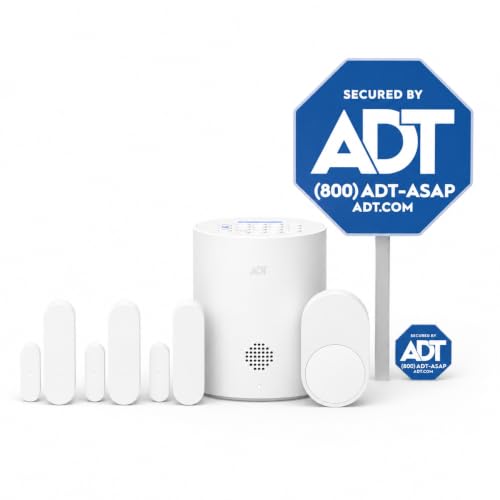
ADT Blu Home Security System Starter Kit
GHome Smart Fingerprint Deadbolt with Keypad
Inside Each Recommended Option
Driveways and side entrances are where most break-ins start, and this bundle tackles both angles at once. The floodlight cam streams 1080p HD video while delivering 2000 lumens of motion-activated light, the kind of brightness that washes a wide front yard. The matching wired doorbell catches the porch approach in the same app, so one interface handles both viewpoints.
Homeowners with existing doorbell wiring get the smoothest install. A 105dB siren pairs with an 85dB app-triggered alarm, giving you two ways to scare off an unwanted visitor. You can carve out custom motion zones in the Ring app, which matters for townhomes where the street walks right past the camera.
What Stands Out
- 1080p HD video with motion-activated floodlights at 2000 lumens, bright enough to clear a dark driveway the moment someone steps in.
- Two-way kit: floodlight cam for the wide approach plus a wired doorbell for porch-level detail in one app.
- Customizable motion zones help you ignore the sidewalk and focus on the walkway and yard.
- Dual alert options: a 105dB hardware siren plus an 85dB app-triggered alarm for flexible response.
- Wired power keeps both devices running continuously, no battery swaps to schedule.
Points To Keep In Mind
- Hardwired installation means routing low-voltage cable, which can be tricky on older brick or stucco exteriors.
- The bundled app works best inside the Ring ecosystem; mixing with non-Ring devices usually means a separate app per brand.
Built With In Mind
Homeowners with existing doorbell wiring who want front-yard lighting and porch-level awareness handled together.
Skip It When
Renters and apartment dwellers should look at the ADT Blu Home Security System Starter Kit, since it stays wireless and avoids hardwiring.
Wi-Fi smart plugs work great until the router signal can’t quite reach the detached garage or basement workshop. This YoLink pack uses LoRa, a long-range radio that holds a signal up to a quarter mile in open conditions, so plugs in the far corners of a property stay reachable. The included hub bridges the radio to your home network.
Each outlet handles up to 15 amps, enough for space heaters, dehumidifiers, and pond pumps. Real-time energy monitoring with exportable reports lets you see exactly which appliance is drawing the most power over a week or a month, depending on how granular you want the data.
What Earns Its Place
- LoRa radio range, up to a quarter mile open-air, means reliable control in detached garages, basements, and yard outlets.
- 15A rating per outlet covers heavier loads like dehumidifiers, fans, and pumps without tripping.
- Cycle scheduling supports precise days, intervals, and durations for appliances that need rest periods.
- Exportable energy reports turn daily consumption into numbers you can actually study.
- Built-in overload protection, a useful safety layer for high-draw appliances.
Trade Offs
- LoRa range assumes open-air conditions; thick masonry and metal outbuildings can shorten the effective distance.
- The hub requires a free Ethernet port on your router, which can be a pinch on crowded networking gear.
Who It Suits Best
Property owners with detached structures or large lots where standard Wi-Fi plugs drop off the network.
Where Another Pick Suits Better
Apartments and single-floor homes get simpler results from the GHome WiFi Smart Plug, since you won’t need the long-range radio.
Doorknob replacement is the gentlest on-ramp to keyless entry, no deadbolt chiseling, no full latch rework. This GHome knob reads fingerprints through a small biometric pad on the exterior and offers three backup methods: a numeric keypad, app control within Bluetooth range, and a traditional mechanical key for emergencies.
Bedroom doors, home offices, and interior apartment entries are the sweet spot. The auto-lock feature engages after a set interval, which helps forgetful roommates or anyone sharing a space with kids who forget to throw the bolt. For most homes, setup is a Phillips screwdriver and ten minutes.
Useful Touches
- Four unlock methods, fingerprint, keypad code, app, and physical key, give every household member an entry style.
- Auto-lock engages after a set delay, removing the “did I lock the door?” loop.
- Doorknob form factor means a straightforward swap with no major door modification.
Honest Caveats
- Bluetooth range limits app control to roughly the same floor as the door, no remote unlock from the grocery store.
- A doorknob rating is generally less secure than a full deadbolt for exterior front doors.
Made For
First-time smart lock users outfitting a bedroom, office, or interior apartment door.
A Better Fit Elsewhere
Anyone securing a primary front door should consider the GHome Smart Fingerprint Deadbolt with Keypad instead, which adds proper deadbolt strength.
Single-outlet smart plugs are the gentlest first step into home automation, and this GHome model keeps the experience uncomplicated. Setup pairs to a 2.4GHz Wi-Fi network, the lower-frequency band that pushes through walls better than 5GHz, and works with both Alexa and Google Home for voice commands.
It’s a clean fit for lamps, fans, and coffee makers in apartments where renters want smart control without rewiring anything. The Bluetooth fallback helps initial pairing stay painless when the Wi-Fi password is the third one you’ve tried that morning.
What Works In Its Favor
- 2.4GHz Wi-Fi plus Bluetooth pairing means faster, more reliable initial setup.
- Voice control through both Alexa and Google Home covers either ecosystem without a separate skill hunt.
- Compact form factor keeps the second outlet free on most wall plates.
Worth Noting
- Rated for lighter loads, so space heaters and high-draw appliances are best left to the YoLink Smart Energy Plug.
- Lacks energy monitoring, which limits the use case for anyone tracking consumption.
Best Suited To
Renters and apartment dwellers who want voice-controlled lamps, fans, and small appliances on day one.
Reach For A Different Pick When
Anyone running outdoor lights, pond pumps, or heavy-draw equipment will do better with the YoLink Smart Energy Plug 15A 4-Pack.
Smart plugs control one outlet at a time. Smart switches control every fixture on the circuit, which is the difference between turning on a single lamp and managing the whole ceiling fixture. This 4-pack handles a single-pole setup, the most common switch wiring in North American homes, and pairs with both Alexa and Google Home.
Renovating a living room, kitchen, and hallway at once makes the four-pack format appealing, since you get the same app experience room to room. Voice commands work cleanly when your hands are full at the front door or covered in cooking flour.
Good Reasons To Consider
- Four-pack format is convenient for whole-room or whole-floor retrofits.
- Single-pole design fits the standard wiring in most homes built in the last several decades.
- Voice control across Alexa and Google Home covers either household preference.
- App-guided install walks through wiring step by step, helpful for first-time DIYers.
Things To Consider
- Single-pole only; not suited to three-way switches commonly found at the top and bottom of staircases.
- Requires a neutral wire in the box, which some older homes may lack.
Right Fit For
Homeowners doing a coordinated lighting upgrade across multiple rooms on the same floor.
Not Your Match When
Older homes without neutral wiring may need a different switch line or a smart bulb alternative instead.
Quick Facts
Sensor-based alarm systems cover a different angle than cameras: they catch the moment a door or window opens, before anyone has reached the living room. This ADT Blu starter kit includes a base hub, three door/window sensors, a pet-friendly motion sensor, a yard sign, and window stickers, enough to cover the main entry points of a small home or apartment.
The DIY wireless setup keeps installation to peel-and-stick mounts, no drilling into brick. A 30-day free monitoring trial starts the moment you unbox, then transitions into a paid subscription with month-to-month flexibility, no multi-year contract required.
What Pays Off
- Covers the standard entry points out of the box: hub, three sensors, a motion detector, and signage.
- Pet-friendly motion sensor avoids false alarms from cats and small dogs under a reasonable weight threshold.
- Month-to-month subscription structure skips the long-term contract trap common with legacy alarm companies.
- Wireless sensors mean peel-and-stick install with no electrical work needed.
Factors To Consider
- Full functionality depends on a paid monitoring plan after the 30-day trial, so factor subscription cost into ownership.
- Three sensors cover the basics, but larger homes will need add-on packs.
Who Should Grab It
Renters and small-home owners who want a contract-free entry alarm without hiring an installer.
Consider Something Else When
Anyone who already has outdoor coverage from the Ring Floodlight Cam Wired Plus with Ring Video Doorbell may not need a second layer of alarm hardware.
Feature Snapshot
Front doors get the most traffic of any lock in the house, and the AI self-learning fingerprint reader on this deadbolt is built for that pace. It claims roughly one-second reads, which matters when your arms are full of groceries and the kids are already inside. The keypad and app offer backup, plus a physical key cylinder for true emergencies.
Airbnb hosts and rental property managers appreciate the auto-lock and code-change flexibility, since guest turnover means rotating access codes regularly. The AI learning aspect, in plain language, means the lock refines its fingerprint match the more you use it, so accuracy improves over weeks rather than degrading.
A Favorable Mix
- One-second fingerprint reads keep entry friction low during busy mornings.
- AI self-learning refines accuracy as the registered fingerprints are used more often.
- Auto-lock engages after a set delay, helpful for forgetful teens or short-trip departures.
- Three backup methods, keypad, app, and physical key, cover any scenario where fingerprint read fails.
Where It May Fall Short
- App control typically operates within Bluetooth range, so remote unlock from across town requires the right hub setup.
- Deadbolt install needs a drill and accurate hole alignment, more involved than the doorknob swap on Item 3.
The Right Fit
Homeowners and short-term rental hosts who want fast, code-flexible keyless entry on their primary door.
Where A Sibling Pick Shines
Anyone needing a quick bedroom or office install may prefer the GHome Smart Fingerprint Door Knob with Keypad for its easier swap.
What Matters Most Before Choosing Smart Home Kits
Compatibility With Your Existing Ecosystem
Voice assistants set the tone for the whole experience, so check whether each device supports yours before adding it to the cart. Alexa, Google Home, and Apple Home each have their own device list, and a plug or switch that only works with one platform can leave you juggling apps. The picks above mostly split between Alexa and Google support, with the Ring bundle adding its own app layer.
Connectivity Range and Network Type
Wi-Fi handles most homes fine, but detached spaces stretch that signal. LoRa radios in the YoLink pack extend reach to roughly a quarter mile, which matters for garages, sheds, and basements where your router signal drops off. For switch installs, a stable 2.4GHz network keeps pairing painless.
Wired vs Wireless Installation
Hardwired devices like the Ring floodlight bundle deliver constant power but require existing low-voltage wiring. Wireless sensors and battery locks trade constant power for peel-and-stick or drill-only installs, which suits renters. Decide your installation comfort level before choosing between Item 1 and Item 6.
Security vs Convenience Trade-offs
A doorknob swap installs in minutes but offers less physical strength than a full deadbolt. Cameras catch footage but need subscriptions for full history. Alarm sensors trigger notifications but depend on monitoring plans after the trial. Weighing where you sit on the security-versus-simplicity spectrum shapes which picks make the final cut.
Smart Buying Advice for Smart Home Kits
Common Shopping Slip Ups
Picking a smart plug or lock before checking the network setup is the most common stumble. A 5GHz-only Wi-Fi network breaks pairing with most smart plugs that need 2.4GHz. Another miss is assuming a “smart” lock replaces a deadbolt: doorknob-format smart locks install easily but provide less physical security than a full deadbolt for exterior front doors.
What Separates Premium From Basic
Higher-tier picks earn their place through longer wireless range, heavier amperage handling, and broader ecosystem support. The YoLink 4-pack justifies its tier with LoRa radio reach and 15A outlets, both of which a basic Wi-Fi plug cannot match. The Ring bundle’s floodlight output and dual-device coverage go beyond what a single doorbell alone would offer. Premium framing here is about capability depth, not brand prestige.