A wall dial that you have to walk across the room to nudge is, frankly, a relic. Smartphone thermostats put climate control in your pocket, learning your patterns and trimming wasted energy without you lifting a finger. The right pick depends on your home’s wiring, your heating system, and whether you care more about automation, app polish, or simple remote access.
The Picks In Brief

Google Nest Temperature Sensor (2nd Gen) – Porcelain

Honeywell Home RTH9600WF Smart Color Thermostat

Warmup 6iE Smart WiFi Thermostat for Underfloor Heating

Aoresac Smart Thermostat 1.32in Screen WiFi
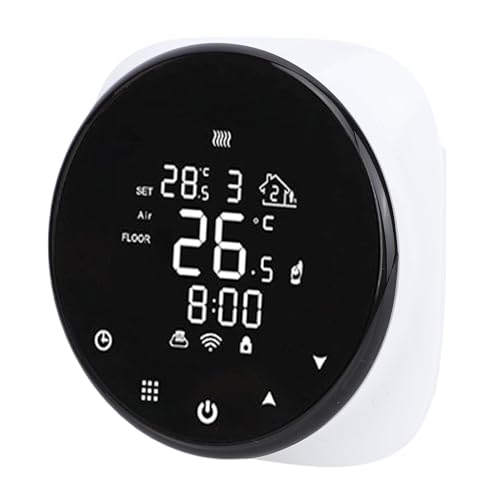
WiFi Wall Mounted Digital Thermostat with Smartphone Connectivity
Honeywell Home RTH9585WF Wi-Fi Smart Color Thermostat

Honeywell Home 7 Day Programmable Touchscreen Thermostat

Google Nest Learning Thermostat (4th Gen) + Sensor, Obsidian

Google Nest Learning Thermostat (4th Gen) + Sensor, Silver
A Deeper Look At The Lineup
The Nest Temperature Sensor (2nd Gen) does one job, and it does it cleanly: it tells a compatible Nest thermostat what the temperature is in a room far from the wall unit. Place it on a shelf in a nursery, a drafty bonus room, or a basement that never quite warms up, and the system prioritizes that reading.
It runs on batteries, so there’s no wiring to chase through the wall, and it pairs over Bluetooth with the Nest Learning Thermostat (3rd and 4th Gen) and the Nest Thermostat E. If you’ve ever argued with a partner about which room deserves priority at 6 a.m., this little puck ends the debate without rerouting ductwork.
Notable Gains
- Eliminates hot and cold spots by averaging readings across rooms you actually use.
- Wire-free installation means renters can deploy it without poking holes.
- Scheduling per sensor lets the nursery stay warm at bedtime while the office cools off.
- Compact Porcelain finish blends with most wall colors, so it disappears on a shelf.
Things To Consider
- Useless on its own. You need a Nest Learning Thermostat already installed for this sensor to do anything.
- Battery replacements come every few years depending on usage, and the unit sits on a shelf, so owners occasionally forget it’s there.
Who Will Love This
Homeowners already running a Nest Learning Thermostat who want zoned comfort without rewiring or installing dampers.
Where Another Pick Suits Better
You don’t own a Nest thermostat yet, in which case the Honeywell Home RTH9585WF Wi-Fi Smart Color Thermostat offers a more complete standalone solution.
The Honeywell Home RTH9600WF leans into personalization. The color touchscreen lets you swap the background to match your paint, your mood, or the season, and the underlying programming adapts to whatever schedule you throw at it.
Where this unit earns its keep is flexibility. It supports custom scheduling for peak rate pricing, runs on Wi-Fi for app control, and plays nicely with Alexa for hands-free adjustments. A common-sense addition: a C-wire (the constant-power wire that keeps smart thermostats fed) is required, so older homes without one will need a quick electrical check before installing.
The Value In It
- Color touchscreen can be tailored to match your décor, which makes it feel less like an appliance bolted to the wall.
- ENERGY STAR-rated, so it leans into the savings story when you compare utility bills month over month.
- Alexa compatibility means you can call out temperature changes while chopping vegetables or carrying groceries.
Worth Noting
- C-wire required, and older homes without one may need a minor wiring upgrade before installation.
- The interface is deeper than a Nest, so first-time smart thermostat owners may take a weekend to fully explore the menus.
Quick Facts
Made For
Households that want strong app control with Alexa voice integration and don’t mind confirming their wiring supports a C-wire.
A Better Fit Elsewhere
Owners of radiant floor systems should skip this and look at the Warmup 6iE Smart WiFi Thermostat, which is purpose-built for underfloor heating.
The Warmup 6iE is unapologetically niche, and that’s the point. Where the Honeywell RTH9600WF and the Honeywell Home 7 Day Programmable Touchscreen Thermostat handle forced air, this slim controller is engineered for electric underfloor heating systems.
The “smartphone touchscreen” framing isn’t marketing fluff: the 6iE uses a glass-style interface that feels closer to a phone than a wall dial. SmartGeo technology learns when you’re actually home and dials back heating when you’ve left for work. For households that invested in radiant floors and want the same scheduling polish that Nest users enjoy, this is the missing piece.
A Few Strong Suits
- Ultra-thin profile sits nearly flush against the wall, which matters on tile or stone where bulky thermostats interrupt clean lines.
- SmartGeo automatically adjusts heating based on your phone’s location, a real win for unpredictable work hours.
- Built for Warmup electric underfloor systems, so integration is tighter than retrofitting a generic thermostat.
Trade Offs
- Limited to electric underfloor heating, not a fit for forced-air HVAC.
- Setup leans on the Warmup app ecosystem, which is excellent within that niche but adds little if you don’t own a Warmup system.
Feature Snapshot
Perfect Match For
Owners of electric underfloor heating who want app-based scheduling and don’t need a thermostat that talks to central air.
Not Your Match When
You heat with forced air or boilers, in which case the Aoresac Smart Thermostat 1.32in Screen WiFi is a better fit for water heating setups.
Where the Warmup 6iE stretches across the wall, the Aoresac Smart Thermostat shrinks to a 1.32-inch screen and asks almost nothing of your décor. This is a control panel for water heating, not a statement piece.
It runs on a wide 95 to 240VAC range, supports loads up to 3A on water heating circuits, and offers a 5 to 35°C set range with ±1°C accuracy. The ABS plastic shell feels light, which makes sense given the price point, and Wi-Fi access means you can tweak the boiler from your phone before stepping into a cold bathroom on a January morning.
Standout Benefits
- Compact footprint suits small utility rooms and tight boiler closets where larger displays feel intrusive.
- Wide voltage tolerance means it installs in older electrical setups without an adapter in most cases.
- App control brings smartphone scheduling to water-based heating, a category often stuck with analog dials.
Points To Note
- The 3A current limit means it’s not built for high-load electric floor heating, which pushes those shoppers toward the Warmup 6iE.
- Build quality is functional rather than premium, and the ABS plastic shell may show scuffs over years of daily use.
Quick Facts
Right Fit For
Apartment dwellers and homeowners with water-based heating who want smartphone control without a bulky wall display.
Reach For A Different Pick When
You need learning behavior over time, which is what the Google Nest Learning Thermostat (4th Gen) does best in this roundup.
The WiFi Wall Mounted Digital Thermostat from shenruifa is the no-frills option on this list. It’s an ABS plastic wall unit with Wi-Fi connectivity, smartphone control, and the kind of straightforward install that doesn’t require an electrician for most homes.
It runs on standard 50/60Hz mains power and ships with screws and a manual for mounting. Where it shines is the price-to-function ratio: you get remote scheduling and precise temperature control without paying for the polished app ecosystems that the higher-tier picks offer. For first-time smart thermostat shoppers dipping a toe into the category, this is a reasonable starting point.
The Case For It
- Accessible price point for homeowners testing whether smartphone thermostats fit their routine.
- Simple wall-mount design with included hardware, so installation is a single afternoon project.
- Precise temperature control through the app, which handles the basics that most households actually use.
Honest Caveats
- App ecosystem is basic compared to Honeywell or Nest, so advanced scheduling and energy reports are limited.
- Build quality leans light, and ABS plastic shells are known to yellow slightly in direct sunlight over years.
Best Suited To
First-time smart thermostat shoppers who want remote control without committing to a premium ecosystem.
Swap It Out When
You want deeper learning features and richer app reporting, which is where the Google Nest Learning Thermostat (4th Gen) earns its higher cost.
The Honeywell Home RTH9585WF sits between the RTH9600WF and the Honeywell Home 7 Day Programmable Touchscreen Thermostat. It keeps the customizable color touchscreen, adds 7-day programming, and integrates with Alexa for voice control.
For most households, this is the sweet spot. You get the scheduling depth that energy-conscious families want without the deeper menu structures of higher-end commercial units. The catch: it’s not compatible with line voltage heating, which is more common in older baseboard setups, so check your wiring before committing.
Everyday Perks
- 7-day programmable schedule lets you set distinct routines for weekdays and weekends without redoing it weekly.
- Customizable color background helps the unit blend with your wall or stand out as a feature.
- ENERGY STAR-rated, with smart response features that learn how long your system takes to reach the target temperature.
Points To Keep In Mind
- C-wire required for installation, similar to the Honeywell Home RTH9600WF.
- Not compatible with line voltage heating systems, so baseboard-heavy older homes may need a different solution.
Built With In Mind
Households with central HVAC that want 7-day scheduling, color customization, and Alexa integration in one unit.
Where A Sibling Pick Shines
You want learning behavior that adapts to your routine, which is where the Google Nest Learning Thermostat (4th Gen) pulls ahead in this roundup.
The Honeywell Home 7 Day Programmable Touchscreen Thermostat strips away the color customization that defines the RTH9585WF and the RTH9600WF, leaving a clean touchscreen with a single focus: reliable scheduling.
This is a programmable unit first, a smart unit second. The crisp display makes weekly setup intuitive, and the package includes a UWP mounting system, screws, and anchors for a tidy install. The trade-off is that Wi-Fi and app control aren’t part of this model’s feature set, so it’s better suited to homes that want consistent schedules without needing remote access.
Everyday Wins
- Clear touchscreen makes weekly setup approachable, even for first-time programmable thermostat users.
- 7-day flexibility means separate routines for weekdays, weekends, or every single day if that’s how your life runs.
- Includes mounting hardware in the box, so the install is one trip to the toolbox.
A Few Limitations
- No Wi-Fi or app control, so you can’t adjust the temperature from your phone.
- Doesn’t integrate with Alexa or Google Assistant, which limits hands-free convenience.
Feature Snapshot
Whose Shelf It Belongs On
Homeowners who want consistent weekly schedules without needing smartphone control or voice assistant integration.
Skip It When
Remote control matters to your routine, in which case the Honeywell Home RTH9600WF adds Wi-Fi without abandoning the scheduling focus.
The Google Nest Learning Thermostat (4th Gen) is the brain of the lineup, and this bundle pairs it with a 2nd Gen Nest Temperature Sensor in Obsidian. Together, they let the system learn your routines and prioritize the rooms where comfort actually matters.
The 4th Gen refines the design language that made earlier Nests recognizable, with a brighter display and a more substantial feel on the wall. Over time, it builds a schedule from your manual adjustments, so the thermostat stops feeling like a thing you program and starts feeling like a thing that knows. The included sensor extends that intelligence to rooms where you spend evenings but the wall unit would never see.
What Helps Most
- Adaptive learning means less manual scheduling, which helps households with shifting routines.
- Bundle includes a sensor, so zoned comfort starts working the day you install it.
- Obsidian finish gives the unit a high-end look that fits modern interiors.
- Smartphone app is among the most polished in the category, with energy reporting that explains savings in plain language.
Things To Weigh
- Premium pricing compared to the Honeywell Home RTH9585WF or the Honeywell Home 7 Day Programmable Touchscreen Thermostat.
- Learning behavior takes a few weeks to mature, so early impressions may feel less polished than a fully scheduled Honeywell unit.
Who Should Grab It
Homeowners who want the thermostat to handle scheduling automatically and value the polished Nest ecosystem over upfront control.
Consider Something Else When
You want a Silver finish to match lighter walls, which is what the Google Nest Learning Thermostat (4th Gen) Silver bundle delivers.
The Silver bundle mirrors the Obsidian version feature for feature, swapping the dark finish for one that suits lighter walls, Scandinavian-inspired interiors, or rooms where the thermostat shouldn’t visually compete with art or tile.
Same 4th Gen learning engine, same Nest Temperature Sensor (2nd Gen), same smartphone control and energy reporting. If you’re comparing this to the Obsidian version, the honest read is that the choice comes down to room palette and personal taste. Functionally, you’re getting the same adaptive scheduling and zoned comfort that makes the Nest ecosystem feel less like a gadget and more like infrastructure.
Key Advantages
- Silver finish reads cleaner against light or neutral walls, where darker thermostats can feel heavy.
- Same learning engine as the Obsidian bundle, so you don’t sacrifice capability for aesthetics.
- Sensor included in the box, removing the need to buy the Nest Temperature Sensor (2nd Gen) separately later.
Trade-Offs To Consider
- Costs more than entry-level options like the WiFi Wall Mounted Digital Thermostat with Smartphone Connectivity.
- Best results require a C-wire, which some older properties may need professionally retrofitted.
Quick Facts
Perfect Match For
Design-conscious households that want the full Nest experience with a finish that suits bright or neutral interiors.
Look Elsewhere When
Budget is the deciding factor, in which case the Honeywell Home RTH9585WF Wi-Fi Smart Color Thermostat gives you scheduling and color customization at a lower tier.
What Matters Most Before Choosing Smartphone Thermostats
Match The System First
Forced air, radiant floor, water heating, and boilers each speak a different thermostat language. The Honeywell Home RTH9600WF and the Honeywell Home RTH9585WF are designed for central HVAC, while the Warmup 6iE is purpose-built for electric underfloor heating. The Aoresac Smart Thermostat 1.32in Screen WiFi covers water-based systems. Buying a thermostat that doesn’t match your system is the most common reason a smart upgrade underperforms, so confirm compatibility before anything else.
Check Your Wiring
A C-wire, sometimes called a common wire, delivers continuous power to smart thermostats. Units like the Honeywell Home RTH9600WF and the Honeywell Home 7 Day Programmable Touchscreen Thermostat often require one. Older homes without a C-wire may need a power adapter or a minor wiring upgrade. Skipping this check is how people end up with a thermostat that reboots randomly.
Decide Between Learning And Programming
Learning thermostats, like the Google Nest Learning Thermostat (4th Gen) bundle, adapt to your routines over time. Programmable thermostats, like the Honeywell Home 7 Day Programmable Touchscreen Thermostat, require you to set schedules yourself. Learning models feel magical after a few weeks but cost more. Programmable models give you predictable control from day one.
Plan For Sensors And Zoning
Single thermostats read one room. The Google Nest Temperature Sensor (2nd Gen) and the bundles with Nest Learning Thermostat (4th Gen) extend that reach to additional rooms. For homes with hot and cold spots, a sensor often matters more than raw thermostat features, and it’s worth budgeting for one.
Key Considerations Across These Picks
Common Shopping Slip Ups
The most frequent mistake is choosing a thermostat before confirming system compatibility. A thermostat that looks beautiful on the wall but can’t talk to your boiler is just an expensive decoration. The second slip is ignoring wiring, since C-wire requirements catch many homeowners off guard. Third, don’t buy a learning thermostat expecting it to behave perfectly on day one. The Google Nest Learning Thermostat (4th Gen) needs a few weeks of real usage before its schedule feels dialed in.
What The Higher Tier Buys
The jump from the Honeywell Home RTH9585WF to the Google Nest Learning Thermostat (4th Gen) bundle buys you adaptive scheduling, room sensors, and a more polished app with energy reporting. Whether that upgrade pays off depends on how much you value automation over manual control. For most households with shifting routines, the learning approach trims more wasted energy over a year, which is where the higher cost earns its keep. For predictable schedules, a programmable unit does the same job for less.
Frequently Asked Questions
Do Smartphone Thermostats Save Money?
Smart thermostats can reduce heating and cooling costs by trimming energy use when nobody’s home, but actual savings depend on your climate, your schedule, and how often you adjust the temperature. ENERGY STAR-rated units like the Honeywell Home RTH9600WF tend to deliver the most consistent results.
What Is A C-Wire?
A C-wire is a common wire that delivers continuous 24-volt power to a thermostat. Smart thermostats need steady power for Wi-Fi, displays, and sensors. Homes built before the mid-2000s may not have one, which is why models like the Honeywell Home RTH9585WF list C-wire as required.
Can A Thermostat Control Multiple Rooms?
A single thermostat reads the temperature in one spot. Adding sensors, like the Nest Temperature Sensor (2nd Gen), lets the system prioritize additional rooms. This is how the Nest Learning Thermostat (4th Gen) bundles handle zoned comfort without rewiring your ductwork.
Are Smartphone Thermostats Hard To Install?
Most wall-mounted units ship with mounting hardware and a step-by-step guide, so confident homeowners can handle installation in an afternoon. Models that require a C-wire may need a minor electrical step, and renters should check with their landlord before drilling.
Which Thermostat Works With Alexa?
Several models on this list work with Alexa, including the Honeywell Home RTH9600WF, the Honeywell Home RTH9585WF, and the Google Nest Learning Thermostat (4th Gen) bundles. Voice control is a separate ecosystem decision, so confirming compatibility before purchase saves a return trip.
Closing Remarks
Smartphone thermostats earn their keep by trimming waste without demanding attention. Start with your heating type, confirm your wiring, then choose between learning automation and programmable control. The right match handles the routine so you barely notice it’s there.