SmartThings is one of the more forgiving smart-home hubs to build around, but picking the right switch still comes down to wiring quirks, connectivity type, and how loud the room is at bedtime. This roundup looks at wall switches, in-wall relays, fan controllers, plugs, and a couple of smart locks that all play nicely with SmartThings routines. Use it as a shortcut through the spec maze and toward something that actually fits how your home is wired.
The Essentials At A Glance
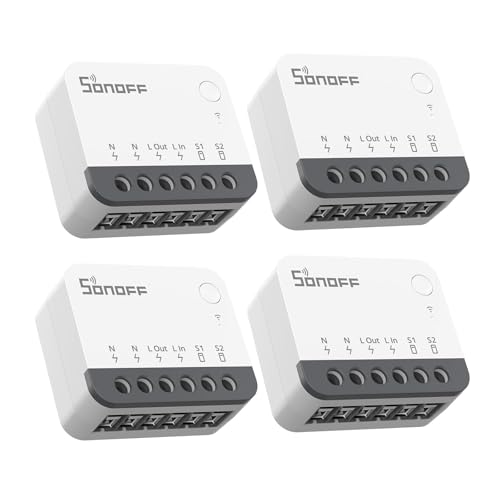
SONOFF Zigbee 3.0 Smart Relay Switch Mini in-Wall Module (4-Pack)

TREATLIFE Smart Light Switch Single Pole 4-Pack

TREATLIFE Smart Switch 4-Pack (Single-Pole WiFi)

GHome Smart Fingerprint Door Knob with Keypad
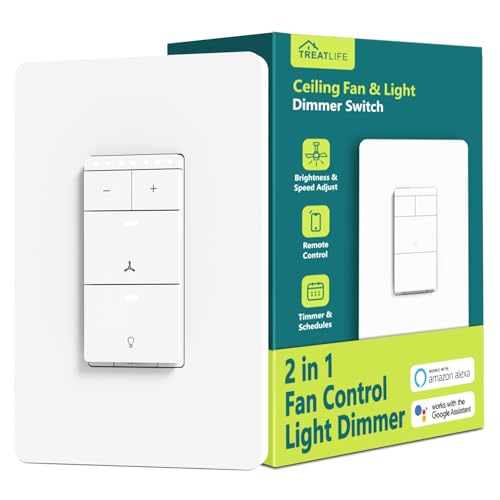
TREATLIFE Smart Ceiling Fan Control and Dimmer Switch

GHome WiFi Smart Plug
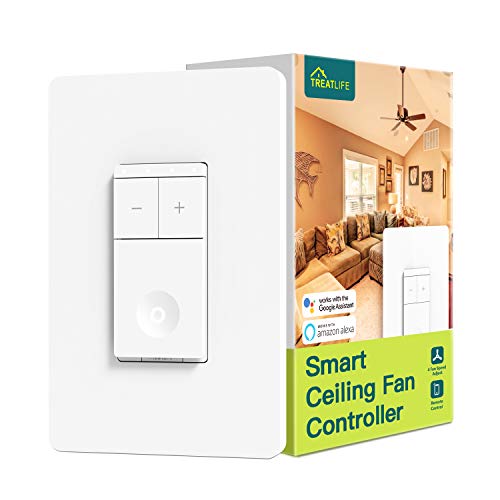
TREATLIFE Smart 4-Speed Fan Switch

TREATLIFE Smart Fan Control and Dimmer 2-Pack

GHome Smart Switches for Lights 4-Pack
GHome Smart Fingerprint Deadbolt for Front Door
Inside Each Recommended Option
If you want to keep your existing toggle or rocker wall plate and just add brains behind it, this SONOFF relay fits where bigger modules can’t. The housing is genuinely tiny, so it slides into cramped EU, 86-type, and shallow 120-type back boxes that would reject chunkier smart modules.
Because it speaks Zigbee 3.0 (a low-power wireless protocol common in smart-home hubs), you’ll need a compatible hub such as SmartThings to act as translator between the switch and your phone. That’s a small extra step, but it means rock-solid routines, low standby draw, and no dependence on your Wi-Fi router’s bandwidth. Most owners find pairing quick once the hub is set to inclusion mode.
Strong Points
- Ultra-compact relay fits shallow and crowded back boxes where other modules won’t seat properly.
- Zigbee 3.0 keeps response time snappy and lets you build large device networks without choking Wi-Fi.
- Works with your existing wall switches, so you keep the look and feel of the room.
- Compatible with external rocker or push-button switches, giving you wiring flexibility across older homes.
- Four-pack pricing makes whole-room retrofits more affordable per switch.
Things To Consider
- A neutral wire is required, so homes wired before the mid-1980s may need an electrician first.
- Requires a Zigbee hub, which is an extra purchase if you don’t already run SmartThings.
Who It Suits Best
Renters and homeowners who want hidden smart control without swapping every visible switch plate.
Look Elsewhere When
You’d rather avoid hub setup entirely, in which case the TREATLIFE Smart Switch 4-Pack is a simpler WiFi path.
TREATLIFE leans hard into the no-hub philosophy, which is the right call for anyone who wants SmartThings control without stacking extra boxes behind the TV. The switch connects directly to your 2.4 GHz Wi-Fi network (the older, longer-range band that most smart-home gear uses) and bridges into SmartThings from there.
The snap-on faceplate is screwless, so the finished look reads clean and modern without extra trim work. Schedule, timer, and voice routines all work through the SmartThings app once linked, which keeps your morning “leaving home” scene from depending on three different apps.
Useful Highlights
- No additional hub required, so setup stays short for renters and first-timers.
- Standard-size screwless wall plate included, saving a trip to the hardware store.
- Direct 2.4 GHz Wi-Fi connection keeps response times consistent across average home networks.
- Four-pack covers a typical living room or small apartment in one purchase.
Worth Noting
- Single-pole only, so 3-way hallways and staircases need a different solution.
- Neutral wire required at the switch box, which older homes may lack.
- On/off only with no dimming capability, so it can’t replace dimmer circuits.
Made For
Homeowners refreshing a room at a time who want SmartThings routines without buying a hub.
Consider Something Else When
You need dimming, in which case the TREATLIFE Smart Ceiling Fan Control and Dimmer Switch handles both jobs.
This 4-pack version of the TREATLIFE switch covers the most common whole-home switch count without forcing you to mix brands in the same wall. The 1-gang faceplate runs about 5.07 by 3.34 inches, which matches the standard US decora footprint, so existing trim rarely needs adjustment.
Up to 1250 W maximum load means most LED, CFL, and incandescent fixtures sit comfortably under the limit, though heavy-duty appliances belong elsewhere. With SmartThings onboard, group commands like “all living room lights” stay snappy once the switches are linked.
A Few Highlights
- Four-pack pricing spreads the cost across rooms, lowering the per-unit upgrade total.
- Standard screwless faceplate included, so each box installs cleanly with no extra trim.
- Direct Wi-Fi connection skips the hub requirement, which keeps the network map simple.
- SmartThings compatibility means voice and routine control work alongside your other devices.
Trade Offs
- Single-pole only, so 3-way circuits need a different switch.
- Neutral wire required, ruling out the oldest switch boxes without rewiring.
Best Suited To
Budget-focused renovators doing a whole-home WiFi switch refresh in one weekend.
Not Your Match When
You want a single-room start, where the GHome Smart Switches for Lights 4-Pack is a slightly more guided fit.
SmartThings plays nicely with locks, and this GHome knob is a useful way to extend that control to a bedroom, office, or interior rental door. Four unlock methods, including fingerprint, custom code, app within Bluetooth range, and a traditional key backup, cover the realistic ways a household actually enters.
Up to 20 fingerprints and 20 codes mean a busy household or rotating guest list won’t run out of slots. Auto-lock behavior reduces the “did I forget to lock the door” anxiety that plagues shared homes.
Useful Strengths
- Four unlock paths cover daily routines, guests, and key emergencies without panic.
- 20 fingerprint and 20 code slots handle large families or short-term rental turnover.
- Auto-lock feature helps households where doors get left ajar in morning rush.
- Mechanical key override preserves access during battery or Bluetooth outages.
Points To Note
- App control only works within Bluetooth range, so remote unlock requires a separate bridge or hub.
- Battery-powered locks need periodic battery swaps, typically a few times per year depending on use.
Who Will Love This
Renters, homeowners, and small-office managers who want keyless entry without rewiring a deadbolt.
A Better Fit Elsewhere
You want a full front-door deadbolt, where the GHome Smart Fingerprint Deadbolt for Front Door is the sturdier step up.
Bedrooms with ceiling fans usually need two separate controls: fan speed and light intensity. TREATLIFE combines both into a single gang, which saves wall space and keeps the SmartThings routine logic tidy, since one device triggers the whole fixture.
Wiring does require separate load wires for the fan and light, so this only drops into boxes where those runs already exist. Older homes with shared wiring need an electrician first.
Practical Pluses
- One gang replaces a fan switch and dimmer, freeing up wall space in tight bedrooms.
- Works with SmartThings for bedtime routines that dim lights and slow the fan in one tap.
- Wi-Fi connection means no extra hub is required for app or voice control.
Possible Compromises
- Requires separate fan and light load wires, ruling out some older ceiling boxes.
- Neutral wire required, which pre-1978 homes may not have at the switch location.
Right Fit For
Bedroom owners running SmartThings bedtime scenes that pull lights and fans into a single command.
Reach For A Different Pick When
You only need fan speed control with no dimmer, in which case the TREATLIFE Smart 4-Speed Fan Switch is the leaner option.
Not every smart control needs to live in the wall. Plug-in smart outlets handle lamps, fans, coffee makers, and holiday lights without touching a single wire. The GHome plug leans on improved Wi-Fi tech for stable pairing and quick reconnects after a router reboot.
Voice control through Alexa and Google Assistant comes standard, and once linked into SmartThings you can fold the outlet into any scene. Most renters love this pick because there’s nothing permanent to undo at move-out.
Features That Help
- Zero-installation setup means lamps and small appliances become smart in seconds.
- 2.4 GHz Wi-Fi compatibility keeps it inside most home networks without extra hardware.
- Voice assistant support across Alexa and Google broadens routine options.
Less Ideal Details
- Plugs occupy an outlet slot, which can crowd power strips or behind-furniture sockets.
- Larger wall-wart power supplies may block the second outlet on a standard duplex.
Perfect Match For
Apartments and dorms where wall rewiring is off the table but smart control is still wanted.
Swap It Out When
You want whole-room lighting control from the wall, where the TREATLIFE Smart Switch 4-Pack fits better.
Some rooms only need fan control without touching the lights. This fan-only switch delivers four discrete speeds through the wall, app, or voice, which gives you finer airflow control than most fan remotes manage.
The faceplate measures 4.72 by 2.99 inches and fits a standard 1-gang box, so it slots into existing switch locations without drywall surgery. Once linked to SmartThings, a “goodnight” routine can slow the bedroom fan to its lowest speed right alongside the lights.
Good Reasons To Consider
- Four discrete speeds give finer airflow control than typical low/medium/high fan remotes.
- Standard 1-gang form factor drops into existing switch boxes without trim rework.
- Schedule and timer features automate nightly slow-downs for sleeping comfort.
- No hub required, which keeps the network map simple for first-time smart home users.
Where It May Fall Short
- Single-pole only, so 3-way fan circuits need a different solution.
- Ceiling fans only, so it cannot control lighting loads.
Who Should Grab It
Homeowners who already have a separate light switch and want only the fan to go smart.
Where Another Pick Suits Better
You want both fan and light in one gang, where the TREATLIFE Smart Ceiling Fan Control and Dimmer Switch does both.
This two-pack version of the fan-and-light combo switch handles a typical upstairs-plus-main-floor setup without forcing you to buy a four-pack you don’t need. Switch dimensions run about 4.14 by 1.73 by 1.34 inches, which fits standard US single-gang boxes.
Independent fan and light control means each room can run its own bedtime routine through SmartThings. Most owners appreciate the consistent app experience across both switches, since it keeps routine logic simple.
Benefits That Matter
- Two-pack quantity fits common two-bedroom layouts without leftover inventory.
- Independent fan and light loads let each room run its own schedule.
- Wi-Fi connection means no hub required, simplifying the home network.
Details To Watch
- Requires neutral, line, ground, fan load, and light load wires, so older boxes may need a rewire.
- Single-pole only, ruling out 3-way hallway or staircase ceiling fans.
Built With In Mind
Two-room households that want matching fan/light combos in both bedrooms with shared SmartThings routines.
Skip It When
You only need a single-room install, in which case the single-pack TREATLIFE Fan Control and Dimmer Switch is the lighter buy.
First-time smart switch installers often stall at the wiring stage. The GHome app walks you through each wire and confirms connections before power is restored, which removes the part of the install that scares most homeowners.
Single-pole Wi-Fi operation covers the bulk of US switch boxes, with 2.4 GHz connectivity that aligns with most home routers. Voice control through Alexa and Google, plus SmartThings linking, gives beginners a layered experience they can grow into.
Everyday Perks
- Step-by-step app guidance reduces wiring anxiety for DIY first-timers.
- Four-pack covers a starter set without leaving an extra switch unused.
- Voice assistant compatibility opens hands-free routines immediately.
A Few Limitations
- Single-pole only, so hallway 3-way circuits remain off the table.
- Neutral wire required at the switch box for proper operation.
The Right Fit
First-time smart-home adopters who want guided setup and a multi-room starter kit in one buy.
Where A Sibling Pick Shines
You need Zigbee range and tiny relay size, where the SONOFF Zigbee 3.0 Mini Relay is the more flexible retrofit.
A front-door deadbolt is the highest-stakes lock in most homes, and this GHome model leans on AI self-learning fingerprint recognition that gets more accurate the more you and your family use it. Fingerprint, passcode, app, and physical key unlock paths cover most real-life entry scenarios.
Auto-lock behavior is the kind of feature that pays for itself the first time you walk out the door already distracted. SmartThings linking puts the lock alongside your other routines, so “leaving home” can arm the lock and the lights together.
What Pays Off
- AI self-learning fingerprint recognition refines accuracy with repeated household use.
- Four unlock paths (fingerprint, passcode, app, physical key) cover daily and emergency use.
- Auto-lock feature closes the door behind busy or distracted household members.
- SmartThings compatibility ties the front door into whole-home security routines.
Honest Caveats
- Battery-powered smart locks need battery swaps, usually a few times per year.
- App-only remote unlock may require an additional bridge or hub for off-site access.
Whose Shelf It Belongs On
Homeowners and short-term rental hosts who want a fingerprint-first front-door experience tied into SmartThings.
Where Another Pick Suits Better
You only need an interior or bedroom door, where the GHome Smart Fingerprint Door Knob is the simpler install.
What To Weigh Before Choosing Smart Switches For Smartthings
Wiring First, Features Second
Open one switch box before you buy. The presence or absence of a neutral wire (the always-on return wire that most modern smart switches need for power) decides which products on this list even fit your home. Pre-1978 homes often lack neutral wiring at the switch, which rules out most Wi-Fi and Zigbee wall switches without an electrician. Three-way circuits (where two switches control one light, like at both ends of a hallway) further narrow the field, since many picks here are single-pole only.
Connectivity Choice: Zigbee, Wi-Fi, or Z-Wave
Zigbee 3.0 switches like the SONOFF relay need a hub, but they use very little power and play nicely across large device counts. Wi-Fi switches skip the hub but lean on your router, so homes with crowded networks may notice slower response during peak use. Z-Wave is another hub-based protocol that some SmartThings owners prefer for its mesh reliability, though it’s not represented in this roundup.
Match the Switch to the Load
A bedroom ceiling fan needs fan-rated control, not a dimmer that wasn’t designed for motor loads. A standard light circuit just needs an on/off switch or dimmer. Combining incompatible loads with the wrong switch is the fastest way to burn out a relay or trip a breaker, so always match the switch to what’s actually in the ceiling box.
Routine Logic and Voice
Think about which voice assistant and routines you actually use. SmartThings bridges most of them, but native compatibility shortens setup time and improves responsiveness. If your household relies on Alexa or Google for lights, prioritize switches that are widely supported so commands don’t lag through extra translation layers.
Key Considerations Across These Picks
Where Shoppers Go Wrong
The most common mistake is buying a switch before checking the box wiring. Confirm whether you have a neutral wire, what kind of load (lighting, fan, mixed) is on the circuit, and whether the box is single-pole or part of a 3-way setup. Skipping those three checks sends people back to the return counter within a week.
When Paying More Pays Off
Higher-tier switches in this category usually add features like dimming, fan speed control, or hub-free Wi-Fi operation. For most households, that upgrade is worth it when the switch controls a fixture you’ll use every day, like a kitchen or bedroom. For guest rooms or low-traffic closets, the entry-level picks deliver plenty of value without overspending.
Frequently Asked Questions
Do all smart switches work with SmartThings?
Most modern smart switches advertise SmartThings compatibility, but support levels vary. Wi-Fi switches often link directly through SmartThings’ device list, while Zigbee and Z-Wave switches pair through the hub’s built-in radios. Always confirm the specific model is listed in SmartThings’ supported devices before buying.
What is a neutral wire, and why does it matter?
A neutral wire is the return path that completes the circuit and stays energized even when the switch is off. Smart switches need constant low-voltage power to run their radios and processors, so most require a neutral. Homes built before the mid-1980s may not have one in the switch box, which means either rewiring or choosing a no-neutral option.
Can I install smart switches without an electrician?
Many homeowners do, especially when the box already has clean line, load, ground, and neutral conductors. App-guided installs like the GHome switches reduce risk for first-timers. If the box lacks a neutral, has aluminum wiring, or controls a 3-way circuit, hiring an electrician is the safer call.
Do smart switches slow down my Wi-Fi?
Wi-Fi switches use brief, lightweight traffic and rarely strain a modern router. The bigger concern is overcrowding your 2.4 GHz band with dozens of devices. If you already run a busy Wi-Fi network, Zigbee switches like the SONOFF relay relieve pressure by using a separate low-power mesh.
Will smart switches work during a power outage?
Most lose all functionality until power returns, since they depend on the home’s electrical system. Battery-powered locks, like the GHome deadbolt, still operate from their own cells and keep access working. For routine reliability, pair smart switches with a UPS (uninterruptible power supply) on your Wi-Fi router so brief outages don’t break connectivity.
Closing Remarks
The right pick depends less on brand and more on what’s already in your walls. Match the wiring first, pick the connectivity protocol that fits your network, and only then narrow down by feature. From there, this list should make the shortlist easier to settle.