Wall switches have quietly become one of the most useful upgrades in a Google-powered home. Voice commands, sunrise routines, and motion-aware automations all depend on a switch that actually responds. The trouble is that the category splits between hub-dependent systems, no-hub Wi-Fi alternatives, and multi-gang panels. The list below sorts through nine solid choices, weighing what each one asks of your wiring, your router, and your patience.
The Main Contenders
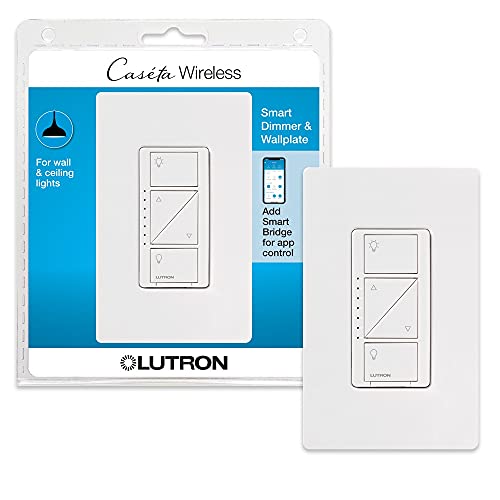
Lutron Caseta Smart Dimmer Switch with Wallplate

Lutron Caseta 3-Way Smart Dimmer Kit

Lutron Caseta Smart Light Switch for Fans
GHome Smart 3-Way Wi-Fi Switch (2-Pack)

GHome Smart 3-Way Wi-Fi Switch (4-Pack)

GHome Smart Single-Pole Switch (4-Pack)
HQL 3-Gang Smart Wi-Fi Switch

HQL 1-Gang Smart Wi-Fi Switch

HQL 4-Gang Smart Wi-Fi Switch
Taking A Closer Look At The Options
The Lutron Caseta dimmer has earned its reputation as a steady, dependable choice for anyone serious about lighting control. Unlike the no-hub alternatives later in this list, this one speaks Lutron’s own Clear Connect RF protocol, which is a low-frequency radio signal that tends to stay responsive even when Wi-Fi is congested. You will need the Caseta Smart Bridge hub to connect it to Google Home, and the dimmer supports incandescent and halogen loads up to 600 watts.
For everyday living rooms or dining areas where you actually care about smooth dimming, this switch delivers the kind of fade behavior that cheaper Wi-Fi switches often miss. Owners commonly report a satisfying tactile button feel and reliable scheduling through the Lutron app. The included wallplate is a small but welcome touch, sparing you a trip to the hardware store.
Points In Its Favor
- Compatible with Google Assistant for hands-free dimming commands
- Reliable Clear Connect RF avoids typical Wi-Fi dropouts
- Includes a coordinating wallplate so the install looks finished
- Supports up to 600 watts of incandescent or halogen lighting
Things To Consider
- Requires the Caseta Smart Bridge hub, which adds to the cost
- Not designed for ceiling fans; a separate switch exists for that
Key Specs
Right Fit For
Households already invested in Google Home who want dependable dimming without juggling cloud delays.
Look Elsewhere When
The Lutron Caseta 3-Way Smart Dimmer Kit makes more sense for hallways or stairways where two switches control the same light.
The 3-Way kit solves the exact headache the standalone Caseta dimmer cannot: controlling one light from two locations. A “3-way circuit” is the wiring setup where two switches operate the same fixture, common at the top and bottom of stairs. This kit pairs the LED dimmer with a wireless Pico remote and a wall bracket, letting you mount a second control point without running new wire through the wall.
For long hallways or split-level homes, this combination removes the awkward “leave one switch in the middle” problem. The Pico remote acts like a switch but sticks anywhere with its bracket, giving you flexible placement after the fact. Assuming a neutral wire is present at the primary switch box, installation is straightforward enough for a confident DIYer.
A Strong Showing
- Adds a second wireless control point without rewiring
- Works inside Google Home routines once the bridge is connected
- Pico remote offers tactile buttons many touch panels lack
Worth Noting
- Still depends on the Caseta Smart Bridge for Google integration
- The Pico remote requires occasional battery swaps every few years
Whose Lights It Solves
Owners of multi-level homes who need dependable dimming at both ends of a staircase or hallway.
Swap It Out When
The Lutron Caseta Smart Dimmer Switch with Wallplate is a better fit for single-location rooms where you do not need a second control point.
This switch stretches the Caseta line into ceiling fan territory, a corner of the smart-home world where many Wi-Fi dimmers simply will not play. The unit handles both lighting and fan control from one wall position, letting Google Home routines toggle either load independently. It still needs the Caseta Smart Bridge to talk to your speaker or display.
Bedrooms with overhead fans benefit most, since voice commands like “Hey Google, turn the fan on low” are much friendlier than fumbling for a pull chain at night. Multi-location control becomes possible by pairing Pico remotes, which are sold separately. Owners commonly report that the four-speed fan handling matches what pull-chain switches offer, without the clicking noise.
Everyday Wins
- Controls lighting and ceiling fans from a single gang
- Integrates with Google Assistant through the Caseta bridge
- Supports Pico remotes for additional wireless control points
- Designed specifically for inductive motor loads like fans
Trade Offs
- Smart Bridge hub is a required add-on for the full experience
- Pico remotes and extra wall brackets add up if you need several
Perfect Match For
Bedrooms and living rooms with ceiling fans that benefit from voice or app-based speed and light control.
Reach For A Different Pick When
The GHome Smart Single-Pole Switch 4-Pack is a better match for renters who want no-hub fan-free lighting control at a lower entry cost.
The GHome 2-Pack hits the sweet spot for shoppers who want 3-way control without committing to a hub or a premium brand. Each switch runs on a neutral wire (the white return path that many newer homes already have), connects directly to a 2.4GHz Wi-Fi network, and pairs with Google Assistant in a few taps. There is no dimming here; the switch is on/off only, rated for up to 15 amps and 1800 watts.
For a top-and-bottom-of-stairs setup in a home built after the mid-1980s, this pair gives you voice control and scheduling without dragging in a bridge. Owners commonly report that the schedule timer inside the companion app is reliable enough for predictable porch-light behavior. Just confirm the box has a neutral conductor before buying, because older homes may not.
What Pays Off
- Connects directly to Google Home over 2.4GHz Wi-Fi, no hub needed
- Two-pack covers a complete 3-way installation
- Handles up to 1800W on a standard 120V circuit
- Schedule timer supports daily routines without manual effort
Honest Caveats
- On/off only, no dimming capability on this unit
- Requires a neutral wire, which some older homes lack
- Not compatible with smart bulbs that need constant power
Made For
DIYers with a 3-way circuit in a modern home who want voice control without buying a hub.
A Better Fit Elsewhere
The Lutron Caseta 3-Way Smart Dimmer Kit suits shoppers who actually want dimming alongside 3-way control, at a higher cost.
Stepping up from the 2-pack, the GHome 4-Pack is built for households converting multiple rooms at once. Same neutral-wire requirement, same 2.4GHz Wi-Fi connection, same on/off behavior with no dimming. The benefit here is straightforward: buying four switches together typically costs less per unit than mixing singles and pairs.
Open-concept floor plans with several 3-way circuits benefit most, since you can wire the kitchen, hallway, and stair lights in one weekend project. Owners commonly report that the companion app keeps each switch clearly labeled, preventing the “which switch is which?” confusion that plagues bulk installs. One thing worth considering is whether your router can handle four simultaneous 2.4GHz connections without congestion.
Real-World Strengths
- Bulk four-pack lowers the per-switch cost
- Works with both Google Assistant and Alexa ecosystems
- 2.4GHz Wi-Fi keeps setup simple for renters
- Schedule timer handles multiple routines across rooms
Points To Keep In Mind
- No dimming, so it cannot replace dimmer switches you already own
- Each unit needs a neutral wire available in the wall box
Best Suited To
Homeowners outfitting several rooms at once who want a consistent look and one familiar app across switches.
Where A Sibling Pick Shines
The GHome Smart Single-Pole Switch 4-Pack makes more sense when most of your circuits are simple on/off rather than 3-way setups.
For first-time smart switch adopters, this single-pole 4-pack removes the most common friction point: the hub. Each switch needs only a neutral wire and a 2.4GHz Wi-Fi signal, and the GHome app walks through wiring with step-by-step diagrams. No electrician is required, assuming your wall boxes meet basic code.
Bedrooms, bathrooms, and closets with simple on/off fixtures are where this bundle shines. Voice routines through Google Home handle the rest, and the app lets you group switches for whole-room control. One practical ownership note: owners commonly recommend labeling each switch on the wall plate during install, because four identical-looking switches can blur together after the novelty wears off.
The Value In It
- No hub required, reducing the upfront ecosystem cost
- Four-pack handles a typical starter home’s worth of rooms
- Voice routines work through Google Assistant out of the box
- Step-by-step app guidance suits first-time installers
Small Caveats
- On/off only, no dimming capability in this model
- Each switch requires a neutral wire at the wall box
Who It Suits Best
First-time smart switch users with neutral-wire-equipped boxes who want a low-commitment entry into voice-controlled lighting.
Skip It When
The Lutron Caseta Smart Dimmer Switch with Wallplate is the better call for shoppers who want actual dimming and a more mature ecosystem.
The HQL 3-Gang panel consolidates three separate switches into one clean wall unit, which is a big visual upgrade in rooms with crowded switch banks. Each gang runs independently over 2.4GHz Wi-Fi, and the whole panel connects to Google Assistant through the Smart Life app ecosystem. A neutral wire is required at the wall box, as with most no-hub smart switches.
Compared to stacking three single-gang units side by side, this design eliminates the seams and screw lines that make traditional switch banks look cluttered. Owners commonly report that the backlight on/off toggle helps in bedrooms where a glowing panel might otherwise disturb sleep. A practical note: because each gang is its own device, the pairing process takes a few extra minutes during setup.
The Good Stuff
- Three switches in one panel reduces wall clutter
- Backlight can be turned off for bedroom installs
- Compatible with Google Assistant via Smart Life integration
- Each gang can be paired as an independent device
A Few Limitations
- Neutral wire required; older homes may need an electrician
- No dimming function; relays handle on/off loads only
Who Should Grab It
Homeowners redoing a room with three or more switches who want a single coordinated panel rather than three separate units.
Not Your Match When
The HQL 1-Gang Smart Wi-Fi Switch is a better fit for single-switch locations like closets or small bathrooms.
The 1-Gang HQL is the smallest unit in this lineup and the right answer for tight spaces where a multi-gang panel would be overkill. It runs on 2.4GHz Wi-Fi with no hub, requires a neutral wire, and pairs through the Smart Life app ecosystem for Google Assistant control. UL certification means it has passed standard electrical safety testing, a useful signal for installation confidence.
Closets, pantries, and small bathrooms are the natural homes for this switch, especially when paired with a Google routine triggered by door sensors. Owners commonly report that the relay remembers its last state across power cycles, so a brief outage does not leave every light in the wrong position. One thing worth considering is whether you need on/off only or actually want dimming; this unit does not dim.
What Helps Most
- UL certified for verified electrical safety standards
- Compact 1-gang form factor fits tight wall boxes
- No hub needed; connects directly to home Wi-Fi
- Last-state memory restores the prior setting after outages
Where It May Fall Short
- No dimming function; relay is on/off only
- Neutral wire requirement limits use in older wiring
Key Specs
Built With In Mind
Small rooms and utility spaces where a single on/off switch needs to join Google Home routines without a hub.
Consider Something Else When
The HQL 4-Gang Smart Wi-Fi Switch fits kitchens or living rooms with many fixtures controlled from one wall box.
The 4-Gang HQL is the largest panel in the lineup and the right call for kitchens, living rooms, or entryways with four switches clustered together. Each gang operates independently over 2.4GHz Wi-Fi and connects through the Smart Life app for Google Assistant voice control. The UL certification and last-state memory match the smaller siblings, keeping the installation experience consistent.
Compared to four separate switches, this consolidated panel gives a single, clean faceplate that fits better with modern interior design. Owners commonly report that pairing all four gangs takes a bit more patience during setup, but the routine creation afterward is straightforward. One practical ownership note: you may find the backlight useful in hallways but distracting in bedrooms, and the unit lets you toggle that behavior per gang.
Well-Handled Touches
- Four gangs in one panel simplifies crowded switch banks
- UL certification supports electrical safety confidence
- Last-state memory keeps settings through power interruptions
- Compatible with both Google Assistant and Alexa
Potential Compromises
- Neutral wire required; older homes may need rewiring
- Initial pairing of four devices takes more setup time
The Right Fit
Homeowners with a busy switch bank in a kitchen or open living area who want a single coordinated panel.
Another Choice May Suit
The HQL 1-Gang Smart Wi-Fi Switch is a better fit for a closet or small room that only needs one switch.
What To Weigh Before Picking Smart Light Switches For Google Home
Hub Or No Hub
Hub-dependent systems like Lutron Caseta lean on a dedicated bridge that translates between your switch and Google Home. The advantage is reliability, since the bridge uses a separate radio band rather than competing with phones and laptops on your Wi-Fi. The trade-off is the upfront cost of the bridge and one more device to keep plugged in.
No-hub Wi-Fi switches skip that hardware by talking directly to your router over a 2.4GHz signal. Setup is faster, but every switch shares bandwidth with your other wireless devices. For homes with crowded networks or many smart devices, that can translate into occasional sluggishness during heavy use.
Neutral Wire Reality
Almost every smart switch on the market needs a neutral wire, the white conductor that returns current to the panel and stays energized even when the switch is off. Homes built before the mid-1980s often lack neutral wiring at the switch box, which is a hard limitation for most of these picks.
Before buying, kill the breaker and pull the wall plate to peek inside. If you see a bundle of white wires capped together, you are likely fine. If not, plan on running new wire or hiring an electrician, which changes the project cost noticeably.
Dimming Versus On Or Off
A surprising number of units in this category are on/off only, especially in the budget no-hub segment. If you care about smooth dimming for movie nights or dinners, the Lutron Caseta dimmers are the most dependable choice in this list. If simple voice on/off control is the goal, the GHome and HQL units handle that task without complication.
What Matters Across These Switches
Wrong Turns To Avoid
The most common mistake is buying a no-hub Wi-Fi switch for a home that does not have a neutral wire at the switch box, which forces a return trip and a wiring project. Another slip is pairing a smart switch with a smart bulb, which can cause flicker or unreachable-power conflicts depending on the setup. Confirming both your wiring and your bulb type before ordering saves a weekend of frustration.
When Paying More Pays Off
Spending more on Lutron Caseta generally buys you a separate RF network, smoother dimming, and Pico remote expandability that budget Wi-Fi switches do not match. The premium pays off in homes with many smart devices, where Wi-Fi congestion slows down cloud-based switches. For smaller projects or single-room installs, a no-hub GHome or HQL unit gets you most of the everyday functionality without the higher entry cost.
Frequently Asked Questions
Do all smart switches work with Google Home?
Most modern smart switches list Google Assistant compatibility, but the underlying connection method varies. Hub-dependent systems need their bridge connected first, while no-hub switches link directly through Wi-Fi. Always check that the specific model mentions Google Assistant in its features.
What is a neutral wire and why does it matter?
A neutral wire is the return path for electrical current, usually a white conductor capped with other whites in your wall box. Smart switches need it because the radio inside stays powered even when the light is off. Without a neutral, most smart switches cannot function.
Can I install these myself without an electrician?
Many homeowners with basic electrical experience handle single-pole and 3-way smart switch installs themselves, especially in newer homes with neutral wiring. Older homes or unfamiliar wiring configurations may benefit from a licensed electrician for safety and code compliance.
Will a smart switch slow down my Wi-Fi?
Each no-hub smart switch uses a small amount of 2.4GHz bandwidth for routine communication. In most homes with under twenty devices, the impact is negligible. Households with heavy network traffic may notice minor congestion when many switches and other smart devices compete for the same band.
What happens to my switch during a power outage?
Most smart switches return to the off state after power is restored, protecting connected bulbs from unexpected surges. Some models, like the HQL units, offer last-state memory that restores the prior setting. Both behaviors are designed around safety rather than convenience.
Bottom Line
The right pick depends on how much wiring work you want, whether dimming matters, and how many switches you need at once. Lutron Caseta remains the dependable premium path for whole-home installs, while GHome and HQL cover the no-hub majority at a friendlier cost. Pick the switch that matches your wall boxes and your daily habits, and the rest of the Google Home integration tends to fall into place.