Building a smart home used to mean juggling five apps and praying they played nicely together. Today’s HomeKit-compatible gear actually cooperates, and that’s a quiet game-changer for renters, families, and anyone tired of yelling at light switches. This roundup collects ten thoughtful picks across blinds, climate, plugs, security, and front-door access, each one picked because it solves a real household problem rather than padding a spec sheet.
The Choices Worth Comparing

Kincmo Motorized Blinds Custom Zebra Shades

Kincmo Motorized Blinds Light Filtering

Aqara Smart Thermostat W200 Adaptive

Kincmo Motorized Outdoor Shades Patio
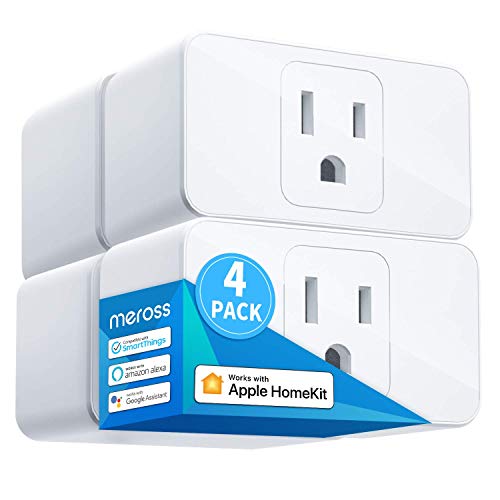
meross Smart Plug 15A HomeKit 4 Pack

meross Matter Smart Plug Mini Compact

SmartWings Motorized Light Filtering Shades

meross Matter Smart Plug Energy Monitor

Aqara Smart Doorbell Camera G410

Aqara UWB Smart Lock U400 Black
A Closer Look At Each Pick
Zebra shades solve a problem most plain roller blinds ignore: you rarely want all the way open or all the way closed. Kincmo layers alternating fabric slats and sheer stripes so you can dial the room somewhere in between, which works beautifully in a home office where screen glare is the daily enemy.
Smart-home integration is the real draw here. The motor runs quietly, and once a HomeKit, Alexa, or Google Home hub is in place, you get voice commands, percentage-based positioning, and scene control through the app. For a living room facing east, that morning sun finally has a schedule.
Positive Points
- Dual-layer slat design lets you choose between full privacy and a 50% open weave for soft daylight.
- Near-silent motor is easy to live with in bedrooms and nurseries.
- Scene and percentage control from the app means you can match lighting to movie night or WFH calls.
- Works across HomeKit, Alexa, and Google, so you’re not locked into one ecosystem.
Worth Noting
- Custom sizing adds lead time, so this isn’t the blind to order the day before guests arrive.
- Zebra fabric collects dust along the slats and benefits from a periodic vacuum-brush pass.
Who It Suits Best
Renters and homeowners who want a single window treatment that handles both glare control and privacy without an extra sheer layer.
Skip It When
You need a true blackout for a shift-sleeper’s bedroom; the meross-driven Aqara Smart Thermostat W200 leans more toward climate, but for window darkness the dedicated indoor option here reads better than outdoor-grade fabric.
Where the zebra shade above is about layered drama, this Kincmo light-filtering model is about gentle moderation. The fabric cuts glare without dropping the room into cave mode, which makes it a natural fit for dining spaces where you still want sunset color on the walls.
Compared to the zebra variant, you give up the dual-layer dial and gain a simpler maintenance story. The same quiet motor, the same HomeKit-friendly app control, and the same trio of voice assistants make this an easy swap when full blackout isn’t the priority.
Everyday Perks
- Moderate shading keeps rooms bright while softening direct sun on tabletops and screens.
- App-based percentage control pairs well with morning routines in the kitchen or dining room.
- Quieter operation than older chain-driven blinds, helpful in open-plan homes.
- Simpler fabric means quicker wipe-downs during routine cleaning.
Honest Caveats
- Light filtering won’t satisfy anyone who needs true blackout for daytime sleep.
- Custom orders still require careful window measurements before purchase.
Made For
Anyone renovating a dining room, sunroom, or casual living space where balanced daylight matters more than total darkness.
Consider Something Else When
You want a window treatment that doubles as patio weather protection; the Kincmo Motorized Outdoor Shades handle that brief far better.
Schedules are the part of smart thermostats most households abandon within a month. Aqara sidesteps that with Adaptive Temperature, a HomeKit feature that learns your comings and goings from your iPhone and eases the house into the right mode without manual programming.
For an Apple-centric household, this is the climate pick that quietly pulls its weight. The thermostat reads activity states like home, sleep, away, and extended away, then nudges the temperature accordingly. Setup needs a HomePod or Apple TV as a hub, which most Apple households already own.
Everyday Wins
- Adaptive Temperature removes the need to manually build weekly schedules.
- Works inside the Apple Home app, so Siri voice commands and automations come along automatically.
- Energy savings show up naturally during workday hours when the house is empty.
- Compatibility with other Aqara sensors makes whole-home climate zoning more accessible over time.
Points To Keep In Mind
- Adaptive features depend on having an Apple home hub on the network at all times.
- Wiring compatibility with your existing HVAC system should be checked before purchase.
Feature Snapshot
Best Suited To
Deep Apple households who want climate that responds to routines instead of rigid schedules.
Look Elsewhere When
You’re building around Alexa or Google Assistant; the meross Smart Plug 15A offers a broader voice-assistant footprint for general home control.
Indoor blinds can’t handle a covered patio. Sun, wind, and the occasional rainstorm will shred fabric that was designed for a climate-controlled bedroom. Kincmo’s outdoor model treats those conditions as the baseline, with a textile engineered to filter light while holding up to weather.
The openness percentages (0%, 1%, 3%, 5%) let you tune how much breeze and view you keep, which is the kind of detail pergola owners actually argue about. Same quiet motor and same HomeKit-friendly control story as the indoor siblings, just dressed for the patio.
Good Reasons To Consider
- Weather-rated fabric resists wind, water, and UV exposure through the long summer months.
- Five openness options let you prioritize breeze, view, or shade depending on the season.
- Voice and percentage control extend your existing HomeKit setup to outdoor living spaces.
- Fire-rated fabric is a quiet plus for covered structures near grills or fire pits.
Trade Offs
- Outdoor installation is more involved than indoor mounting and may need a second pair of hands.
- Fabric still needs seasonal cleaning to keep pollen and dust from settling in.
Right Fit For
Homeowners with a porch, pergola, or covered patio who want shade that responds to a voice command.
A Better Fit Elsewhere
You mostly need indoor glare control; the Kincmo Motorized Blinds Light Filtering handle that job for less money.
Smart plugs are the unsung heroes of any HomeKit build. They turn the lamp your grandmother gave you into something Siri can switch off, and a four-pack means you can scatter them across rooms without running back to the store.
This meross pack is built around a 15-amp rating, which is the right ceiling for most lamps, fans, and small appliances. Voice control spans Apple HomeKit, Siri, CarPlay, Alexa, and Google Assistant, so the same plug survives an ecosystem swap without becoming e-waste.
A Strong Showing
- Four-pack pricing spreads across the whole home for less than buying singles.
- 15-amp rating covers space heaters, fans, and most household lamps safely.
- Multi-ecosystem support protects your investment if you change voice assistants later.
- Remote control through HomeKit requires a HomePod, Apple TV, or always-on iPad.
Room For Improvement
- Bulky body may block the second outlet on a standard wall plate.
- HomeKit remote control drops offline if your chosen Apple hub is powered down.
Quick Facts
Who Will Love This
Anyone just starting a smart home who wants room-by-room control without buying four separate single packs.
Another Choice May Suit
Your outlets sit behind furniture and need a slimmer profile; the meross Matter Smart Plug Mini was built for tight spaces.
Smart plugs don’t get credit for fitting where they’re supposed to, until you try one behind a couch and it blocks both outlets. The Mini fixes that by going noticeably smaller, which sounds trivial until you’re rearranging the living room at 10 p.m.
Matter support is the bigger story. Matter is a newer cross-platform standard that lets the same plug talk to Apple Home, Alexa, Google Home, and SmartThings without separate apps. If you live in a mixed-vendor household, this little plug quietly ends a lot of arguments.
Practical Advantages
- Compact body keeps the second outlet free on most wall plates and power strips.
- Matter compatibility future-proofs the plug against ecosystem churn.
- Local network control reduces dependence on cloud services for basic on/off commands.
- Setup is straightforward through any Matter-certified controller.
Points To Note
- No energy-monitoring features, so curious users will want the energy-tracking meross plug instead.
- Matter setup needs a compatible hub or controller you already own.
Perfect Match For
Apartment dwellers or anyone running mixed smart-home platforms who needs reliable control in tight quarters.
Reach For A Different Pick When
You want to monitor how much power a device is drawing; the meross Matter Smart Plug with Energy Monitoring covers that need.
Standard-sized blinds don’t fit every window. SmartWings leans into custom sizing, which is the right call for older homes with non-standard frames or oversized picture windows that need serious coverage.
The 70% blackout rating is a useful middle ground between full light filtering and sleep-grade blackout. A rechargeable battery motor is a real quality-of-life upgrade, because no one wants to fish a USB cable up to a window every few months.
Where It Delivers
- Custom sizing tackles arched, oversized, or unusually shaped windows that off-the-shelf shades skip.
- Rechargeable battery cuts down on maintenance trips up the ladder.
- Matter, HomeKit, Alexa, and Thread/Zigbee support gives flexibility across ecosystems.
- 70% blackout suits shift workers and media rooms without going pitch black.
Soft Spots
- Some motor versions require a separate smart hub, which adds to the total cost.
- Custom orders carry longer lead times than ready-made blinds.
Who Should Grab It
Owners of older homes or uniquely shaped windows where standard sizing just won’t cooperate.
Swap It Out When
You need simple off-the-shelf blinds for a rental; the Kincmo zebra or light-filtering shades are friendlier for standard windows.
Most smart plugs tell you whether a device is on. A smaller group tell you how much power that device is actually pulling. This meross plug is in the second group, which is exactly the kind of insight that helps kill phantom loads from older TVs and game consoles.
Like the Mini, it speaks Matter, so the same plug works across Apple Home, Alexa, Google Home, and SmartThings. That dual purpose, energy tracking plus cross-platform control, makes it the more thoughtful pick for anyone serious about trimming their power bill.
Practical Pluses
- Real-time energy monitoring exposes standby draw on TVs, game consoles, and computer setups.
- Matter compatibility keeps the plug useful across any major smart-home ecosystem.
- FFS (frustration-free setup) simplifies pairing through compatible Echo devices.
- Compact enough to keep most second outlets accessible.
A Few Limitations
- Energy history depth depends on which Matter controller app you’re using.
- Energy tracking works best for appliances with a noticeable standby draw.
Feature Card
Built With In Mind
Energy-conscious households who want both smarter control and a clearer picture of where their electricity actually goes.
Not Your Match When
You just need the cheapest plug in a four-pack; the meross Smart Plug 15A 4 Pack handles pure coverage at a friendlier per-unit cost.
Front-door cameras have a privacy problem that’s rarely discussed. The footage of your family walking in and out ends up on someone else’s server. HomeKit Secure Video (HSV) encrypts those clips end to end and stores them in your personal iCloud account, which is the kind of quiet upgrade that matters more than 4K resolution.
The G410 also ships with a built-in Aqara Zigbee and Matter hub, so it doubles as the brain for other Aqara sensors around the house. For Apple households already running HomeKit, that’s a tidy two-for-one at the front door.
Points In Its Favor
- HomeKit Secure Video keeps recordings encrypted in your own iCloud storage.
- Built-in Zigbee and Matter hub reduces the need for extra bridges around the house.
- Works alongside Alexa, Google Assistant, and SmartThings for mixed households.
- Chime included, so you don’t need to hunt for a compatible speaker on day one.
Some Limits To Know
- HomeKit Secure Video requires a paid iCloud storage plan for full history.
- Doorbell wiring should be checked for compatibility with low-voltage chime systems.
Whose Shelf It Belongs On
Apple households that want doorbell footage stored privately without giving up smart-home integration.
Where A Sibling Pick Shines
You care more about locking down the door itself; the Aqara UWB Smart Lock U400 is the access-control sibling in this roundup.
Walking up to a door with arms full of groceries and watching it unlock as you approach is the kind of moment smart locks were made for. The U400 uses ultra-wideband (UWB) radio to detect your approach, direction, and intent, so the deadbolt knows you actually meant to come inside.
Apple Home Key support means your iPhone or Apple Watch becomes the key, with fingerprint backup for the moments when you don’t have either. It’s the most forward-leaning lock in this roundup and the one most likely to make you wonder how you carried a key for 20 years.
The Helpful Details
- UWB detection unlocks the door as you approach without lifting your phone.
- Apple Home Key turns iPhone and Apple Watch into the primary key.
- Fingerprint deadbolt is a strong backup for kids or anyone without an Apple device.
- Works with existing HomeKit automations for lights, locks, and entry scenes.
Things To Weigh Up
- UWB unlock experience depends on newer iPhones with the UWB chip.
- Smart locks need occasional battery swaps or recharges, so plan a reminder.
Technical Highlights
The Right Fit
Busy households juggling groceries, kids, and gear who want the door to handle itself.
Where Another Pick Suits Better
Your front door needs visual coverage more than smarter access; the Aqara Smart Doorbell Camera G410 covers that front-door security niche.
Picking HomeKit Gear That Actually Fits Your Home
Compatibility comes first. HomeKit, Matter, Thread, and Zigbee each have quirks, and a hub-free device often turns into a frustration-heavy one once you try to automate it. Confirm whether your home already runs a HomePod, Apple TV, or compatible Thread border router before adding anything that depends on one.
Use case matters more than spec count. A homeowner with a covered patio cares about weather-rated fabric, not motor decibels. A renter with three lamps cares about plug size, not energy monitoring. Decide what problem you’re solving first, then match the category.
Power and wiring deserve a quick audit. Smart thermostats and locks depend on compatible wiring, while smart plugs need a 15-amp ceiling for heaters and heavier appliances. Measure twice, check voltage once.
Privacy and ecosystem lock-in are worth weighing. HomeKit Secure Video keeps footage in your iCloud, while cloud-first cameras trade that privacy for easier remote viewing. The right call depends on how much you trust your chosen provider.
Common Shopping Slip Ups and Smart Upgrades
Mistakes Worth Dodging
Buying a smart-home device before confirming the hub situation is the classic first-timer trap. A Matter plug on a network with no Matter controller behaves like a plain outlet. Audit your existing hubs and voice assistants first.
Ignoring size and clearance is the second most common slip. A “compact” smart plug can still block the second outlet, and a sleek smart lock can clash with a non-standard door. Measure the real-world footprint, not just the spec sheet.
Where The Extra Money Goes
Higher-tier picks in this category typically buy better motors, longer battery life, broader ecosystem support, and stronger materials. For blinds, that means quieter motors and weather-rated fabric. For locks, it means UWB presence detection and Home Key. For plugs, it means energy monitoring and Matter.
The honest read is that a starter four-pack of meross plugs covers most lamp-and-fan control needs. The upgrade pays off when you want finer insight into energy use, smoother HomeKit integration, or hands-free entry at the door. Pick the tier that matches the routine you actually live.