Upgrading the switches on your walls is one of the most practical entry points into a connected home. You still get a familiar toggle, but now your lights answer to routines, voice assistants, and a single app. The catch is that “SmartThings compatible” covers everything from full wall switches down to tiny relay modules that hide behind your existing plate. Picking the right one depends on whether your boxes have a neutral wire, whether you already run a Zigbee hub, and whether dimming matters.
This roundup walks through ten switches and modules that play nicely with SmartThings, each with a clear profile for the type of home it suits. You’ll find direct wall switches, behind-the-scenes relays for tricky installations, and dedicated dimmers for rooms where mood matters.
A Closer Look At The Lineup
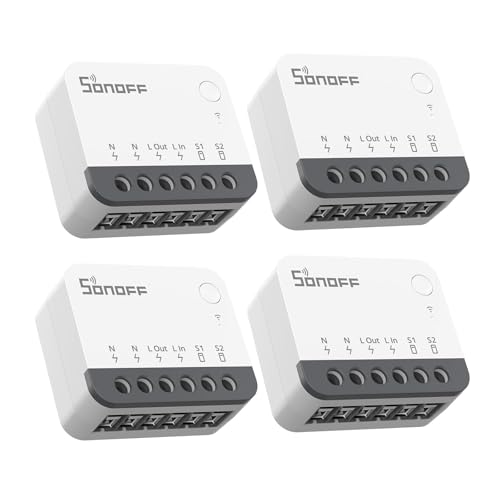
SONOFF ZBMINIR2 Smart Relay Switch 4-Pack

SONOFF ZBMINIR2 ZigBee Mini Smart Switch 2-Pack
GHome Smart Dimmer Light Switch SW2 (Single Pack)

TREATLIFE Smart Light Switch 4-Pack with Timer

TREATLIFE Smart Switch 4-Pack WiFi
TREATLIFE Smart Light Switch (Single Pack)

meross Smart Light Switch 2-Pack for Apple HomeKit

meross Smart Light Switch for HomeKit (Single)

GHome Smart Dimmer Light Switch SW2 (3-Pack)
GHome Smart Switch for Lights SW5 (Single Pack)
What Each Pick Brings To The Table
This relay module hides behind your existing rocker or push-button switch rather than replacing the faceplate. For older homes where the wall plate already matches the décor, that’s a real plus, since you keep the look you like and add intelligence behind it. SONOFF builds the unit around the Zigbee 3.0 protocol (a low-power mesh wireless standard that pairs well with SmartThings hubs), and it fits inside tight EU-style, 86-type, or 120-type boxes.
The four-pack format suits someone outfitting a hallway, bathroom, and bedroom set in one afternoon. In a typical retrofit, owners wire the relay to the existing switch and the SmartThings hub handles the rest. If your boxes lack a neutral wire, this module can still work in some wiring configurations, though verifying your specific setup before purchase matters.
Why It Works Well
- Tiny footprint fits shallow boxes where a full smart switch won’t.
- Keeps your current wall plate and switch style intact.
- Zigbee 3.0 gives broad SmartThings compatibility.
- Four-pack covers a small project at a lower per-unit cost.
Worth Noting
- Requires a Zigbee hub and a neutral wire in most US boxes.
- Setup involves working inside the gang box, which may feel intimidating for first-time installers.
- 10A single-channel limit means high-wattage fixtures need separate consideration.
Key Specs
Made For
Homeowners with a Zigbee hub who want to keep their existing switch plates and add automation behind the scenes.
Look Elsewhere When
You’d rather avoid touching the gang box; the GHome Smart Dimmer Light Switch SW2 offers a direct wall swap with no relay wiring.
The 2-pack sibling to the previous relay scales down for smaller jobs, like automating two specific fixtures without committing to a four-unit purchase. It uses the same Zigbee 3.0 foundation, which means any SmartThings hub you already run sees it as a familiar device type. Builders and renovators sometimes add these two at a time as rooms come online.
The compact shell drops into standard mounting boxes, and the unit is rated as a 10A single-channel relay (a switch that handles one circuit up to 10 amps). For a single ceiling fixture or a sconce, that’s plenty. If your Zigbee network already hosts other SONOFF accessories, this module joins without extra setup steps.
Notable Upsides
- Lower commitment than a four-pack for two-room projects.
- Zigbee 3.0 pairs cleanly with SmartThings, Alexa, and Google Home.
- Compact profile suits crowded gang boxes with extra wires.
- Supports up to 64 Zigbee sub-devices on a well-meshed hub.
Points To Note
- No dimming support, since this is a relay rather than a dimmer.
- Hub not included, so you’ll need an existing gateway to pair with.
- Wiring still requires basic electrical comfort to install safely.
Right Fit For
Smart-home builders adding Zigbee control to two fixtures without overstocking on modules.
Skip It When
You want direct wall control with a visible smart faceplate; the meross Smart Light Switch for HomeKit gives you that without rewiring inside a relay.
Dimming is the headline feature here, and the SW2 leans into it with a touch-screen surface that slides through 1% to 100% brightness. The underlying touch IC chip (a small integrated circuit that detects finger movement on the panel) gives you fine-grained control rather than the jumpy steps you sometimes see on cheaper dimmers. For living rooms where you watch movies and read books at different brightness levels, that smooth ramp is genuinely useful.
The single-pole design means it controls one fixture from one location, which covers most bedrooms and home offices. Owners commonly pair it with dimmable LED bulbs and set a minimum brightness range in the app to avoid flicker at low levels. SmartThings ties it into routines alongside voice assistants.
Features That Help
- Wide dimming range from 1% to 100% via touch slide.
- Configurable minimum range to reduce flicker with finicky bulbs.
- Touch panel looks cleaner than rocker switches on a modern wall.
- Single-pole wiring suits most standard room layouts.
Honest Caveats
- Touch interface lacks tactile feedback, which can feel odd in the dark.
- Single-pole only, so not suitable for hallways with two switches.
- Performance with cheap non-dimmable LEDs can produce buzzing or limited range.
Key Specs
Who It Suits Best
Anyone with dimmable LED bulbs who wants smooth touch dimming in a living room or primary bedroom.
Consider Something Else When
You need multi-location control from two switches; the GHome Smart Switch SW5 covers single-pole on/off needs without the dimming panel.
This TREATLIFE four-pack targets whole-home retrofits where the priority is volume rather than specialty features. Each switch runs on 2.4GHz WiFi (the standard low-bandwidth frequency most home routers broadcast for smart devices) and pairs directly with SmartThings, so no separate hub is needed. For renters or first-time smart-home shoppers, that simpler setup removes a meaningful barrier.
The on/off switch design covers standard non-smart bulbs, and the timer function lets you schedule lights to match your daily pattern. The screwless snap-on wall plate (a faceplate that clips on without visible screws) gives a clean, modern look in hallways and bedrooms. In a typical home, owners often start with four high-traffic rooms and add more later.
A Few Highlights
- Four switches at a friendly per-unit cost.
- Direct WiFi pairing, no additional hub to buy.
- Built-in timer for scheduled routines.
- Screwless faceplate included for a tidy install.
Room For Improvement
- On/off only, with no dimming curve.
- Requires a neutral wire in the gang box.
- Single-pole design rules out three-way switch locations.
Quick Facts
Who Should Grab It
Homeowners outfitting an entire floor of switches at once and prioritizing simple, hub-free setup.
Another Choice May Suit
You want dimming built into the switch; the GHome Smart Dimmer SW2 handles smooth brightness in a single-gang package.
This TREATLIFE bundle mirrors the previous set but with a slightly different feature mix aimed at family households. The 1250W maximum power rating gives plenty of headroom for chandeliers or multi-bulb fixtures, and the 2.4GHz WiFi connection keeps installation straightforward. SmartThings ties the switches into routines that match school mornings and bedtime patterns.
Step-by-step instructions and the included faceplate help first-time installers get through the wiring without a second visit from an electrician. For a typical three-bedroom home, four switches cover the main living spaces and one bedroom, leaving the rest for a follow-up order. Owners often report the app setup takes just a few minutes per switch.
The Helpful Details
- 1250W max handles most household lighting loads.
- Clear step-by-step instructions in the box.
- Remote control via app from anywhere.
- Standard sizing matches typical gang boxes.
Factors To Consider
- Neutral wire still required, which older homes may lack.
- No dimming support on this specific model.
- Only 2.4GHz networks work, so dual-band routers need to broadcast the older band.
Best Suited To
Busy families outfitting multiple rooms at once who want app and voice control without a hub purchase.
Reach For A Different Pick When
You’re building around Zigbee rather than WiFi; the SONOFF ZBMINIR2 relay slots into a Zigbee mesh more naturally.
If the four-packs feel like overkill for your situation, this single-pack lets you test the waters in one room before committing to a larger rollout. The 1250W power ceiling and 10A output current handle standard ceiling fixtures and lamp circuits without strain. For a single home office or guest bedroom, one switch is plenty.
The screwless faceplate and clear instructions make this a sensible first project for someone new to smart switches. Once installed, owners usually find that voice control through Alexa or Google becomes the everyday interface, with the app reserved for occasional scheduling tweaks.
Where It Delivers
- Single-pack lowers the entry cost for first-time buyers.
- 1250W max covers standard room lighting.
- Screwless faceplate included for a clean look.
- Hub-free setup with 2.4GHz WiFi.
Practical Considerations
- Neutral wire required in the box.
- Single-pole only, not compatible with multi-switch setups.
- 5GHz-only routers need a 2.4GHz band enabled.
Perfect Match For
Someone starting with one smart switch to learn how SmartThings routines behave before scaling up.
Swap It Out When
You’re ready to convert an entire floor at once; the TREATLIFE Smart Switch 4-Pack saves on per-unit cost.
meross builds native HomeKit support (Apple’s smart-home framework, which lets you control devices via iPhone, iPad, or Siri) into this two-pack, which makes it a natural pick for iPhone-led households. Setup runs through the Apple Home app, and SmartThings can still control the switch on the side through the meross skill. For renters with two rooms to convert, two switches at once is a tidy starter.
The single-pole design works with standard wiring, and the included faceplates match typical US gang boxes. Owners commonly pair these with HomePod or Apple TV hubs for full remote access from outside the home. Siri voice control becomes the primary daily interface.
Notable Gains
- Native HomeKit pairing without extra bridges.
- Two switches in one box for paired rooms.
- Standard US sizing drops into most gang boxes.
- Remote control via HomePod or Apple TV.
Things To Consider
- Neutral wire required, which some older homes lack.
- No dimming and no three-way compatibility.
- Full HomeKit remote features need an Apple hub device.
Who Will Love This
Apple households that want Siri voice control and Home app automation across two rooms.
Where A Sibling Pick Shines
You prefer Alexa-led routines without an Apple hub; the GHome Smart Switch SW5 pairs directly with Amazon devices.
The single-pack version of the previous meross switch fits one-room experiments without forcing a two-unit purchase. WiFi connects it directly to your home router, and the HomeKit certification lets it appear in the Apple Home app alongside other Apple-native devices. SmartThings integration comes through the meross skill rather than native pairing.
For a hallway or guest room that needs one smart switch, this keeps the cost lean. Owners sometimes use it as a way to test how well HomeKit fits into their daily routine before expanding. Remote control requires a HomePod, Apple TV 4K, or Apple TV HD on the network.
A Strong Showing
- HomeKit native for fast Apple Home integration.
- Single-pack price suits one-room installs.
- WiFi direct pairing without extra hubs.
- Compact design fits standard gang boxes.
Potential Drawbacks
- Neutral wire must be present in the gang box.
- Remote HomeKit access needs an Apple hub device.
- No dimming support on this model.
The Right Fit
Apple users adding one switch at a time to a HomeKit-first smart home setup.
Not Your Match When
You’d rather use Alexa or Google as your primary voice assistant; the TREATLIFE Smart Switch offers similar WiFi simplicity on those platforms.
This three-pack builds on the earlier GHome dimmer with a bundle sized for medium projects like a living room, primary bedroom, and dining area. The same touch-slide dimming from 1% to 100% carries over, and the configurable minimum range helps avoid flicker with bulbs that misbehave at low brightness. For a household that watches movies in one room and reads in another, having matched dimmers across three spaces feels intentional.
SmartThings ties the three switches into scenes like “Movie Night” or “Bedtime” with different brightness levels per room. Owners commonly set up voice shortcuts that adjust all three at once, which becomes a small daily luxury once the system is in place.
A Few Strong Suits
- Three-pack suits a living room, bedroom, and dining area in one purchase.
- Wide dimming range with flicker mitigation.
- Touch panel gives consistent look across rooms.
- SmartThings scenes can address all three at once.
Small Caveats
- Touch panel takes adjustment if you’re used to rocker switches.
- Single-pole only, no three-way support.
- Best results depend on quality dimmable LED bulbs.
Whose Shelf It Belongs On
Homeowners setting up coordinated dimming across multiple rooms with matching fixtures and routines.
A Better Fit Elsewhere
You only need dimming in one room to start; the GHome Smart Dimmer SW2 single pack is a more conservative starting point.
The SW5 rounds out the GHome lineup with a no-frills on/off switch that focuses on reliability over extras. For a pantry, closet, or laundry room where dimming would never matter, this single-pole design handles the basics well. Owners sometimes pick these for utility spaces to keep specialty dimmers for living areas.
GHome has released firmware updates for stability, so following the in-app prompts to upgrade to the current version is a sensible first step after install. Once paired with Alexa, voice commands become the everyday interface for a switch you might otherwise forget about.
Key Advantages
- Simple on/off function fits utility rooms.
- Single-pole wiring suits standard gang boxes.
- Alexa integration for hands-free control.
- Firmware updates improve long-term stability.
Where It May Fall Short
- No dimming, so not suitable for ambient lighting.
- Single switch only, no multi-pack discount on this listing.
- Limited feature set compared to dimmer models in the same family.
Built With In Mind
Anyone adding smart control to a closet, pantry, or laundry room where simple on/off is all you need.
Where Another Pick Suits Better
You want coordinated dimming across rooms; the GHome Smart Dimmer SW2 three-pack covers that scope more thoughtfully.
What To Weigh Before Picking Smartthings Light Switches
The first fork in the road is wiring. Most smart switches need a neutral wire (the white wire that returns current to the panel and powers the switch’s electronics even when the light is off), which is common in homes built after the mid-1980s but absent in many older properties. If your boxes lack a neutral, relay-style modules that fit behind the existing switch are often the path forward, though you should always confirm compatibility with your specific wiring before purchase.
Protocol Choice: WiFi vs Zigbee
WiFi switches pair directly with your router, which simplifies setup but adds congestion to your home network. Zigbee switches require a hub but build a mesh network (where each device relays signals for the others) that’s often more reliable for larger installations. SmartThings supports both, so the decision comes down to whether you already run a hub and how many switches you plan to install.
Dimming vs On/Off
If your living room doubles as a movie space, dimming is worth the premium. Smooth dimmers like the GHome SW2 ramp from 1% to 100%, which gives more flexibility than cheap step dimmers. For closets, hallways, and utility rooms, on/off switches are usually sufficient.
Form Factor
Full wall switches replace your existing faceplate for a clean look. Relay modules hide behind your current switch to preserve the original plate. The right choice depends on whether you want to update the visible hardware or keep the existing aesthetic intact.
Voice and Ecosystem Fit
SmartThings ties into Alexa, Google Home, and Apple HomeKit through skills or integrations. If your household leans toward iPhones and HomePods, HomeKit-native options like meross reduce friction. Alexa-led homes get the simplest experience with direct WiFi switches.
Smart Buying Tips For Smartthings Light Switches
Common Shopping Slip Ups
Buying a smart switch before checking for a neutral wire is the most common mistake. The product looks appealing on the listing, but the install grinds to a halt when the box only has line and load wires. Pull a wall plate and look before ordering, or take a photo to confirm with the manufacturer’s support team.
Another trap is assuming 5GHz WiFi will work. Most smart switches only support 2.4GHz networks, which travel farther through walls but carry less data. Dual-band routers handle this fine, but make sure the older band is enabled.
What The Higher Tier Buys
Dimmer switches cost more than on/off models for a reason, and the smoother brightness control shows up in everyday use. Touch panels, configurable minimum ranges, and better LED bulb compatibility are the meaningful upgrades. For rooms you actually spend time in, the step up pays off.
Multi-packs save meaningfully on per-unit cost when outfitting a whole floor. Single switches suit one-room experiments, but a four-pack brings the price down once you’ve committed to the project. Bundles also keep switches visually consistent across rooms, which matters more than you’d think once they’re on the wall.
Frequently Asked Questions
Do Smartthings Light Switches Need A Hub?
Some do, some don’t. Zigbee switches require a SmartThings hub or compatible gateway, while WiFi switches pair directly with your router. If you already own a hub, Zigbee options often perform more reliably at scale. If not, hub-free WiFi switches are a simpler starting point.
Can I Install Smart Switches Without A Neutral Wire?
Standard wall switches almost always need a neutral wire to power their radios. Behind-the-scenes relay modules sometimes work without a neutral, depending on your wiring. Check the product specifications and your gang box before purchasing.
Are Smartthings Light Switches Compatible With Alexa And Google Home?
Most are. SmartThings acts as a bridge to both Alexa and Google Home, so once a switch is added to SmartThings, voice control flows through the usual routines. HomeKit compatibility varies by brand, with meross being a notable native option.
Do These Switches Work With Existing LED Bulbs?
On/off switches work with any standard bulb, dimmable or not. Dimmer switches need dimmable LED bulbs to perform well. Cheap non-dimmable LEDs may flicker, buzz, or refuse to dim to low levels. Matching bulb and switch capability matters.
How Hard Is Installation For A Typical Homeowner?
Most single-pole installs take 15 to 30 minutes per switch for someone comfortable with basic electrical work. The included faceplates and instructions cover the common cases. If your wiring is unusual or you lack a neutral, consulting an electrician is worth the service call.
The Takeaway
The right Smartthings switch depends on your existing wiring, your hub situation, and how much you care about dimming. Hub-free WiFi options suit first-timers, while Zigbee modules reward households already running a mesh. Dimming is a worthwhile upgrade in rooms where you relax, but on/off switches cover the rest of the home just fine. Pick the format that matches your boxes, and start with one or two rooms to learn how the routines fit your daily life before expanding.