A wall switch that answers to your voice sounds like a small luxury, until you start asking Alexa to kill the lights from bed every night. The right smart switch turns fumbling in the dark into a simple phrase, while the wrong one leaves you wrestling with neutrals, hubs, and flaky apps. This list sorts through the wall-plate headaches and protocol quirks so you can land on the switch that fits your wiring, your routine, and your voice assistant.
The Picks In Brief
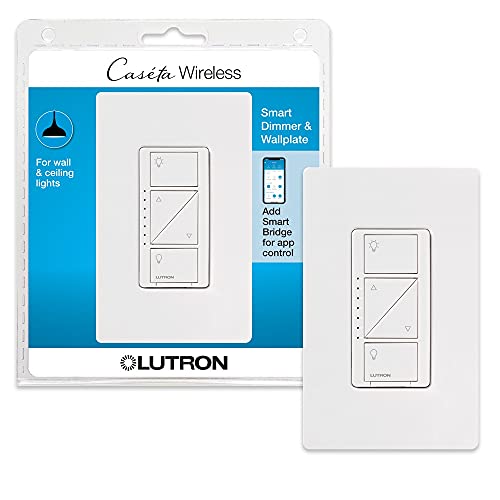
Lutron Caseta Smart Dimmer Switch with Wallplate

Lutron Caseta 3-Way Smart Dimmer Kit

Lutron Caseta Smart Light Switch for Fans

Lutron Caseta 3-Way Smart Switch Kit
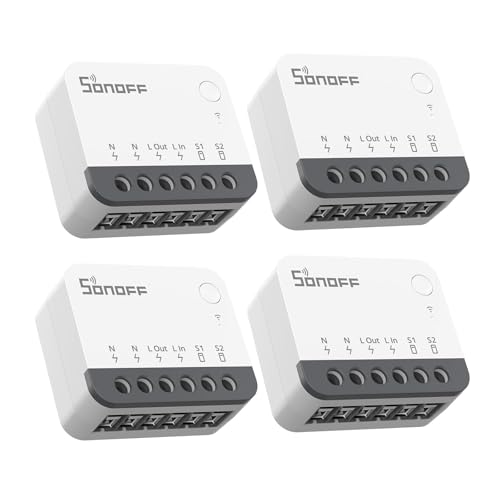
SONOFF ZBMINIR2 Zigbee Mini Relay 4-Pack

SONOFF ZBMINIR2 Zigbee Mini Switch 2-Pack

Kasa Smart Light Switch HS200

Kasa Smart Light Switch HS200P3 (3-Pack)

Kasa Smart 3-Way Switch HS210 Kit

Lutron Caseta Claro Smart Switch
Inside Each Recommended Option
If you want a smart switch that simply behaves like a switch, Lutron’s Caseta dimmer is the one most smart-home owners gravitate toward. It needs a separate Lutron Smart Bridge hub, but in exchange you get rock-solid voice control through Alexa, schedules that fire reliably, and dimming that won’t leave your LEDs buzzing. For a living room where you read, host, and watch movies, the granular fade levels are genuinely useful rather than a gimmick.
Unlike the bare-bones relay modules later in this list, the Caseta dimmer ships with its own screwless wallplate, which keeps the finished install looking tidy. You’ll want to confirm a neutral wire isn’t required in your box (Lutron’s dimmers famously skip the neutral), making it friendly to older homes. Daily commuters who want the porch lit by 6 p.m. every night will appreciate the geofencing and scene features in the Lutron app.
Practical Advantages
- No neutral wire needed, which sidesteps the most common install blocker in older homes
- Alexa routines and dim levels feel instant, with very few dropped commands reported by owners
- Includes a coordinating wallplate, so you don’t need to hunt for a matching cover
- Compatible with Apple Home, Google Home, Ring, and Sonos when paired with the Smart Bridge
- Hardware buttons stay responsive even after years of daily tapping
Things To Consider
- Requires the Lutron Smart Bridge sold separately, adding to total cost for a single switch
- Pico wireless remotes are useful but cost extra if you want wall-mountable 3-way control
Quick Facts
Best Suited To
Homeowners outfitting multiple rooms who already plan to invest in a proper smart-home hub for reliability.
Consider Something Else When
The Kasa Smart Light Switch HS200 suits you better if you want hub-free Wi-Fi control and a lower upfront entry cost.
The 3-way version of the Caseta dimmer solves a problem regular smart switches can’t: rooms where two switches control the same light. A hallway, staircase, or open-concept kitchen island all benefit from a Pico wireless remote and a coordinating bracket, which together let you mount the second control anywhere without pulling extra wire.
Compared with the single-pole Caseta reviewed above, this kit leans into installation flexibility. If you’ve ever wished for a switch at the top and bottom of the stairs, the Pico remote delivers that with no new wiring run. The dimmer itself behaves identically, holding a tight LED curve and responding to Alexa commands almost instantly through the Lutron Smart Bridge.
Where It Excels
- Pico remote can be wall-mounted with the included bracket, no extra wire run needed
- Excellent LED dimming without flicker across most compatible bulbs
- Integrates with Alexa routines for whole-home scenes like “movie night”
Worth Noting
- Pico remotes use battery power, so you’ll occasionally swap coin cells over the years
- The kit assumes you already own or are buying the Lutron Smart Bridge separately
Who Will Love This
Anyone with a long hallway, staircase, or large room where one switch location isn’t convenient.
Look Elsewhere When
The Lutron Caseta 3-Way Smart Switch Kit makes more sense if you don’t actually need dimming and just want on/off control at both switch locations.
Not every ceiling fan pairs well with a dimmer, and that’s where this dedicated on/off Caseta switch shines. It treats lights and fans as separate loads, giving you safe on/off control without risking motor damage. For bedrooms with a light kit plus a fan, this is the right tool for the job.
You’ll still need the Lutron Smart Bridge to unlock Alexa voice control, schedules, and the geofencing feature Lutron owners tend to mention. Once it’s connected, asking Alexa to “turn off the bedroom fan” or “turn on the entry light” feels natural. The finish matches other Caseta wallplates, which helps in hallways where this switch sits next to a dimmer from the first pick.
The Upside
- Designed for ceiling fan motors, which standard dimmers can damage over time
- Schedules the porch light at sunset and runs the fan on a bedtime routine automatically
- Same reliable Lutron app experience as the rest of the Caseta line
Small Caveats
- No dimming on this model, which matters for rooms where you want a slide for mood lighting
- Hub requirement still applies, so first-time Caseta shoppers face a two-part purchase
Built With In Mind
Bedroom retrofits where a ceiling fan and light kit share a gang box and you want voice control without risking the motor.
A Better Fit Elsewhere
The Lutron Caseta Smart Dimmer Switch suits you better if your fan is separate and you only need wall control for a dimmable light.
This is the non-dimming sibling to pick number two. You get the same Pico wireless remote and bracket approach, but the main switch is a straightforward on/off unit that’s safer for non-dimmable loads like fluorescent fixtures, vintage bulbs, or outdoor lights. For someone outfitting a stairwell where dimming isn’t a priority, that’s a smart trade-off.
The geofencing and “smart away” features let your porch light switch on at dusk and off at sunrise without any input, which is genuinely useful for travelers. Setup mirrors the other Caseta kits, including the Smart Bridge requirement. Compared with the Kasa HS210 reviewed later, this kit costs more but delivers a noticeably tighter Alexa response time in most households.
Positive Points
- Safer choice for non-dimmable bulbs, including certain LEDs and vintage filament styles
- Smart Away mode randomly toggles lights to make an empty house look lived-in
- Bracket-mountable Pico remote means no extra electrical work for the second switch location
- Schedule-based scenes integrate cleanly with Alexa routines
Honest Caveats
- You’ll pay for the Lutron ecosystem on top of the switch itself
- Pico remotes are wall-mountable but their battery covers wear with frequent removal
Feature Snapshot
Right Fit For
Stairways, hallways, and outdoor-rated fixtures where you want two switch points and reliable schedules over dimming.
Reach For A Different Pick When
The Lutron Caseta 3-Way Smart Dimmer Kit serves you better if you want dimming at both locations, particularly in a dining or living area.
The SONOFF ZBMINIR2 isn’t a wall plate switch, it’s a tiny relay that hides behind your existing toggle. For renters or owners who don’t want to swap the visible switch hardware, that’s the whole appeal. The module fits inside the smallest gang boxes and pairs with Alexa through a Zigbee hub like the SONOFF ZBBridge or a compatible SmartThings setup.
The 4-pack format makes this a sensible choice if you’re outfitting an apartment’s worth of lights at once. You’ll want basic comfort with electrical work, since the module sits behind the switch and interacts with the existing toggle. Compared with full-switch replacements like the Kasa HS200, you preserve your current wall plate style while gaining voice control.
Well-Handled Touches
- Hides behind existing switches, so wall plate aesthetics don’t change
- Works with rocker, toggle, and push-button wall switches
- Four-pack format lowers the per-switch cost for whole-home projects
- Compatible with Alexa, Google Home, and SmartThings hubs
Trade Offs
- Requires a Zigbee 3.0 hub, which is an extra purchase if you don’t already run one
- Needs a neutral wire at the switch box, ruling out some older homes
- No physical dimming slider since it’s a relay, only on/off through voice or app
The Right Fit
DIYers with a Zigbee hub already on the network who want invisible smart upgrades behind their existing wall switches.
Swap It Out When
The Kasa Smart Light Switch HS200 fits better if you’d rather not deal with relay modules and want a clean Wi-Fi install with a visible paddle switch.
The 2-pack version of the SONOFF ZBMINIR2 trims the cost for smaller projects. Two switches are enough to bring a living room and a hallway online without committing to a four-room install. Functionally, the module mirrors the 4-pack covered above: same Zigbee 3.0 protocol, same Alexa and Google Home compatibility, same neutral-wire requirement.
For someone testing the Zigbee relay concept in a single room before scaling up, this is the lower-risk way to do it. The 10A single-channel rating covers most standard light loads, though you’d want to size up for any heavy fixture or motor. Owners with a SONOFF ZBBridge or SmartThings hub get the smoothest pairing experience.
Points In Its Favor
- Lower entry cost than the 4-pack for first-time relay conversions
- Supports up to 64 Zigbee sub-devices when paired with a compatible gateway
- Single-channel 10A rating covers typical room lighting loads
Less Ideal Details
- Still requires a Zigbee gateway, which isn’t included
- Neutral wire must be present in the box, limiting older home applications
Perfect Match For
Shoppers with two specific rooms in mind who want a low-commitment way to try Zigbee-based voice control.
Not Your Match When
The SONOFF ZBMINIR2 4-Pack is the smarter value if you know you’ll want four or more relays installed at once.
The Kasa HS200 is the smart switch most first-timers end up buying. It connects directly to your 2.4 GHz Wi-Fi, no hub required, and the Kasa app walks you through wiring step by step. For an apartment dweller who just wants Alexa to control one lamp’s worth of light, the path of least resistance is the right call.
The single-pole format means it replaces one switch controlling one light, not a 3-way setup. You’ll need a neutral wire in the box, which is standard in most post-1985 homes but worth checking. The paddle-style button feels solid in hand and matches Kasa’s broader smart-home lineup, which helps if you later add outlets or dimmers.
Real-World Strengths
- Hub-free install keeps the cost and complexity low for beginners
- Kasa app includes schedules, timers, and countdowns without any subscription
- Voice control through Alexa works without extra configuration once linked
- Compatible with other Kasa devices for grouped routines
Points To Note
- 2.4 GHz Wi-Fi only, so dual-band routers need the older band enabled
- No dimming on this model, which matters for media rooms or bedside lamps
- Neutral wire must be present in the gang box
Feature Card
Who Should Grab It
First-time smart switch shoppers who want the simplest possible install with no extra hub to manage.
Another Choice May Suit
The Kasa Smart 3-Way Switch HS210 Kit serves you better if the room has two switches controlling the same fixture.
The 3-pack version of the HS200 trims cost when you’re outfitting multiple rooms. The switches themselves behave identically to the single-unit version, so you get the same hub-free Wi-Fi install and the same Kasa app routines. For a whole-floor rollout in a newer condo, this format just makes sense.
Each switch is single pole, so you’ll want to confirm each box controls only one fixture. The app-guided install walks through wiring, and once linked to Alexa you can group rooms with phrases like “Alexa, turn off the upstairs.” Compared with the Lutron Caseta dimmer covered earlier, this set is more wallet-friendly but skips the polished dimming and Pico remote ecosystem.
What Earns Its Place
- Bulk format lowers the per-switch cost for multi-room projects
- App-guided install makes wiring approachable for first-timers
- Group control through Alexa routines keeps voice commands tidy
Things To Weigh
- Each switch needs a neutral wire, which older homes may not have in every box
- 2.4 GHz Wi-Fi required, so check router settings before linking
Whose Shelf It Belongs On
Apartment dwellers outfitting three or more rooms at once who want hub-free Wi-Fi control and consistent app behavior across switches.
Where A Sibling Pick Shines
The Kasa Smart Light Switch HS200 single-pack fits when you only need one switch and don’t want to commit to a three-pack.
Most smart switches assume one switch, one light, and that’s it. The HS210 kit ships two matched switches designed to replace both ends of a 3-way circuit, where two wall switches control the same fixture. Living rooms, halls, and stairways are the classic use case, and Kasa avoids the usual confusion over master and auxiliary roles.
Both switches connect over Wi-Fi without a hub, and the Kasa app handles pairing for each switch separately. You’ll need a neutral wire at both boxes, so this works best in newer construction. For someone outfitting an open-concept living room with two switch locations, the kit removes a fair bit of install-day math.
Useful Touches
- Matched-pair design eliminates master/auxiliary confusion during install
- Hub-free Wi-Fi setup keeps things simple for new smart-home owners
- Each switch can be renamed and grouped in the Kasa app for natural voice commands
Practical Considerations
- Neutral wire required at both switch boxes, ruling out some wiring setups
- On/off only, no dimming, which is a meaningful limitation for media rooms
Made For
Homeowners with two-switch rooms who want both ends smart without juggling remote-mounting brackets.
Skip It When
The Lutron Caseta 3-Way Smart Dimmer Kit is a stronger match if you want dimming at both switch locations and don’t mind paying for the Lutron Smart Bridge.
The Claro switch rounds out the Caseta family with a clean, decorator-style paddle that looks at home next to other modern wall fixtures. The Smart Away feature toggles lights at random intervals to mimic occupancy, which travelers and second-home owners tend to appreciate. It still needs the Lutron Smart Bridge, same as the other Caseta units reviewed above.
Functionally, the Claro handles on/off control for lights and fans just like the earlier Caseta switch in this list. The differentiator is aesthetic and the Smart Away feature, which is genuinely useful for vacation properties. If you already run a Caseta system, adding a Claro at the entryway is a natural complement.
Positive Takeaways
- Slim decorator paddle pairs visually with other modern switches and outlets
- Smart Away randomized lighting pattern is a thoughtful travel feature
- Connects to Alexa, Apple Home, Google Home, Ring, and Sonos through the Smart Bridge
Where It Is Less Suited
- Requires the Lutron Smart Bridge, raising the entry cost for a single switch
- On/off only, no dimming on the Claro model
Perfect Match For
Owners with an existing Caseta setup who want a coordinated look at the entryway or a room with non-dimmable fixtures.
Where Another Pick Suits Better
The Lutron Caseta Smart Dimmer Switch is the better starting point if you want dimming capability right out of the gate.
Smart Light Switches For Alexa: What Matters Before You Buy
Smart switches live inside your wall, so a few decisions made now save hours of troubleshooting later. Think about how each switch fits your existing wiring, your voice assistant, and the routines you actually run.
Hub or No Hub
A hub, which is a small bridge device that connects your smart switches to your home network and voice assistant, adds setup time but pays off in reliability. Lutron’s Caseta line, for example, runs through the Smart Bridge for near-instant Alexa response. Hub-free options like the Kasa HS200 connect straight to your Wi-Fi, which keeps things simple but ties switch performance to your router’s reach.
Single Pole vs 3-Way
A single-pole switch controls one fixture from one location, which covers most bedrooms. A 3-way switch controls the same fixture from two locations, common in hallways and stairwells. Buying the wrong format means rewiring later, so check your switch box before ordering.
Neutral Wire Availability
Many smart switches require a neutral wire, which is the always-hot return path that keeps the switch’s radio powered even when the light is off. Older homes built before the mid-1980s often lack a neutral in the switch box. Lutron Caseta dimmers famously skip this requirement, while Kasa and SONOFF switches generally need it.
Dimming and Fan Compatibility
Dimming switches should only run on dimmable loads, and ceiling fans need a switch rated for motor loads, not a dimmer. The Lutron Caseta Smart Light Switch for Fans reviewed above is built specifically for that case. Pairing a regular dimmer with a fan motor is a common DIY mistake worth avoiding.
Voice Assistant Compatibility
Every switch here works with Alexa, but ecosystem breadth varies. If you also use Apple HomeKit, Google Home, or SmartThings, confirm the switch plays nicely with your primary hub. Lutron’s Caseta line covers the widest mix, while budget-focused options sometimes narrow the list to Alexa and Google only.
Where Shoppers Go Wrong and What The Higher Tier Buys
Wrong Turns To Avoid
The most common slip-up is buying a dimmer for a non-dimmable load, which causes flicker or outright damage to certain LED and vintage bulbs. Another regular mistake is ordering a single-pole switch for a 3-way room, then discovering the second switch doesn’t behave like a smart one. Skip both traps by confirming the fixture type and the number of switch locations before you click order.
Where The Extra Money Goes
Spending more on a smart switch usually buys three things: a hub-based protocol that responds faster through Alexa, an ecosystem of accessories like Pico remotes and wall plates, and dimming that doesn’t make LEDs buzz. The Lutron Caseta line commands a higher price because the Smart Bridge unlocks those extras. For a single-room install, a budget-friendly Kasa switch delivers most of the voice control without the premium, but a whole-home rollout tends to reward the higher tier.