SmartThings is one of the more flexible smart-home ecosystems, but the plug you pair with it shapes the day-to-day experience more than people expect. Some plugs lean on Matter, others on Zigbee or Z-Wave, and a few skip the hub entirely over Wi-Fi. The right pick depends on what you already own and how much automation you actually want to run.
This roundup breaks down ten options worth your attention, from hub-based Zigbee and Z-Wave models to Wi-Fi plugs that talk to SmartThings through the cloud. Each pick is evaluated on compatibility depth, real-world control latency, build quality, and how well it fits common household scenarios like lamps, fans, holiday lights, and coffee makers.
How The Shortlist Stacks Up
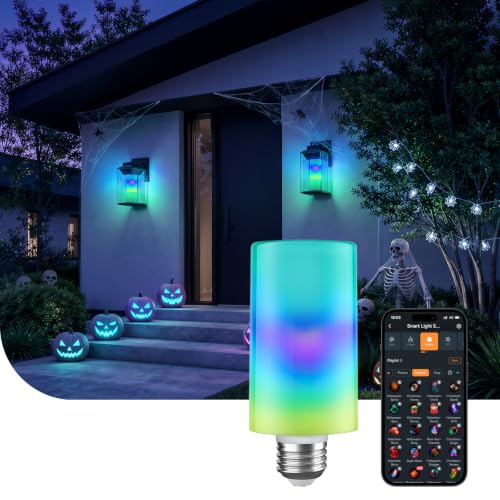
Linkind Smart Light Stick Color Bulb 850lm

Linkind Matter Smart Plug for SmartThings

Linkind Matter Smart Light Bulbs

Linkind Matter Smart Plug 15A 1800W

THIRDREALITY Smart Plug Gen3 4-Pack

New One Z-Wave 800 Smart Plug
Minoston MP21Z Z-Wave 800 Plug

EIGHTREE WiFi Smart Plug 15A 1-Pack

Tapo P115 Smart Plug 4-Pack

EIGHTREE SmartThings Plug 4-Pack
A Breakdown Of The Leading Choices
This is the odd one out on the list, and that is on purpose. The Linkind Smart Light Stick is a bulb rather than a plug, but it shows up here because many shoppers arrive at a “smart plugs for SmartThings” search already weighing whether to swap fixtures or switch the socket.
An E26 base keeps it compatible with most standard lamps and ceiling fixtures, and the T19 stick form factor at roughly 57 by 131 millimeters reaches recessed cans where a typical A19 bulb sits too tall. Output of 850 lumens covers a reading lamp or hallway sconce without complaint, and the color-plus-white range covers both daily tasks and mood scenes.
Useful Highlights
- Tunable color and white in one stick-shaped bulb.
- Standard E26 base for tool-free swap into existing fixtures.
- App and voice control integration with SmartThings routines.
- Useful 850-lumen output for accent and task lighting alike.
Things To Consider
- Requires a 2.4 GHz Wi-Fi network, so dual-band routers need the right band enabled.
- Not compatible with legacy dimmer switches that may cause flicker.
- Works only with specific ecosystems, not the open Tuya or Smart Life stack.
Quick Facts
Right Fit For
Anyone lighting a reading nook, accent shelf, or stairwell where a slim bulb shape beats a chunky one and SmartThings voice control is already part of daily life.
Skip It When
You need to switch legacy appliances like a window fan or holiday lights, in which case the Linkind Matter Smart Plug a few picks down is a better tool for the job.
Matter is the protocol that lets one device ride multiple smart-home platforms at once, so a Matter-certified plug shows up in Apple Home, Alexa, Google Home, and SmartThings from the same pairing code. The Linkind Matter Smart Plug uses that standard to dodge the multi-app shuffle that plagued earlier generations.
You will still need a Matter controller, such as a SmartThings Hub, Echo with built-in hub, HomePod, or Nest hub, to bring the plug into routines. Once paired, on/off and schedule commands travel locally for faster response compared with many cloud-only Wi-Fi plugs.
Notable Gains
- One pairing process works across the major smart-home platforms.
- Local control path keeps routine execution snappy.
- App and voice control across Alexa, Siri, and Google Assistant.
Worth Noting
- A Matter-certified hub or controller is required for Apple Home use.
- 2.4 GHz Wi-Fi only, so router band settings may need a quick check.
Built With In Mind
Multi-platform households that split time between iPhone and Android, or run both Siri and Alexa on the same property.
Look Elsewhere When
You run a pure Zigbee mesh and would rather extend that mesh than add a Wi-Fi device, in which case the THIRDREALITY Smart Plug Gen3 is a stronger fit.
Like the first pick on this list, the Linkind Matter Smart Bulbs are not a plug. They earn a spot because lighting is the most common reason someone ends up browsing this category, and these bulbs pair through Matter so they show up in SmartThings alongside the plugs without a second app.
Run them on 120V household current through any standard socket, then bring them into a Matter-certified hub such as a SmartThings Hub, Echo, or Nest. Multi-admin control means the same bulb can also answer to Apple Home and Google Home without losing its SmartThings membership.
Advantages To Know
- Multi-admin support across major ecosystems from one pairing.
- Drop-in replacement for fixtures already on standard sockets.
Honest Caveats
- Requires a Matter-certified hub or controller to function.
- Setup hiccups are widely reported when routers isolate 2.4 GHz networks.
Whose Shelf It Belongs On
Anyone building out whole-room lighting scenes that need to react to the same SmartThings routines that switch their plugs.
Consider Something Else When
You want the appliance on the outlet itself to be controllable rather than the bulb, where the Linkind Matter Smart Plug 15A makes more sense.
Where the previous Linkind plug stays compact and flexible, this single-pack version pushes the spec sheet higher with a 15 amp, 1800 watt ceiling that covers most household appliances short of a space heater pulling constant full load. That ceiling matters because some lamp loads and small kitchen gear sit right at the edge of cheaper plug ratings.
Timer, schedule, and remote app control arrive through the SmartThings side once the plug joins a Matter-certified hub. For homeowners who want one plug per appliance rather than a strip-style multi-pack, the single configuration keeps inventory tidy.
What Makes Sense
- Generous 15A/1800W rating covers lamps, coffee makers, and fans.
- Native SmartThings support through Matter certification.
- Schedule and timer functions baked into the firmware.
Trade-Offs
- Single-pack only, so multi-room budgets need several units.
- 2.4 GHz Wi-Fi only, with no Ethernet fallback for spotty wireless.
Who Should Grab It
Anyone modernizing a single room with a coffee bar, bedside lamp, or media center that should power on with one routine.
Another Choice May Suit
If you plan to outfit an entire apartment at once, the EIGHTREE 4-Pack later in the list spreads the same compatibility across more rooms.
This Gen3 four-pack is the energy nerd’s pick. Each outlet reports real-time power draw into your Zigbee hub, which means SmartThings can graph wattage across the day and you can spot the appliances that quietly add up to real money on the bill.
The plugs act as enhanced Zigbee repeaters at the same time, so each one strengthens the mesh that carries signals to your garage, basement, or far bedroom. A Zigbee hub is required, with SmartThings 2015/2018 hubs both listed as supported alongside Home Assistant, Hubitat, and several Echo models with built-in radios.
Positive Takeaways
- Live power metering on every outlet in the bundle.
- Doubles as a Zigbee mesh extender for far rooms.
- ETL certification adds a layer of safety assurance.
Points To Keep In Mind
- No standalone Wi-Fi fallback if you do not yet run a Zigbee hub.
- Real-time metering precision varies slightly with appliance type.
Feature Snapshot
Best Suited To
Smart-home owners who already run a SmartThings Hub or compatible Zigbee controller and want both energy data and stronger mesh coverage in one purchase.
A Better Fit Elsewhere
First-timers without a Zigbee hub should look at the Tapo P115 4-Pack for a Wi-Fi path that needs nothing beyond a router.
Z-Wave, like Zigbee, is a low-power mesh protocol built for the smart home, but it trades Wi-Fi traffic for a quieter dedicated radio. The New One 800 Series plug uses the latest Z-Wave chip generation, which extends the working range and improves reaction time over older 500 and 700 series hardware.
In open air, that radio reaches up to roughly 1,300 feet, which is the kind of headroom that lets one plug talk back to the hub from a detached garage, basement, or backyard shed. A built-in repeater keeps the signal clean by relaying for other Z-Wave nodes on its way back.
Real Benefits
- Up to 1,300 ft range in open areas for outbuilding coverage.
- Acts as a repeater for other Z-Wave devices on the mesh.
- S2 security layer protects the pairing process.
Less Ideal Details
- Requires a Z-Wave-capable hub such as SmartThings or Hubitat.
- Range drops sharply through masonry or metal-clad walls.
Made For
Homeowners with detached structures, basements, or long driveways where the Wi-Fi signal struggles to follow but a Z-Wave mesh can still climb.
Reach For A Different Pick When
You need a compact body to fit behind furniture, where the Minoston MP21Z z-wave plug offers a smaller shell with similar radio capability.
Outlet strips and tight behind-couch receptacles punish bulky plugs. The Minoston MP21Z uses the same 800 Series Z-Wave chip set as longer-range models but shrinks the housing so two of them can sit on a duplex outlet without fighting for space.
SmartStart pairing reads a QR code for fast inclusion, and S2 authentication adds a layer of security on top of the standard Z-Wave handshake. The 15 amp rating covers standard appliance loads, and the built-in repeater keeps the mesh healthy even when the plug is tucked behind furniture.
Where It Delivers
- Compact housing fits two per duplex outlet.
- SmartStart QR code speeds the pairing process.
- S2 authentication adds encrypted device inclusion.
Points To Note
- Z-Wave hub still required for any SmartThings pairing.
- Body color and finish are widely reported as plain compared with decorator-style alternatives.
Technical Highlights
Who Will Love This
Apartment dwellers or media-center builders who need to stack plugs on tight outlet strips without sacrificing Z-Wave mesh quality.
Where Another Pick Suits Better
Anyone chasing whole-home energy data should swap to the THIRDREALITY Gen3 four-pack, which adds real-time power metering.
Some shoppers do not want to buy a hub just to flip a lamp from their phone. The EIGHTREE WiFi Plug skips the hub entirely and rides the existing 2.4 GHz Wi-Fi through the Smart Life app, then surfaces in SmartThings once linked.
Bluetooth-assisted setup helps the phone find the plug faster than the older Wi-Fi-only models, cutting the time between unboxing and first command. Voice control works through Alexa and Google Assistant once paired, which covers the two most common smart speakers in U.S. homes.
Strong Points
- No additional hub required, just a 2.4 GHz Wi-Fi router.
- Bluetooth pairing step trims the setup time.
- 15A rating fits typical lamp and fan loads.
Small Caveats
- Voice control requires a brief Smart Life app connection first.
- Depends on cloud servers for routine execution, so an outage stalls automations.
Perfect Match For
First-time smart-plug owners who want one outlet controlled by phone or voice without investing in a separate hub.
Not Your Match When
You already run a SmartThings Hub and want faster local execution, where the Linkind Matter Smart Plug offers lower-latency routine triggers.
The Tapo P115 adds built-in energy monitoring to a four-pack Wi-Fi plug, which gives SmartThings users a budget path to per-outlet consumption data without buying a hub. Tapo maintains its own app for the granular history, and the data also surfaces in SmartThings once the device is linked.
The compact shell keeps both outlets of a standard receptacle usable when one plug sits in each socket, and voice control flows through Alexa or Google Assistant on the usual path. You do not need a SmartThings Hub to use it, but a Hub does unlock richer routine integration.
Everyday Perks
- Energy monitoring per outlet without paying for a hub.
- Compact shell leaves the second receptacle accessible.
- Voice control through Alexa and Google Assistant.
- Four-pack covers most apartments in one buy.
Trade-Offs
- Energy history is richest inside the Tapo app, with thinner summaries in SmartThings.
- Wi-Fi dependency means an internet outage pauses remote control.
Feature Card
Perfect Match For
Renters and budget-conscious households who want energy data and voice control across several outlets without buying a hub.
Swap It Out When
You already run a Zigbee mesh and want each plug to extend it, where the THIRDREALITY Gen3 4-Pack is a stronger match.
The other EIGHTREE plug on this list was a single Wi-Fi unit for first-timers. This four-pack sibling targets people who have already committed to SmartThings and want every room on the same network with a single purchase.
Setup runs through the Smart Life app first, then links to SmartThings through the supported connection path. Voice control works through Alexa and Google Assistant on top of the SmartThings routine engine, so a single routine can switch four outlets at once.
The Good Stuff
- Four plugs cover living room, bedroom, kitchen, and office in one buy.
- SmartThings compatibility listed in the supported ecosystems.
- 15A rating suits lamps, fans, and small kitchen appliances.
Where It Is Less Suited
- Requires the Smart Life app for initial pairing.
- IFTTT integration is not supported on this model.
Who It Suits Best
SmartThings households outfitting several rooms at once who want consistent voice control and routine execution across the property.
Where A Sibling Pick Shines
Anyone watching energy use should pick the Tapo P115 4-Pack instead, since it adds per-outlet monitoring at a similar pack size.
What Matters Most Before Choosing Smart Plugs For Smartthings
The protocol decision shapes everything else. SmartThings supports Zigbee, Z-Wave, and Matter over Wi-Fi, so the plug you pick should match the radio your hub speaks natively. Matter plugs tend to be the most flexible for households juggling iPhone and Android, while Zigbee and Z-Wave plugs extend mesh coverage across larger homes.
Current rating is the spec most shoppers underweight. A 15A, 1800W ceiling handles lamps, fans, coffee makers, and most small kitchen gear without complaint. Anything pulling sustained heavy load, like a space heater, deserves a hard look at the rating before trusting it to an outlet switch.
Hub dependency is the third fork in the road. Wi-Fi-only plugs need nothing beyond a router, but their routines usually travel through the cloud. Hub-based plugs execute routines locally, which means a routines run even if the internet drops, a meaningful edge for security lighting and morning coffee.
Finally, the form factor matters more than people expect. A bulky shell can block the second outlet in a duplex receptacle, and a plug buried behind a couch can lose signal strength in ways the spec sheet never mentions. Look for compact shells if you are stacking plugs, and consider range-extending models if the outlet sits far from the hub.
Key Considerations Across These Picks
Where Shoppers Go Wrong
The most common mistake is buying a hub-required plug without owning the hub. Several picks on this list, including the THIRDREALITY, Minoston, and New One models, will not pair to SmartThings without a Zigbee or Z-Wave controller in the network. Confirm hub compatibility before checkout, especially the SmartThings Hub generation you own.
Another trap is ignoring the Wi-Fi band. Every Wi-Fi plug on this list runs on 2.4 GHz only, and many modern routers split or disable that band by default. A plug that refuses to pair is often a router setting rather than a defective device.
When Paying More Pays Off
The jump from a single Wi-Fi plug to a four-pack with energy monitoring or from a 500 Series Z-Wave chip to an 800 Series one pays off in three specific scenarios: large homes where mesh range matters, households that watch energy bills closely, and setups that need routines to fire even when the internet drops. Outside those cases, a budget Wi-Fi plug does the same job for less.