Smart plugs tend to be the quietest workhorses in a connected home. They take boring lamp cords, slow coffee makers, and stubborn window fans and quietly bend them to your schedule, your voice, and sometimes your phone’s GPS. After sorting through nine options that cover apartments, patios, energy-tracking needs, and long-range workshops, the picks below cover the realistic choices most homes actually face. The goal isn’t just flashy app control, it’s plugs that pair quickly, stay online, and handle the appliance you throw at them without drama.
The Main Contenders
PickWhy We Picked ItBest ForAction

Simple StandoutLoraTap Mini Remote Control Outlet Plug Adapter (White)
No-hub remote control
Renters, Simple Setups
Heavy Duty PickYoLink Smart Energy Plug 15A YS6614
Long-range LoRa control
Large Homes, Workshops
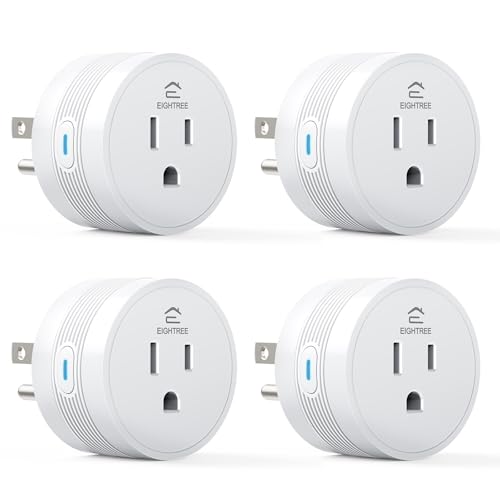
Family FriendlyEIGHTREE 15A Smart Plug 4 Pack
Multi-room starter pack
Whole-Home Voice Control
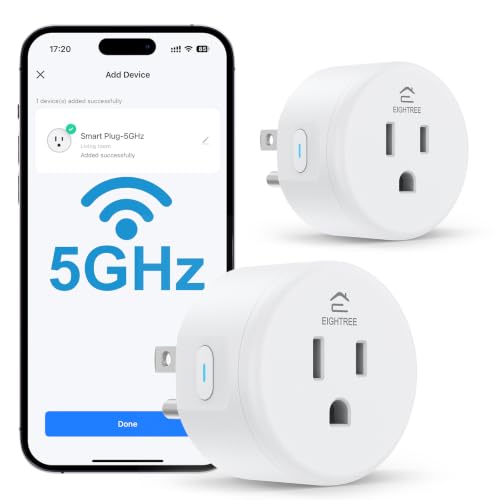
Streamlined PickEIGHTREE 5GHz Smart Plug 4 Pack
Dual-band Wi-Fi
Crowded Router Homes |
Outdoor ReadyEIGHTREE 5GHz Outdoor Smart Plug
Patio-ready dual outlets
Decks, Yards, Gardens
Apartment FriendlyEIGHTREE 15A Smart Plug 2 Pack
Compact two-outlet starter
Small Spaces, Beginners
Capable CompanionEIGHTREE 5GHz Smart Plug 15A 4 Pack
High-power dual-band
Heaters, Coffee Makers |
Garden ChoiceEIGHTREE Outdoor Smart Plug 15A
Weather-tough dual sockets
Holiday Lights, Ponds
Refined PickEIGHTREE 5GHz Smart Plug 15A 2 Pack
Premium dual-band, two-pack
Quiet Living Rooms | More On The Choices That Made The List
For shoppers who don’t want to fiddle with apps or wifi passwords just to turn a lamp on, the LoraTap Mini Remote Control Outlet Plug Adapter offers a refreshingly old-school shortcut. It pairs with its own battery-powered remote rather than relying on your home network, which means a power outage or router reboot won’t leave a lamp stuck in the wrong state. In a typical bedroom or living room, that simple remote-on-the-nightstand approach is exactly what many people actually need.
Compared to the app-heavy smart plugs later in this list, LoraTap leans hard into “set it and forget it” simplicity. The 656-foot line-of-sight range is generous for most homes, and the magnetic wall plate means the remote stays put next to a light switch.
A Few Highlights
- ✓No hub, no wifi setup, just plug-and-go pairing with the included remote
- ✓656-foot range covers most houses and apartments, including detached garages in many cases
- ✓10A/1100W rating handles lamps, fans, and most small household appliances comfortably
- ✓Magnetic mounting plate lets the remote double as a wall switch or sit on a fridge
Worth Noting
- •Remote-only control, so no smartphone scheduling or voice assistant integration
- •10A rating is lower than the 15A plugs elsewhere on the list, ruling out heavy heaters
- •Owners commonly report replacing coin-cell batteries every year or two depending on use
Made For
Renters, dorm rooms, and anyone who wants lamp control without touching a phone or router.
Skip It When
The EIGHTREE 15A Smart Plug 4 Pack is a smarter fit for voice-driven households.
The YoLink Smart Energy Plug 15A earns its spot by doing things wifi-based plugs physically can’t. It uses LoRa, a long-range, low-power radio protocol, to reach up to a quarter-mile in open air, which means a workshop, a barn, or a detached garage stays connected even when the wifi router can’t reach. Add real-time energy monitoring with exportable reports and overload protection, and this stops looking like a smart plug and starts looking like a small piece of utility hardware.
Where the LoraTap above skips apps entirely, the YoLink leans into data. For a homeowner tracking which appliance spikes the electric bill, the cycle scheduling and historical export features genuinely earn their keep.
Where It Delivers
- ✓Up to 15A output supports heavy loads like dehumidifiers, space heaters, and pond pumps
- ✓Quarter-mile LoRa range solves the “wifi can’t reach the outbuilding” problem
- ✓Real-time energy monitoring plus exportable reports for trend tracking
- ✓Cycle scheduling repeats on intervals, useful for fans and irrigation-style routines
Practical Considerations
- •A YoLink hub is required, so this isn’t a true standalone plug
- •LoRa integration with Alexa or Google depends on the hub’s setup, adding a layer of configuration
- •Energy reporting works best when the app stays logged in, otherwise data may not sync
Best Suited To
Owners of large properties, workshops, and anywhere the wifi signal gives up before the outlet does.
Look Elsewhere When
The EIGHTREE 5GHz Smart Plug 15A 4 Pack is the better call for smaller homes that just need app and voice control.
Most smart plug shoppers want more than one, and the EIGHTREE 15A Smart Plug 4 Pack answers that need without forcing a premium tax per outlet. Each plug handles 15A loads, so a coffee pot, an air fryer, or a small space heater are all fair game. Setup runs through the Smart Life app (a Tuya-based platform, meaning the same app can manage a wide range of compatible devices from different brands), then hands off to Alexa or Google for voice control.
Unlike the LoraTap’s remote-only approach, this pack leans fully into app routines, schedules, and shared household access. For families splitting duties across devices, that’s a meaningful upgrade.
Real-World Strengths
- ✓Four plugs cover a typical kitchen, living room, and bedroom in one purchase
- ✓15A rating handles high-draw countertop appliances without tripping
- ✓Alexa and Google Home support let routines trigger multiple plugs at once
- ✓Compact body keeps the second outlet in a duplex receptacle usable
Points To Keep In Mind
- •2.4GHz wifi only, so a newer dual-band router may need guest network tweaking
- •Smart Life app is feature-rich but can feel busy to first-time smart home shoppers
Who It Suits Best
Voice-first households outfitting a whole home or apartment with hands-free control.
Reach For A Different Pick When
The EIGHTREE 5GHz Smart Plug 4 Pack is friendlier on congested networks with mixed 2.4GHz and 5GHz devices.
Anyone who has watched a 2.4GHz-only device stubbornly refuse to pair on a crowded modern router will appreciate the EIGHTREE 5GHz Smart Plug 4 Pack. Dual-band support means the plug finds a less congested lane when a household is brimming with smart bulbs, security cams, and streaming gear. The trade-off is range: 5GHz delivers speed but degrades faster through walls, so for a far-flung garage this may not be the right call.
For most living spaces, the upgrade feels invisible in the best way. Pairing through Bluetooth first, then handing off to wifi, cuts setup friction down considerably.
Where It Helps
- ✓Dual-band wifi handles 5GHz networks where many cheaper plugs can’t connect
- ✓Bluetooth-assisted pairing speeds up initial setup
- ✓Compact housing fits two plugs per standard duplex outlet
- ✓Four-pack pricing keeps per-plug cost competitive
Trade Offs
- •5GHz signal drops faster through walls than 2.4GHz, so far rooms may need a mesh node
- •Smart Life app is still required for scheduling, just like the 2.4GHz EIGHTREE pick
The Right Fit
Homes with newer mesh routers where 2.4GHz-only plugs keep stalling during pairing.
Swap It Out When
The YoLink Smart Energy Plug 15A YS6614 is more useful in large properties needing long-range reach.
Holiday lights, patio string lights, and a backyard fountain don’t always want the same schedule, which is exactly why the EIGHTREE 5GHz Outdoor Smart Plug offers two independently controlled outlets in one weather-ready shell. Dual-band wifi gives it more flexibility near a modern router, and each socket runs on its own timer so one set of lights can fade off at 11 p.m. while the fountain keeps humming through midnight.
Compared to the indoor 4-packs above, this is the first pick built for rain and dust. Setup feels similar once the Smart Life app recognizes the device, and voice control works the same way.
What Works In Its Favor
- ✓Two independently scheduled outlets let different devices run their own routines
- ✓Dual-band support reduces pairing headaches on modern routers
- ✓Weather-rated housing suits permanent patio or yard installations
- ✓Works with Alexa and Google for voice-activated outdoor scenes
A Few Limitations
- •Outdoor-rated doesn’t mean fully waterproof, so sheltered mounting under an eave is wise
- •Only one plug is included, so larger yards may need multiple units
Perfect Match For
Patios, porches, and backyards running a mix of decorative lighting and water features.
Consider Something Else When
The EIGHTREE Outdoor Smart Plug 15A is a better choice when 15A-rated loads like pond pumps come into play.
The EIGHTREE 15A Smart Plug 2 Pack covers the most common starter scenario: a couple of lamps and one kitchen appliance. The 15A rating handles everyday gear, and the compact body keeps a second outlet free for vacuums or phone chargers. It’s a friendly entry point without overcommitting to a four-pack before knowing how the app fits into daily routines.
Versus the LoraTap above, this is a proper smart home gateway. Setup still happens through Smart Life, and voice control through Alexa or Google makes routines genuinely useful in shared spaces.
Benefits That Matter
- ✓15A capacity supports typical kitchen and living room appliances
- ✓Two-pack is a measured first step into app-driven home automation
- ✓Voice integration with both Alexa and Google Home
- ✓Small footprint keeps adjacent outlets usable
Honest Caveats
- •2.4GHz-only, so dual-band-heavy homes may prefer the EIGHTREE 5GHz 2 Pack
- •Two outlets may fill up quickly in households that already see value here
Right Fit For
Small apartments and first-time smart home shoppers testing the waters.
Where Another Pick Suits Better
The EIGHTREE 15A Smart Plug 4 Pack makes more sense once routines prove their value.
The EIGHTREE 5GHz Smart Plug 15A 4 Pack is essentially the do-everything pick on this list. It pairs the dual-band wifi of the previous EIGHTREE plugs with a full 15A rating, then ships four of them in one box. For households running a small army of appliances, from espresso machines to space heaters, this is the kind of set-and-go setup that keeps routers, app hubs, and voice assistants all working together.
Where the LoraTap earlier in this list gives up smart features for simplicity, this plug goes the other direction. For someone who has already decided voice and app control are the goal, the four-pack format is hard to beat.
Useful Touches
- ✓5GHz support reduces pairing timeouts on modern mesh networks
- ✓15A/1800W rating handles coffee makers, air fryers, and tower heaters
- ✓Bluetooth-assisted setup shortens the initial configuration
- ✓Four plugs suit a kitchen-plus-living-room rollout in one purchase
Things To Weigh
- •5GHz range drops fast through dense walls, so far outlets may behave inconsistently
- •Smart Life app governs scheduling, which means another account to manage
Who Should Grab It
Multi-room households upgrading older 2.4GHz plugs to dual-band gear.
Not Your Match When
The YoLink Smart Energy Plug 15A YS6614 wins for any outbuilding the router can’t reach.
The EIGHTREE Outdoor Smart Plug 15A brings two of the most useful outdoor attributes together: an IP44 weather rating (meaning it tolerates splashing water from above, though not full submersion) and a 15A capacity that handles heavier outdoor loads. Pond pumps, inflatables, and chunky landscape lighting all fall within range, while each socket runs its own independent schedule through the Smart Life app.
Compared to the 5GHz outdoor pick above, this one prioritizes raw load capacity over network agility. For most homes with a standard router outside, that’s usually the right trade-off.
The Case For It
- ✓15A rating covers pond pumps, inflatables, and high-draw holiday decor
- ✓Two independently controlled outlets simplify mixed device schedules
- ✓IP44 weather rating handles rain and dust for permanent outdoor mounting
- ✓Smart Life app supports countdown timers and weekly schedules
Points To Note
- •Mounting location matters, since IP44 covers splashes rather than full submersion
- •Outdoor installations may need a covered outlet box for long-term reliability
Built With In Mind
Yards with pumps, ponds, or multi-zone landscape lighting that needs independent timing.
A Better Fit Elsewhere
The EIGHTREE 5GHz Outdoor Smart Plug is a smarter pick on congested wifi setups.
The EIGHTREE 5GHz Smart Plug 15A 2 Pack rounds out the list with a tightly focused option: a small dual-band bundle built for rooms where connectivity matters but expansion plans don’t. Two plugs cover a single bedside lamp and a coffee maker, or a TV and a soundbar, without dragging a four-pack into a space that doesn’t need it. The 15A rating keeps the heavy appliances in play.
Versus the larger 4-pack EIGHTREE above, this trades raw quantity for a more measured rollout. For a den, a guest room, or a home office, that restraint often reads as smart shopping.
Standout Benefits
- ✓Dual-band support cuts pairing failures on modern routers
- ✓15A capacity handles tower fans, heaters, and similar mid-size loads
- ✓Two-pack format fits single-room upgrades without overbuying
- ✓Alexa and Google Home voice integration built in
Softer Spots
- •Two plugs may run out quickly in households already using voice control for several devices
- •5GHz signal may degrade in larger homes without mesh networking
Whose Shelf It Belongs On
Anyone upgrading a single room to dual-band, voice-friendly smart control.
Wrong Turns To Avoid
The LoraTap Mini Remote Control Outlet Plug Adapter is the cleaner pick for a no-app bedroom lamp.
Choosing Smart Wifi Plugs Without Overbuying
Start With The Appliance, Not The App
The smartest way to pick a plug is to walk over to the device you want to control and check its wattage. A lamp or a fan usually sits well under 1000W, while a space heater, air fryer, or large coffee maker can push closer to 1500W. Assuming a standard 15-amp household circuit (the typical receptacle in most US homes), a 15A/1800W smart plug gives you headroom for almost anything portable. The LoraTap’s 10A rating is plenty for lighting but limits heavier gear.
Match The Plug’s Range To The Room
Modern dual-band routers broadcast on two frequencies: 2.4GHz (a longer-range, slower lane that punches through walls well) and 5GHz (a faster lane that fades faster through dense materials). A 2.4GHz-only plug tends to pair reliably from across the house, while a 5GHz-capable plug feels snappier when it’s close to the router. Homes with mesh systems can usually run either, while older single-router setups often do best with 2.4GHz for distance.
Decide Whether Voice And Energy Data Matter
Voice control through Alexa or Google is standard across most picks here, but real-time energy monitoring is rarer. For shoppers tracking phantom loads (the small amount of power electronics draw even when turned off) or compressor cycles on a dehumidifier, the YoLink’s exportable reports offer meaningful insight. Most households won’t need that detail and can skip the hub dependency entirely.
Indoor Versus Outdoor Ratings
An outdoor plug’s IP44 rating is built for splashing water from above, like rain hitting the side of a house, not full submersion or pressure washing. Mount under an eave when possible, and confirm the receptacle is GFCI-protected (a built-in safety switch that cuts power if it detects moisture imbalance), which is standard for outdoor outlets in most homes built after the 1970s. Treating outdoor plugs as indoor gear is a common mistake that shortens their lifespan quickly.
Key Considerations Across These Picks
Where Shoppers Go Wrong
A common mistake is buying the cheapest plug and then expecting it to talk to a voice assistant. Not every model supports Alexa or Google, and the LoraTap in this list is a clear example: it skips apps entirely in favor of a dedicated remote. Another slip is choosing a 2.4GHz-only plug for a 5GHz-only router or guest network, which leads to frustrating pairing loops. Checking router bands before buying saves an afternoon of troubleshooting.
When Paying More Pays Off
Higher-tier plugs in this category usually justify their cost through a few specific upgrades: dual-band wifi for cleaner pairing, higher amperage for heavier loads, weatherproofing for outdoor use, and energy monitoring for the data-curious. For most shoppers, a standard 15A indoor plug covers everyday needs at a reasonable cost, but homes with newer routers, outdoor outlets, or workshop setups benefit from the extra engineering in upgraded models.
Frequently Asked Questions
QDo Smart Wifi Plugs Use A Lot Of Power On Their Own?
No. Most draw well under one watt when idle, so leaving them plugged in year-round adds pennies to a monthly electric bill. The real energy play is using schedules to cut phantom loads from devices that would otherwise sit warm.
QCan A Smart Plug Work Without Internet?
Some can. The LoraTap in this list uses a dedicated remote and doesn’t need a wifi signal at all. App-driven plugs typically lose remote control during outages but usually keep their last-known schedule running on a local timer.
QAre Outdoor Smart Plugs Safe In Rain?
Yes, when they’re properly rated. The IP44 rating on the outdoor picks here covers splashing water from above, but the outlet itself should still be GFCI-protected, and the plug should mount under some kind of cover when possible.
QWill A 15A Plug Handle A Space Heater?
Generally yes, but a 15A plug assumes the appliance also runs at 15A or lower. Most portable space heaters sit between 12.5A and 14A, so they fit. Running two heaters on the same circuit is the real risk, since household circuits typically share 15A across multiple outlets.
QDo Smart Plugs Slow Down Wifi Networks?
Not noticeably. A single plug uses a tiny slice of network bandwidth. Problems only appear when dozens of devices crowd an older router, which is when a mesh system or dual-band setup starts to matter.
The Takeaway
The right smart plug depends less on features and more on where it lives. Remote-only plugs suit simple lamp setups, dual-band indoor plugs handle voice-driven homes, and weather-rated outdoor plugs earn their keep on patios and in gardens. Match the plug to the appliance, the room, and the router, and the rest tends to fall into place. From there, scaling up is just a matter of adding more outlets that match the use case you already trust.