A smart plug turns any outlet into a voice-controlled switch, and the right pick depends on the ecosystem you already use and the load you’re switching. Whether you’re automating a single lamp or wiring up an entire living room, the models below cover the major assistant platforms, hub requirements, and energy-monitoring needs. This lineup focuses on real-world fit, so you can match a plug to your home instead of forcing your home to match a plug.
Your Options, Compared


Amazon Smart Plug

YoLink Smart Energy Plug 15A

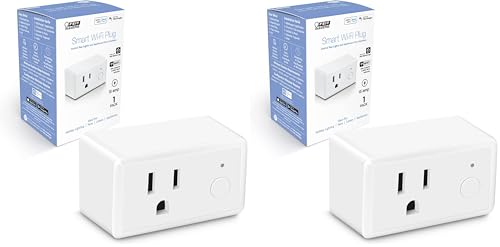
Feit Electric Smart Plug 2-Pack

Govee Smart Plug 15A 4-Pack

Govee Dual Smart Plug 4-Pack
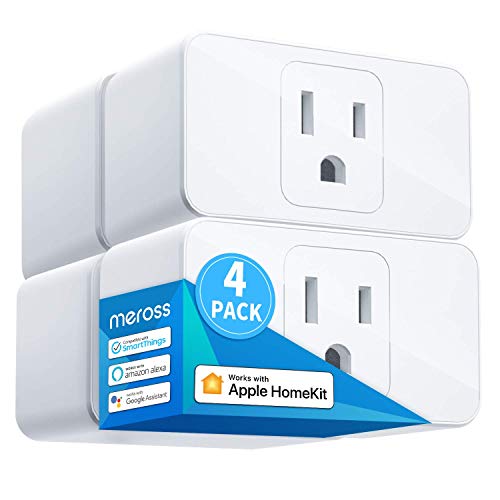
meross Smart Plug 15A 4-Pack

meross Matter Smart Plug Mini

meross Matter Smart Plug
A Deeper Look At The Lineup
Most smart plugs hog both receptacles on a duplex outlet, leaving you with one usable socket after installation. The Govee Dual Smart Plug sidesteps that problem by placing two outlets side-by-side inside a single, low-profile housing, so a standard wall fixture still offers two controllable smart sockets plus room for something else.
The unit talks to both Alexa and Google Assistant through the Govee Home App, and the Bluetooth fallback helps when your router is acting up. Homeowners with older outlets or crowded power strips tend to appreciate the horizontal layout most.
A Few Strong Suits
- Doubling up on a single outlet means a duplex wall plate still has usable space for a lamp or phone charger.
- Bluetooth pairing offers a backup path when the 2.4 GHz WiFi is congested or temporarily down.
- At 15 amps, the plug handles most household lamps, fans, and small kitchen gear without strain.
- Two-pack pricing keeps per-outlet cost lower than buying singles, useful for a small apartment rollout.
Things To Consider
- Setup requires a Govee Home App account, an extra step compared with hub-free options.
- The wider body may still block a decor outlet with a recessed faceplate, so measure your box depth first.
Built With In Mind
Renters and apartment dwellers who need voice control without rewiring or losing access to their second outlet.
Swap It Out When
You live deep inside the Apple ecosystem, where the meross Smart Plug 15A 4-Pack handles HomeKit more naturally.
Plug it in, open the Alexa app, and within minutes a lamp or fan answers to a voice command. That’s the whole pitch for the Amazon Smart Plug, and it lives up to the simplicity claim, since the device skips a separate app account entirely.
Anyone already running an Echo speaker will find the most friction-free path here. The trade-off is a closed ecosystem: the plug only responds inside the Alexa environment, so households leaning on Google or Apple will want a different pick.
A Favorable Mix
- No third-party app or hub required, which shortens the learning curve for first-time smart-home shoppers.
- Schedules and routines live inside the existing Alexa app, so routines across lights, locks, and speakers stay unified.
- Compact body fits behind most furniture without pushing a plug away from the wall.
Honest Caveats
- No Google Home or HomeKit support, which limits flexibility if your household splits across ecosystems.
- Lacks energy monitoring, so you can’t track how much a connected device actually draws over time.
Quick Facts
Who Will Love This
Newcomers who own an Echo and want voice control without any extra app, hub, or setup friction.
Consider Something Else When
Your home runs Google Assistant primarily, in which case the Govee Smart Plug 15A 4-Pack covers both Google and Alexa at a similar price.
WiFi drops out the moment you step into a detached garage or a metal-roofed workshop. The YoLink Smart Energy Plug sidesteps that with LoRa, a long-range radio that reaches roughly a quarter mile in open air and shrugs off concrete and brick better than a 2.4 GHz signal.
The catch is hub dependency: YoLink products need their own hub to bridge the LoRa signal to your router and voice assistants. Property owners with outbuildings, basements, or long driveways get the clearest benefit.
Real-World Strengths
- Cycle scheduling lets a pump or dehumidifier run on repeating intervals, useful for irrigation or crawl-space moisture control.
- Real-time energy monitoring with exportable reports makes it easier to spot which appliance is driving the bill.
- Overload protection adds a safety margin for high-draw gear like space heaters or window AC units.
Worth Bearing In Mind
- A YoLink hub is required, which raises the total spend if you’re starting from scratch.
- LoRa is one-way in some firmware states, so feedback like energy readings may lag slightly behind the app refresh.
Right Fit For
Homeowners with detached garages, sheds, or workshops where standard WiFi signals can’t reliably reach a smart plug.
Look Elsewhere When
You’re staying inside a normal-size home, since the meross Matter Smart Plug Mini delivers multi-platform support without the hub cost.
Four plugs in a single box lets you automate a living room, bedroom, and kitchen counter without piecing together singles. The Govee Smart Plug 4-Pack keeps the cost low enough to scatter across a starter home without much thought to per-outlet budgeting.
Like the dual version above, it leans on the Govee Home App for setup. Households that already trust the Govee ecosystem will find this an easy add-on.
Practical Pluses
- Four-pack pricing undercuts buying singles, ideal when you’re rolling out smart control room by room.
- Bluetooth fallback keeps pairing smooth even when your router is mid-reboot.
- Group control in the app lets one tap turn off every plug in a room at bedtime.
Points To Note
- Single-outlet body means a duplex wall plate loses half its capacity per installed plug.
- Requires a Govee Home App login, which is another account to manage alongside your assistant app.
Made For
First-time smart home shoppers spreading voice control across multiple rooms on a tighter budget.
A Better Fit Elsewhere
Anyone needing to preserve both sockets on a duplex outlet should consider the Govee Dual Smart Plug 4-Pack, which doubles usable outlets per wall plate.
Feit Electric built this plug to disappear into a wall and behave like any other outlet until you ask Alexa to flip it. The 2.4 GHz WiFi connection talks directly to your router, so there’s no hub to hide on a shelf.
The 15-amp rating covers typical household appliances, and the white housing blends with most trim and outlet plates. Households that want straightforward scheduling without extra apps tend to land here.
Everyday Perks
- Direct 2.4 GHz WiFi keeps the setup simple and avoids a bridge device.
- Compatible with both Alexa and Google Home, which covers the most common assistant platforms.
- Two-pack offers a reasonable entry point without overcommitting on inventory.
Less-Strong Areas
- No HomeKit compatibility, so Apple households will need to look at the meross Smart Plug 15A 4-Pack instead.
- Lacks energy monitoring, which limits insight into actual power draw per device.
Feature Snapshot
Best Suited To
Households on Alexa or Google that want a no-fuss plug for lamps, fans, and coffee makers.
Reach For A Different Pick When
Energy tracking matters to you, since the meross Matter Smart Plug pairs similar convenience with live consumption data.
Patchy WiFi at the back of the house can make a smart plug disappear from the network without warning. The Govee Smart Plug 15A 4-Pack adds Bluetooth as a parallel control channel, which keeps local toggling responsive even when the router is having a moment.
Group control in the app lets a household flip every lamp or kitchen counter plug at once. Larger families managing devices for multiple members often find this routine useful.
Features That Help
- Bluetooth pairing gives an alternative path when the WiFi signal dips in a far bedroom or basement corner.
- Group control consolidates routine actions, so one tap can shut everything down at bedtime.
- 15A rating covers small kitchen appliances without needing a dedicated heavy-duty model.
Some Limits To Know
- Requires a Govee Home App login, an extra account to track if you don’t already use Govee gear.
- No HomeKit support, so Apple users will want to skip to a meross model.
Perfect Match For
Families managing multiple voice-controlled devices across rooms where WiFi coverage isn’t perfectly even.
Where A Sibling Pick Shines
Anyone running a multi-platform smart home should consider the meross Matter Smart Plug Mini for unified control without the Govee app.
Four dual units in one box yield eight controllable outlets from just four wall plates, enough to handle most living spaces without resorting to power strips. The 2-in-1 horizontal layout preserves the second receptacle on every duplex outlet it touches.
This is the pick for whole-home rollouts where you’re outfitting multiple rooms at once. The setup leans on the same Govee Home App as the rest of the brand’s lineup.
A Few Highlights
- Eight smart outlets from four wall fixtures means fewer outlets lost to bulky single plugs.
- Bluetooth fallback keeps the pairing process reliable in homes with older routers.
- Bulk four-pack pricing lowers the per-room cost of a full deployment.
Factors To Consider
- Setup still requires creating or signing into a Govee Home App account.
- Horizontal layout may stick out from the wall more than a slim single plug, so check clearance behind furniture.
Who Should Grab It
Households automating an entire home in a single weekend rather than spreading purchases room by room.
Skip It When
You only need a couple of outlets, since the Govee Dual Smart Plug 2 Pack covers a smaller deployment without the surplus.
Apple households have a short list of smart plugs that actually work with HomeKit, and meross has been on it longer than most. The meross Smart Plug 15A 4-Pack brings native HomeKit support while still answering to Alexa and Google, so mixed-device homes don’t have to pick a side.
For full HomeKit remote control, you need a HomePod, Apple TV, or iPad acting as a home hub. Anyone already running Apple gear in the living room will find this almost plug-and-play.
Useful Strengths
- HomeKit compatibility covers Siri voice control and Apple Watch toggling from anywhere on the home WiFi.
- Simultaneous Alexa and Google support avoids forcing family members to share one assistant.
- Four-pack format covers most rooms of a typical home in one purchase.
Practical Considerations
- A persistent Apple home hub must stay powered and online for remote access, which adds a dependency most buyers overlook.
- Lacks energy monitoring, so consumption tracking requires a different model.
Whose Shelf It Belongs On
Apple-centric households and mixed-ecosystem families who want one plug that plays nicely with every assistant at the table.
Where Another Pick Suits Better
You mainly care about tracking energy use, since the meross Matter Smart Plug adds monitoring alongside the same multi-platform reach.
Matter is the new shared language for smart home devices, and the meross Matter Smart Plug Mini speaks it fluently across Apple Home, Alexa, Google Home, and SmartThings. One plug, four ecosystems, no app juggling required after the initial pairing.
The compact housing tucks behind tight furniture without pushing the plug away from the wall. Smaller apartments and shared spaces benefit most from that low footprint.
Notable Gains
- Matter support means a single plug works across Apple, Alexa, Google, and SmartThings without brand lock-in.
- Compact body fits behind sofas, bookshelves, and tight outlet layouts where larger plugs struggle.
- Local network control via Matter reduces cloud dependency for basic on and off actions.
Where It Is Less Suited
- Matter setup requires a compatible hub or controller for full cross-platform function, which not every household owns yet.
- No energy monitoring in this mini variant, a feature reserved for the larger meross Matter Smart Plug below.
Feature Snapshot
Made For
Multi-ecosystem households and Matter early adopters who want one plug that travels between platforms as their setup evolves.
Not Your Match When
You want built-in energy tracking, since the meross Matter Smart Plug adds live consumption data in a slightly larger body.
Phantom loads from idle TVs, gaming consoles, and computer peripherals quietly add up across a year. The meross Matter Smart Plug tracks real-time power draw and exports historical data, so you can spot the standby hogs and cut them off with a schedule.
The FFS easy-setup path with Echo devices shortens the pairing process for households already running Alexa. Cross-platform Matter support keeps the door open to Apple, Google, and SmartThings too.
What Earns Its Place
- Real-time energy monitoring surfaces the devices costing you the most in standby mode.
- Matter multi-platform support keeps the plug useful even if your preferred assistant changes next year.
- Frustration-free setup with compatible Echo speakers removes the QR-scan step for most households.
Trade-Offs To Consider
- Larger body than the meross Mini variant, so it may crowd tight outlet layouts.
- Energy data lives in the meross app, which means toggling between that and your main assistant app for full insights.
Feature Card
Right Fit For
Energy-conscious households looking to track standby loads while keeping cross-platform flexibility for future upgrades.
Consider Something Else When
Outlet space is tight behind your furniture, in which case the meross Matter Smart Plug Mini trades energy data for a slimmer footprint.
What Matters Most Before Choosing Smart Plugs For Home Assistant
Match The Plug To Your Assistant First
A smart plug that doesn’t talk to your voice assistant is just an expensive timer. Start by identifying which ecosystem runs your household: Alexa, Google Home, Apple HomeKit, or a newer Matter setup that bridges them all. Each plug on this list names its compatible platforms in the specs, so cross-checking takes only a moment. Buyers running Apple gear should pay special attention, since HomeKit compatibility is less common than Alexa or Google support.
Think About Load, Not Just Looks
A 15-amp plug handles most lamps, fans, and small kitchen appliances, but space heaters and window AC units can push the limits of older home wiring. Check the wattage of whatever you plan to automate, then confirm the plug’s rating covers it with margin to spare. Underestimating load is the most common reason a smart plug disappoints in daily use.
Hub Or No Hub Changes The Math
Plugs that talk directly to your router over 2.4 GHz WiFi skip a hub entirely, which keeps the setup lean. Other models, like the YoLink Energy Plug, rely on long-range radios that require their own bridge device. If you’re starting from scratch, a hub-free design keeps the total cost and complexity lower; if you already own a compatible hub, a hub-based plug often unlocks features like longer range or richer automation.
Bulk Packs vs Singles
Multi-packs lower the per-plug cost and let you automate a whole room in one purchase, but they only make sense when you actually need that many outlets. Singles and two-packs suit smaller deployments or households adding onto an existing setup. Counting the rooms you want to cover before buying helps avoid surplus plugs gathering dust in a drawer.
Key Considerations Across These Picks
Common Slip Ups Worth Dodging
Picking a plug that supports only one assistant can trap you in that ecosystem, even if your household later shifts toward Matter or HomeKit. Buyers also forget to check the WiFi band: many of these plugs run on 2.4 GHz, and a mesh router set to “5 GHz only” mode will refuse to pair them. Finally, ignoring the physical size of the plug leads to blocked outlets behind furniture, which the dual designs above exist to solve.
Why Top Tier Costs More
Higher-tier plugs bundle energy monitoring, longer-range radios, or Matter multi-platform support, each of which adds chipset and firmware cost. For most apartments, a basic Alexa or Google plug handles daily routines at a lower entry point. Stepping up to energy tracking or Matter makes sense when phantom loads or ecosystem flexibility are real concerns, not hypothetical ones.
Frequently Asked Questions
Do Smart Plugs For Home Assistant Need A Hub?
Some do, some don’t. Models that connect directly to your 2.4 GHz WiFi router work without any extra hardware, while others rely on a proprietary hub (like YoLink) or a smart home ecosystem bridge (like a HomePod for HomeKit remote access). Check the compatibility section before buying.
Can A Smart Plug Handle High-Wattage Appliances Like Space Heaters?
It depends on the amperage rating. Most models on this list support 15 amps, which covers typical lamps, fans, and small kitchen gear. Always confirm the wattage of the appliance against the plug’s rating, and avoid daisy-chaining power strips.
Will A Smart Plug Slow Down My WiFi Network?
A handful of smart plugs on a typical home network won’t noticeably affect performance. Very large deployments of dozens of devices can stress older routers, especially on congested 2.4 GHz channels. If your network already feels crowded, consider upgrading to a modern mesh system.
What’s The Difference Between WiFi And Matter Smart Plugs?
WiFi plugs connect directly to your router and rely on a companion app or assistant for control. Matter plugs use a shared protocol that lets them talk across Apple, Alexa, Google, and SmartThings with one pairing, often with local network control for faster response. Matter is newer, so make sure your preferred platform supports it before buying.
How Long Do Smart Plugs Typically Last?
Most manufacturers design smart plugs for multi-year daily use, and reports from long-term owners suggest several years of normal operation before any reliability concerns. Firmware updates help extend the useful life, so picking a brand with active app development matters more than the hardware alone.
Closing Remarks
The right smart plug comes down to which assistant you trust, what you want to automate, and whether energy tracking or Matter flexibility are worth the upgrade. For Alexa-only households, the Amazon Smart Plug keeps things simple. For mixed ecosystems, the meross Matter options cover more ground. For detached spaces, YoLink’s LoRa reach solves a problem WiFi can’t. Pick the one that matches your home, and the rest of the setup tends to fall into place.