Most folks don’t want a complicated smart home setup. They want to walk in, say “Hey Siri, turn on the lamp,” and have it actually work. The right HomeKit-compatible plug makes that feel effortless, and the wrong one leaves you juggling apps and re-pairing devices. This roundup focuses on the picks that deliver on Apple’s ecosystem without adding friction.
The Essentials At A Glance
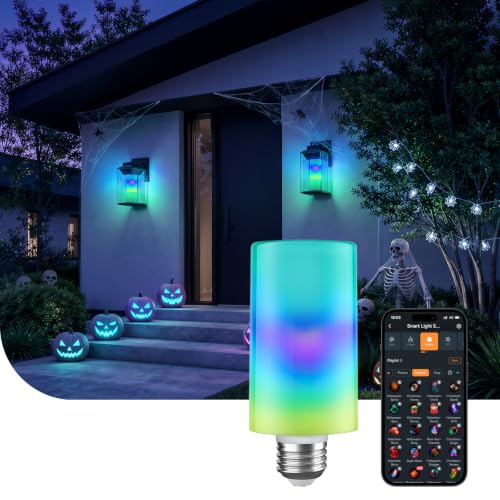
Linkind Smart Light Stick Color Bulb 850lm

Kasa Smart Plug HS103P2 Wi-Fi 2-Pack

Linkind Matter Smart Plug for Apple Home

Linkind Matter Smart Light Bulbs for HomeKit

Govee Dual Smart Plug 4 Pack 2-in-1

Govee Smart Plug 15A 4 Pack Group Control

Tapo HomeKit Smart Plug Mini P125 4-Pack

Kasa Matter Smart Outdoor Plug EP40M

Leviton Decora Smart Plug D215P Wi-Fi

Philips Hue Smart Plug White 1-Pack
The Picks, Examined More Closely
Starting with the Linkind Smart Light Stick feels a little sideways for a plug roundup, but this color-and-white bulb earns its spot because it speaks directly to Apple users. The T19 stick form factor (57 × 131mm) fits standard E26 sockets, and the 850-lumen output punches above what you’d expect from such a slim profile.
Unlike the plug-first entries later in this list, this bulb leans into ambiance rather than appliance control. You get tunable white plus full color, all driven through your preferred voice assistant or app. Renters who can’t swap fixtures will appreciate that the standard base removes any rewiring concerns.
Benefits That Matter
- 850 lumens covers most reading nooks and accent zones without feeling dim
- E26 base and T19 stick shape slot into nearly any existing lamp or fixture
- Color and tunable white support one bulb handling both accent and task lighting
- App and voice control give you hands-off adjustment from the couch
Small Caveats
- Runs on 2.4GHz Wi-Fi only, which can be a wrinkle on newer 5GHz-first routers
- Pairing with traditional dimmer switches tends to cause flicker, so expect a swap
Right Fit For
Homeowners wanting tunable accent lighting in a single E26 fixture without rewiring.
Swap It Out When
You’d rather control an existing appliance, in which case the Linkind Matter Smart Plug is the more targeted pick.
The Kasa HS103P2 arrives as a two-pack, which makes it the most approachable way to test whether a smart plug actually fits your routine. After the Linkind bulb above, you shift from smart lighting into smart outlets, and Kasa has been a steady name in this corner for years.
The companion app walks you through setup step by step, and Matter compatibility keeps the door open if you later decide to expand into Apple Home. Compared with the Linkind plug further down, this one feels more polished in its onboarding flow and slightly less cluttered in its daily controls.
Everyday Wins
- Two-pack pricing lowers the per-outlet cost for early experiments
- Matter support future-proofs the purchase across ecosystems
- Voice control via Alexa or Google Assistant reduces phone-grabbing
Worth Noting
- Wi-Fi-only radios mean no offline fallback if the router hiccups
- Two-pack may leave you wanting a third outlet for rooms with more appliances
Feature Snapshot
Made For
First-time smart home owners dipping a toe in with a small two-pack setup.
Another Choice May Suit
The Govee Smart Plug 4-Pack covers more rooms at a similar outlay if you want broader coverage.
Pick three gets to the heart of what an Apple HomeKit smart plug should do. The Linkind Matter Smart Plug carries the Matter badge, which is the cross-platform language that lets a single device speak to Apple Home, Alexa, Google Home, and SmartThings without juggling manufacturer apps.
For households running HomePods alongside an Echo or Nest speaker, that universal fluency matters more than raw specs. The earlier Kasa plug offers Matter too, but this Linkind entry leans harder into HomeKit naming and Siri shortcuts. You trade some app polish for tighter Apple alignment.
The Value In It
- Matter certification unlocks Apple Home without proprietary hub gymnastics
- Siri shortcut support delivers natural voice triggers through iPhone and HomePod
- Single-app control via Apple Home reduces the clutter of overlapping platforms
- Compact housing clears adjacent outlets on most wall plates
- Scheduling and timers let you automate lamps without lifting a finger
Points To Note
- Requires a Matter-compatible hub such as HomePod, Echo Dot, Nest, or SmartThings Hub
- Setup glitches tend to surface when the Wi-Fi network spans multiple access points
Best Suited To
Mixed-ecosystem households that want Siri shortcuts without giving up Alexa or Google.
Skip It When
You already own the Tapo HomeKit Smart Plug Mini and prefer TP-Link’s app continuity.
The Linkind Matter Smart Light Bulbs return you to lighting after the plug-focused picks above. Running on the same Matter platform as pick three, these bulbs integrate into Apple Home the moment a HomePod or Echo acts as the controlling hub.
Where the Linkind Light Stick in pick one leans accent and color, this bulb set targets whole-room replacements. You swap out a fixture’s standard bulbs and gain tunable control across an entire space. Compared with the Tapo plug later in the list, this pick trades appliance control for direct light customization.
Everyday Perks
- Bundled bulbs cover multi-lamp rooms without mixing brands
- Matter hub compatibility mirrors the same onboarding used for Linkind plugs
- Standard 120V operation suits most North American fixtures
Trade Offs
- Requires a Matter hub, much like the Linkind plug above
- Bulb replacements feel more disruptive than adding a plug to an existing lamp
Feature Rundown
Who It Suits Best
Homeowners swapping multiple bulbs at once for tunable whole-room lighting.
Reach For A Different Pick When
The Kasa HS103P2 is a better starting point if you want appliance control first and lighting later.
Midway through the list, Govee arrives with a denser offering. Each unit here hosts two independently controlled outlets, so a four-pack effectively yields eight controllable sockets. The earlier Kasa two-pack covers two outlets total, so the math shifts quickly for larger rooms.
The 15A rating per outlet handles heavier appliances like tower fans and small space heaters on standard residential circuits, though you should always verify the load before plugging in. App control arrives via Wi-Fi and Bluetooth, with a fallback path if your router needs rebooting.
Notable Gains
- Two controllable outlets per plug double the coverage per wall socket
- 15A capacity covers most household appliances on a standard circuit
- Bluetooth fallback helps when Wi-Fi temporarily drops
- Four-pack density reduces wall clutter versus eight separate smart plugs
Honest Caveats
- No Matter support means tighter coupling with the Govee Home app
- Dual-outlet design makes the body wider than a single-outlet pick like the Tapo mini
- No Apple HomeKit native pairing, which complicates pure HomeKit households
Quick Facts
The Right Fit
Homeowners retrofitting living rooms where lamp-and-fan pairs share the same outlet.
A Better Fit Elsewhere
Apple-only households get a cleaner experience with the Tapo HomeKit Smart Plug Mini in pick seven.
The single-outlet Govee pack steps in alongside the dual-outlet model above, and the difference shapes the entire use case. Where pick five thrives on pairing appliances at one outlet, pick six spreads thinner and lighter across more rooms.
Group control through the Govee Home App lets you trigger multiple plugs as one scene, which is the killer feature for renters automating an entire apartment at once. Compare that to the Leviton plug later, which favors refined styling over quantity.
Practical Pluses
- Four-pack covers bedrooms, living room, and office in one purchase
- Group control bundles several plugs into a single tap or voice command
- 15A rating handles most everyday lamps and small appliances
- Lower per-plug cost compared with single-purchase alternatives
A Few Limitations
- Wi-Fi only radios can feel fragile if your network layout is complex
- No Matter or HomeKit native pairing locks you into the Govee app
Whose Shelf It Belongs On
Apartment dwellers outfitting multiple rooms on a constrained budget.
Not Your Match When
The Leviton Decora Smart Plug fits better if aesthetic matters more than outlet count.
The Tapo P125 mini earns its spot at the center of the roundup by solving a specific annoyance: bulky plugs that block the second outlet. Coming after the Govee packs, the Tapo’s compact body feels like a sigh of relief on crowded power strips.
TP-Link’s networking pedigree shows up in the setup reliability, and the HomeKit focus lands it firmly inside the Apple ecosystem this list targets. You give up some app-side flair compared with Kasa, but for HomeKit purists, that’s a fair trade.
The Practical Payoff
- Compact body fits crowded power strips and tight outlet layouts
- Native Apple HomeKit support removes the need for workarounds
- 15A capacity handles most lamps and small appliances
- Four-pack quantity covers several rooms at once
- TP-Link networking stability reduces pairing headaches
Things To Consider
- Compact size means no pass-through outlet for a second device
- Setup relies on a HomeKit hub for full remote access
Feature Snapshot
Built With In Mind
Apple-centric households prioritizing compact design and tight HomeKit integration.
Where Another Pick Suits Better
The Kasa Matter Smart Outdoor Plug EP40M makes more sense if your project lives on a patio.
The Kasa EP40M shifts the conversation outdoors. Weather resistance and a dual-outlet layout make this the pick for patios, string lights, and seasonal displays. The earlier indoor plugs handle inside rooms well, but they shouldn’t see rain.
Matter support keeps this plug inside the same ecosystem language as pick three and pick four, so Apple Home control extends to your backyard. The 15A per outlet rating covers most outdoor lighting configurations without strain.
A Favorable Mix
- Weather-resistant housing handles outdoor exposure through seasonal changes
- Dual independent outlets run two zones of lights from one wall box
- Matter certification preserves Apple Home integration
Points To Keep In Mind
- Outdoor-rated pricing runs higher than indoor equivalents
- You may find the housing too bulky for covered outlet boxes
Who Should Grab It
Patio owners wanting Siri-controlled string lights and seasonal decor.
Skip It When
The Philips Hue Smart Plug is the better target if your outdoor setup already uses Hue fixtures.
Coming in second to last, the Leviton Decora Smart Plug swaps quantity for refinement. Where Govee and Tapo focus on packing outlets into a room, Leviton focuses on how a single plug looks next to designer fixtures and trim.
The D215P runs on Wi-Fi 2nd Gen architecture and pairs with the My Leviton app, which keeps automations tidy for homeowners who already use Leviton switches. Compared with the Tapo mini earlier, this plug takes up more space but feels more deliberate on the wall.
What Earns Its Place
- Decora styling blends with coordinated wall plates and switches
- My Leviton app support keeps automations in a single dashboard
- Wi-Fi connectivity avoids extra hub hardware
Potential Drawbacks
- Larger footprint may crowd nearby outlets
- Single-pack quantity drives higher per-outlet cost than the Govee bundles
Perfect Match For
Homeowners matching smart plugs to existing Decora switches and trim.
Where A Sibling Pick Shines
The Govee Smart Plug 4 Pack is a smarter call if you’re filling a full apartment fast.
Closing the roundup, the Philips Hue Smart Plug rewards anyone already running a Hue Bridge. This little white box turns any lamp into a Hue-controlled fixture, even one where you can’t swap in a Hue bulb. After the broader-coverage picks above, the single-pack quantity may feel modest, but the ecosystem depth justifies the position for the right owner.
Matter compatibility broadens the appeal beyond Hue households, though the bridge still unlocks the richest automations. Compared with the Leviton pick, this plug trades Decora aesthetics for Hue app polish.
A Strong Showing
- Turns any lamp into a smart light without changing the bulb
- Hue Bridge integration unlocks advanced automations and remote access
- Matter compatibility supports Apple HomeKit alongside Hue routines
- Compact white design blends into most rooms
- Voice control through Alexa, Google, and Siri ties into existing setups
Where It May Fall Short
- Best features require a Hue Bridge, adding to total ownership cost
- One-pack quantity runs higher per outlet than multi-pack competitors
Who Will Love This
Existing Hue bridge owners extending smart control to lamps without Hue bulbs.
Look Elsewhere When
The Kasa Matter Smart Plug HS103P2 is the more economical pick if you don’t own a Hue Bridge.
What To Weigh Before Choosing Smart Plug Apple Homekits
HomeKit Hub Matters More Than The Plug
Apple HomeKit requires a hub for full remote access and automation. A HomePod, HomePod mini, or Apple TV acts as that hub, and without one, your plug behaves like a Bluetooth device with limited range. Choose your plug first, then verify the hub piece is in place.
Wi-Fi Band And Router Layout
Most smart plugs run on 2.4GHz networks rather than 5GHz. That matters in newer homes where the router broadcasts both bands with band-steering enabled, because the plug may struggle to find the right network. A quick check of your router’s band settings saves hours of frustration during setup.
Outlet Density And Footprint
A four-pack sounds generous until you realize each plug may block the adjacent outlet. Compact picks like the Tapo mini solve that for power strips, while dual-outlet picks like the Govee EP40M trade density for body width. Match the form factor to where you’ll actually install them.
Ecosystem Lock-In
Matter-compatible plugs reduce lock-in by speaking to Apple Home, Alexa, and Google. Older non-Matter plugs tie you to a single app, which complicates switching later. If you anticipate swapping phones or voice assistants, Matter future-proofing earns its place in the decision.
Key Considerations Across These Picks
Where Shoppers Go Wrong
A common mistake is buying a smart plug before confirming HomeKit hub ownership. Without that hub, automations stall and remote access disappears, leaving you with a glorified timer. Another slip is assuming any plug handles heavy loads like space heaters, when many cap out at lower wattages than expected. Always match the rating to the appliance.
What The Higher Tier Buys
Premium picks like the Philips Hue Smart Plug bundle ecosystem integration that budget plugs can’t match. The extra cost covers bridge connectivity, refined app features, and tighter HomeKit handoff. For homeowners already invested in a Hue setup, that tier pays back through richer automations. For a single lamp, a budget pick delivers most of the practical value without the premium.
Frequently Asked Questions
Do all smart plugs work with Apple HomeKit?
No. Only HomeKit-certified or Matter-certified plugs pair directly with Apple Home. Non-certified plugs often rely on a manufacturer’s app and offer limited Siri shortcuts.
Is a HomeKit hub required for these plugs?
Full remote access and automation typically require a HomePod, HomePod mini, or Apple TV as the home hub. Without one, plugs work locally but lose many features.
Can smart plugs handle heavy appliances?
Most handle lamps and small electronics reliably. Heavier appliances like space heaters need verified wattage and amperage matching, ideally a 15A-rated plug on a standard 15A circuit.
What is Matter and why does it matter here?
Matter is a cross-platform smart home standard that lets one device talk to Apple Home, Alexa, Google Home, and SmartThings. For mixed households, Matter reduces app juggling and simplifies future swaps.
Are four-packs always cheaper than singles?
Not always. Premium single plugs can cost less than budget four-packs, so compare per-outlet pricing rather than pack totals when budget guides the choice.
Bottom Line
The right HomeKit smart plug depends on where it lives and what ecosystem it joins. Apartment dwellers filling rooms on a budget lean toward the Govee packs, while Apple purists want the Tapo mini for tight outlets. Premium households already invested in Hue get the most from the Philips Hue Smart Plug. Match the form factor, hub setup, and ecosystem before you commit, and the rest tends to fall into place.